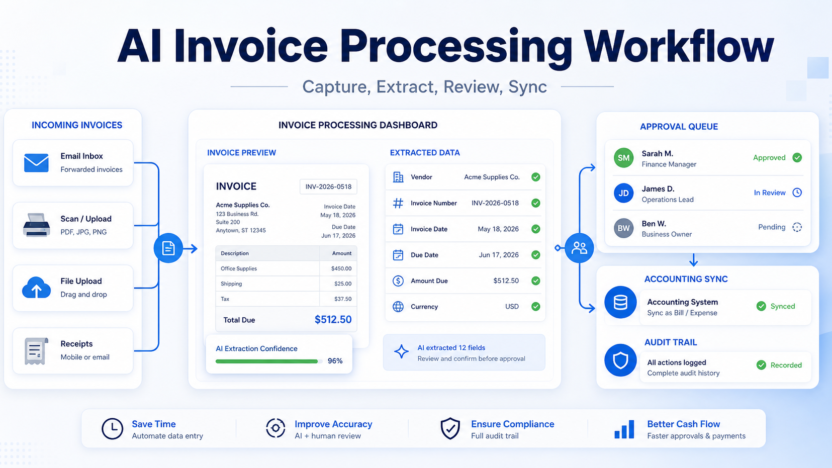
Invoice processing is one of those back-office jobs that looks simple until the volume grows. A supplier emails a PDF, someone downloads it, another person checks the amount, the due date gets copied into accounting software, approval waits in a message thread, and the original document disappears into a folder nobody wants to open. An AI invoice processing workflow makes that routine more reliable by turning incoming invoices into structured records, routing exceptions to humans, and keeping an audit trail before anything reaches payment.
The goal is not to let AI pay bills on its own. The goal is to reduce manual entry while keeping finance control where it belongs. Tools such as Microsoft AI Builder invoice processing, Hubdoc document capture, and DocuWare Intelligent Document Processing show how modern systems can extract invoice fields, classify documents, and support automated workflows. Your exact stack may differ, but the workflow below gives small businesses a practical structure.
The Short Workflow
| Stage | What AI helps with | What a human must confirm |
|---|---|---|
| Capture | Collect invoices from email, upload, scan, or mobile photo | Whether the invoice belongs in the process |
| Extraction | Read vendor, invoice number, dates, totals, tax, and line items | Whether the extracted fields are correct |
| Matching | Compare invoice data with purchase orders, receipts, or vendor records | Whether exceptions should be approved |
| Approval | Route invoices to the right owner or manager | Whether the spend is legitimate |
| Sync | Prepare the bill or expense record for accounting software | Whether it should be posted or held |
| Archive | Store the source document and history | Whether the audit trail is complete |
Start With The Invoice Inbox
The first step is deciding where invoices enter the system. Small businesses often receive invoices in several places: a shared finance inbox, an owner???s personal email, a scanned PDF, a vendor portal download, or a paper receipt captured by phone. If invoices enter through too many channels, AI extraction will not solve the bigger process problem.
Create one intake rule. For example, all vendor invoices should go to a shared finance email or upload folder before they are reviewed. If your team uses Microsoft 365, a SharePoint folder can trigger a Power Automate flow. Microsoft???s invoice processing example shows a cloud flow triggered when a new invoice is added to a SharePoint folder, then the invoice model extracts data for downstream steps. If your team uses Xero or QuickBooks workflows, Hubdoc can capture documents from upload, email, scan, or mobile photo and extract key information from bills and receipts.
The intake rule should also define what does not belong. Quotes, contracts, packing slips, payment confirmations, and duplicate invoices should not move through the same approval path as a real supplier invoice.
Extract The Fields That Actually Matter
AI invoice extraction is useful because it turns a document into fields your accounting process can review. The most important fields are usually supplier name, invoice number, invoice date, due date, total amount, tax amount, currency, purchase order number, and line-item description. Microsoft describes its prebuilt invoice model as optimized for common invoice elements such as invoice ID, invoice date, and amount due. Hubdoc says it extracts supplier names, amounts, invoice numbers, and due dates so documents can become usable accounting data.
Do not ask AI to extract every possible detail at first. Start with the fields needed to decide whether an invoice should be approved, coded, or sent back to the vendor. A smaller field set is easier to review and easier to trust.
Add a confidence rule. If the extraction confidence is high and the vendor is known, the invoice can move to normal review. If the total, tax, currency, or supplier name looks uncertain, the workflow should route it to manual review. Low-confidence invoices should never slide directly into payment.
Add Matching Before Approval
Invoice processing becomes safer when extracted data is compared with existing records. A simple workflow can check whether the vendor exists, whether the invoice number has already been seen, whether the total matches a purchase order, and whether the invoice date is reasonable.
Small teams do not always use purchase orders, but they can still create useful checks. Flag duplicate invoice numbers. Flag invoices from vendors that are not in the approved vendor list. Flag amounts above a review threshold. Flag invoices that arrive from an email domain unrelated to the vendor. These checks are not glamorous, but they prevent expensive mistakes.
AI should support matching, not override it. If the workflow detects a mismatch, the invoice should pause. The right person should decide whether it is a legitimate exception, a vendor mistake, a duplicate, or a possible fraud risk.
Route Approval By Amount And Owner
Approval routing should be simple enough that everyone understands it. A small business might use three paths: low-value recurring invoices approved by the finance admin, department spend approved by the team owner, and high-value or unusual invoices approved by the business owner.
The AI role is to prepare the approval packet. That packet should include the original invoice, extracted fields, vendor history, matching results, and a short explanation of why the invoice needs review. The human approver should not have to open five systems just to understand what they are approving.
Avoid approval by chat memory. If someone approves an invoice in Slack, WhatsApp, or an email thread, the decision should still be recorded in the invoice system or accounting workflow. The audit trail matters later when a vendor disputes a balance or your accountant asks why a payment was made.
For broader small-business automation planning, see AI sales follow-up workflow and AI project management workflow. Both follow the same principle: AI can prepare work, but humans approve decisions with business consequences.
Sync Only Reviewed Records
Once an invoice is approved, the workflow can prepare the accounting record. That might mean creating a bill, expense, or document attachment in your accounting system. QuickBooks describes invoicing software as a way to create, send, track invoices, record payments, and monitor balances. For incoming vendor documents, systems like Hubdoc can turn extracted information into records for Xero or QuickBooks with the source document attached.
The important rule is that reviewed records sync, not raw AI guesses. If the due date, amount, vendor, or tax field is uncertain, fix it before syncing. If the invoice is rejected, archive the source document with the reason instead of deleting it.
Create a naming rule for attachments. Include the vendor name, invoice number, and date when possible. Clean file names make later searches much easier.
Keep A Real Audit Trail
An AI invoice workflow should make the process easier to inspect, not harder. Keep the original document, extracted fields, approval decision, approver name, sync time, and any exception notes. DocuWare frames intelligent document processing around classification, extraction, and workflow automation, and that matters because invoice processing is not just data entry. It is a financial control.
A good audit trail answers basic questions quickly: Who submitted this invoice? What did AI extract? What changed before approval? Who approved it? When did it sync? Where is the source document?
If the workflow cannot answer those questions, slow down and improve the process before automating more steps.
Common Mistakes To Avoid
Do not start with payment automation. Start with capture, extraction, review, and approval. Payment should remain separate until the intake process is dependable.
Do not assume AI extraction is always right. Invoices vary widely by vendor, country, format, currency, tax treatment, and line-item structure. Even strong models can misread totals or dates when scans are blurry or layouts are unusual.
Do not route every invoice to the business owner. That creates a bottleneck and defeats the point of the workflow. Use thresholds and owners.
Do not skip duplicate checks. A duplicate invoice can look legitimate because it is a real invoice. The workflow should check invoice number, supplier, amount, and date before approval.
Do not add pricing claims to your internal tool comparison unless you have verified the exact current plan terms from official pricing pages. For this workflow, pricing is less important than process fit, accounting integration, audit trail, and review control.
FAQ
What is an AI invoice processing workflow?
An AI invoice processing workflow is a repeatable process that uses AI to capture invoice documents, extract key fields, route approvals, sync reviewed records, and preserve an audit trail.
Is this the same as automatic payment?
No. Invoice processing prepares and reviews invoice records. Payment approval should remain a separate control, especially for small businesses.
Which invoice fields should AI extract first?
Start with supplier name, invoice number, invoice date, due date, amount due, tax, currency, purchase order number, and line-item summary.
Can AI process scanned paper invoices?
It can help when the scan is clear, but blurry scans and unusual layouts should be routed to manual review.
Should low-confidence fields sync to accounting software?
No. Low-confidence fields should be reviewed and corrected before the record is posted or synced.
What tools can support invoice extraction?
Microsoft AI Builder, Hubdoc, and DocuWare IDP are examples of official tools that support invoice or document capture and extraction workflows.
Do small businesses need purchase orders for this workflow?
Not always. Purchase orders help with matching, but small teams can still check vendor records, duplicate invoice numbers, approval thresholds, and source documents.
How do I prevent duplicate invoice payments?
Check vendor name, invoice number, invoice date, amount, and payment status before approval. Duplicate detection should happen before syncing or payment.
What should humans approve?
Humans should approve exceptions, new vendors, unusual amounts, mismatches, low-confidence extractions, and any invoice that affects cash flow materially.
What is the biggest limitation?
AI depends on document quality and process discipline. If invoices arrive through scattered channels or vendor data is messy, extraction accuracy and routing quality will suffer.
Final Decision
Use an AI invoice processing workflow when your team spends too much time copying invoice data, chasing approvals, or searching for source documents. Start with a single intake channel, extract only the fields you need, route exceptions to humans, and sync only reviewed records. Do not use AI as a shortcut around financial controls. The best workflow saves time because it makes the process clearer, not because it removes judgment.