Quick Verdict
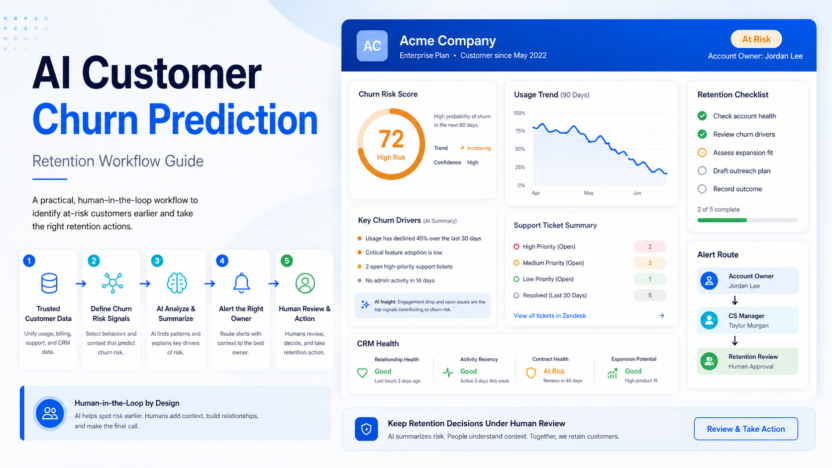
The safest AI customer churn prediction workflow starts with trusted customer data, defines churn-risk signals, uses AI to summarize patterns, sends alerts to the right owner, and keeps retention decisions under human review. AI should help spot risk earlier, not automatically label customers without context.
This article is written for small business owners, operators, marketers, support leaders, and team managers who need a practical software decision, not a broad AI overview. Official product and pricing sources reviewed include HubSpot, Salesforce Einstein, Zapier, Airtable. Pricing last checked on July 28, 2026.
Related Dailytimespro reading:
Best For
- SaaS teams tracking renewals, usage, support tickets, and account health.
- customer success teams that need earlier warning signs before cancellation.
- small businesses building a practical retention workflow before buying a dedicated enterprise platform.
Not Best For
- teams with messy customer records and no account owner.
- businesses that want AI to make retention decisions without review.
- companies using sensitive customer data without clear privacy and access rules.
Our Evaluation Criteria
We evaluated AI customer churn prediction by ease of use, setup effort, pricing clarity, AI usefulness, integration fit, review controls, support workflow, realistic use cases, and value for money. The best option is not automatically the tool with the most AI features. The best option is the one that improves a workflow your team already understands.
For small businesses, the decision should start with one repeated job. If the tool helps prepare useful work, keeps the review step visible, and fits the budget model, it deserves a deeper trial. If the tool creates polished drafts that still require heavy cleanup or unclear ownership, the business case is weaker.
Quick Comparison
| Decision factor | What to compare | Why it matters |
|---|---|---|
| Best fit | User type, team size, and repeated workflow | A tool is only valuable when it fits regular work |
| Setup | Data sources, prompts, integrations, permissions | Setup cost can erase AI time savings |
| AI quality | Accuracy, control, explainability, editability | Good first drafts still need review |
| Pricing | Seats, credits, outcomes, minutes, tasks, or usage | The pricing model should match real volume |
| Integrations | CRM, helpdesk, docs, meetings, analytics, or publishing stack | AI output is more useful when it lands where work happens |
| Review controls | Approvals, handoffs, transcripts, logs, admin roles | Teams need accountability before outputs reach customers |
| Scalability | Limits, workspace features, team controls, enterprise options | The starter plan may not match a growing workflow |
| Limitations | What the tool cannot safely do alone | Trust improves when limits are visible |
| Adoption | How easily a team can use it every week | Unused AI tools are expensive even when cheap |
Key Tools and Product Fit
HubSpot
HubSpot is relevant because its official product material points to CRM records, lifecycle data, customer communication history, and AI-assisted go-to-market tools. For this article, the practical fit is teams already using HubSpot for customer records and retention work. The useful question is not whether HubSpot has the longest feature list. The useful question is whether it improves one repeated workflow with clearer inputs, cleaner review, and less manual follow-up.
Pricing source: HubSpot pricing.
Salesforce Einstein
Salesforce Einstein is relevant because its official product material points to AI capabilities across Salesforce CRM, sales, service, and customer data workflows. For this article, the practical fit is larger teams that need churn signals inside Salesforce. The useful question is not whether Salesforce Einstein has the longest feature list. The useful question is whether it improves one repeated workflow with clearer inputs, cleaner review, and less manual follow-up.
Pricing source: Salesforce Einstein pricing.
Zapier
Zapier is relevant because its official product material points to automation, app triggers, AI steps, tables, interfaces, and handoff workflows. For this article, the practical fit is small teams routing churn-risk alerts across CRM, Slack, email, and spreadsheets. The useful question is not whether Zapier has the longest feature list. The useful question is whether it improves one repeated workflow with clearer inputs, cleaner review, and less manual follow-up.
Pricing source: Zapier pricing.
Airtable
Airtable is relevant because its official product material points to structured customer records, interfaces, automations, and AI features for operational workflows. For this article, the practical fit is teams building a lightweight customer health tracker. The useful question is not whether Airtable has the longest feature list. The useful question is whether it improves one repeated workflow with clearer inputs, cleaner review, and less manual follow-up.
Pricing source: Airtable pricing.
Real Use Cases
Flagging Customers With Falling Product Usage
In a typical small business workflow, flagging customers with falling product usage works best when the source material is already clear and a person owns the final review. AI can prepare a draft, summarize context, classify a request, or create a first version faster than manual work. The output should still be checked before it affects customers, published pages, budget decisions, or sales commitments. This is where the strongest AI tools create value: they reduce repetitive preparation while keeping the responsible person in control.
Summarizing Support Tickets Before Renewal Review
In a typical small business workflow, summarizing support tickets before renewal review works best when the source material is already clear and a person owns the final review. AI can prepare a draft, summarize context, classify a request, or create a first version faster than manual work. The output should still be checked before it affects customers, published pages, budget decisions, or sales commitments. This is where the strongest AI tools create value: they reduce repetitive preparation while keeping the responsible person in control.
Routing Churn-Risk Accounts To Customer Success
In a typical small business workflow, routing churn-risk accounts to customer success works best when the source material is already clear and a person owns the final review. AI can prepare a draft, summarize context, classify a request, or create a first version faster than manual work. The output should still be checked before it affects customers, published pages, budget decisions, or sales commitments. This is where the strongest AI tools create value: they reduce repetitive preparation while keeping the responsible person in control.
Updating Customer Health Fields In The Crm
In a typical small business workflow, updating customer health fields in the CRM works best when the source material is already clear and a person owns the final review. AI can prepare a draft, summarize context, classify a request, or create a first version faster than manual work. The output should still be checked before it affects customers, published pages, budget decisions, or sales commitments. This is where the strongest AI tools create value: they reduce repetitive preparation while keeping the responsible person in control.
Building A Retention Checklist For High-Value Accounts
In a typical small business workflow, building a retention checklist for high-value accounts works best when the source material is already clear and a person owns the final review. AI can prepare a draft, summarize context, classify a request, or create a first version faster than manual work. The output should still be checked before it affects customers, published pages, budget decisions, or sales commitments. This is where the strongest AI tools create value: they reduce repetitive preparation while keeping the responsible person in control.
Pricing
HubSpot, Salesforce, Zapier, and Airtable publish official pricing or product pages for the CRM, automation, and customer data systems commonly used in churn workflows. Pricing last checked on July 28, 2026.
| Tool or plan | Official pricing note | Best-fit buying context |
|---|---|---|
| HubSpot | Official pricing pages cover CRM hub plans, seats, and AI-related product paths | Customer records and retention workflows |
| Salesforce | Official pricing pages cover Sales Cloud, Service Cloud, and Einstein-related paths by plan | Enterprise CRM and customer success operations |
| Zapier | Official pricing page covers automation tasks, apps, and workflow usage | Routing churn alerts across CRM, Slack, email, and spreadsheets |
| Airtable | Official pricing page covers workspace plans, automations, interfaces, and AI-related options | Lightweight customer health tracking |
Pricing should be judged against the workflow you will actually run. Count users, conversations, minutes, voice credits, support outcomes, automation tasks, contacts, projects, or workspace seats where those factors apply. A lower entry plan is not always cheaper if the required feature sits in a higher tier. A higher plan is not always better if the team only needs one narrow workflow.
Pros
- Helps teams reduce repeated preparation work such as drafts, summaries, routing, scoring, voiceovers, support answers, or research notes.
- Makes workflows easier to document when prompts, source material, and review steps are clear.
- Can improve consistency when a team uses the same criteria for every output.
- Supports faster handoff between marketing, sales, support, operations, and management.
- Works well when paired with official sources, internal guidelines, and responsible human approval.
Cons
- AI output still needs review before it reaches customers or public content.
- Pricing can depend on seats, usage, credits, minutes, outcomes, messages, projects, or add-ons.
- Some tools are excellent for one workflow but poor replacements for a full operating system.
- Teams may overvalue a polished demo and undervalue setup, governance, and maintenance.
- Integrations and admin controls can matter more than the visible AI feature list.
Alternatives
| Alternative | Best for | Main strength | Limitation |
|---|---|---|---|
| Gainsight | customer success operations | Useful when customer success operations is the main priority | Still needs workflow fit and pricing review |
| ChurnZero | customer health and retention workflows | Useful when customer health and retention workflows is the main priority | Still needs workflow fit and pricing review |
| Vitally | SaaS customer success tracking | Useful when saas customer success tracking is the main priority | Still needs workflow fit and pricing review |
Alternatives matter because most AI software decisions are workflow decisions. A product that looks weaker in a generic comparison may be stronger for a specific use case, existing stack, or review process. Compare alternatives with the same input, the same expected output, and the same approval standard.
Implementation Checklist
1. Define the workflow in one sentence. 2. List the source inputs the tool needs. 3. Decide who reviews the output. 4. Identify which official plan matches likely usage. 5. Run two or three realistic examples. 6. Record what had to be corrected. 7. Compare alternatives using the same criteria. 8. Choose the tool only if the reviewed output saves real time.
Which One Should You Choose?
Choose the option that matches the work your team repeats most often. For AI customer churn prediction, that means comparing real usage, review effort, integration fit, and official pricing. Do not buy a tool because it can generate a good sample in isolation. Buy it only when it improves a repeatable workflow after review.
If two choices look close, choose the one that is easier to maintain. A slightly narrower product with clear pricing, clean handoff, and strong adoption can be a better business decision than a broader platform that nobody uses consistently.
Final Recommendation
The safest AI customer churn prediction workflow starts with trusted customer data, defines churn-risk signals, uses AI to summarize patterns, sends alerts to the right owner, and keeps retention decisions under human review. AI should help spot risk earlier, not automatically label customers without context.
The practical buying rule is simple: start narrow, verify pricing from official sources, keep review ownership explicit, and expand only after the workflow saves time in real work. AI tools are most useful when they make responsible people faster, not when they remove responsibility from the process.