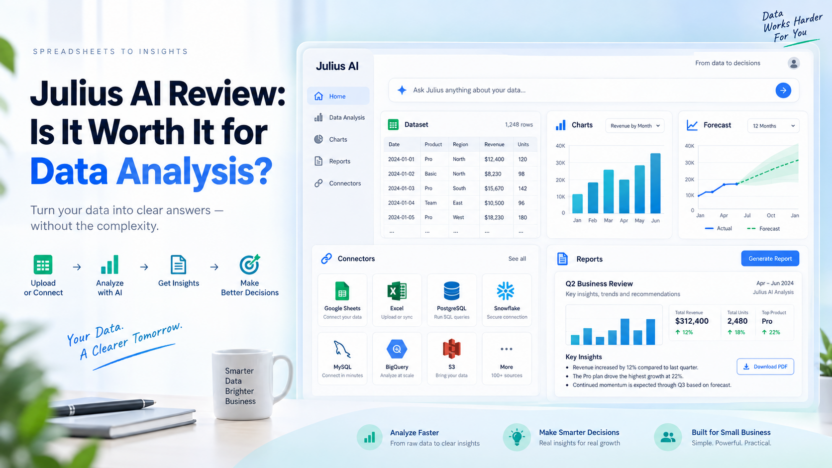
Julius AI is worth considering if you want a data analysis workspace that feels closer to talking with an analyst than learning a traditional business intelligence tool. It lets users upload or connect data, ask questions in natural language, generate charts, run deeper analysis, create reports, and turn findings into presentations or websites.
The short answer: Julius AI is strongest for small businesses, operators, marketers, founders, analysts, and teams that need faster answers from spreadsheets, CSV files, business databases, and reporting workflows. It is less ideal if your company already has a mature BI stack, strict internal data governance, or analysts who prefer full control in SQL, Python, R, Tableau, or Power BI.
This Julius AI review covers what it does, official pricing, key features, real use cases, pros and cons, alternatives, and buyer guidance for small business teams comparing AI data analysis tools.
Quick Verdict
Julius AI is a practical AI data analysis tool for teams that want to move from raw data to useful answers without building every chart, SQL query, or report manually. The official Julius AI pages position it as an AI workspace for analysis and creation, with support for data analysis, research, presentations, reports, dashboards, websites, images, and video.
For a small business, the main value is speed. Instead of waiting for a weekly analyst request or manually building pivot tables, a team member can connect a spreadsheet, ask a question, create a visualization, and turn the output into a report or presentation.
The main tradeoff is that Julius is still an AI-assisted analysis layer. Important financial, operational, medical, legal, or investor-facing decisions still need human review, clean data, and clear assumptions. Julius can help you explore, summarize, and present data, but it should not replace sound judgment or proper analytics governance.
Best For
Julius AI is best for small business owners, marketing teams, revenue teams, operations managers, consultants, students, researchers, and analysts who work with spreadsheets or business data and want faster analysis.
It is especially useful when someone has a question like “Which product category is growing fastest?”, “What changed in customer churn?”, “Can you forecast next quarter from this dataset?”, or “Turn this analysis into a presentation.” Julius is built for that practical bridge between raw data and useful explanation.
Not Best For
Julius AI is not the best fit if your company needs strict enterprise BI governance, complex semantic modeling, large-scale dashboard administration, or deeply customized production analytics. In those cases, Power BI, Tableau, Looker, Mode, Hex, or a warehouse-first analytics stack may be better.
It is also not ideal when the underlying data is messy, undocumented, or sensitive and nobody is available to validate the output. AI can make analysis faster, but it cannot magically fix bad definitions, missing fields, duplicate rows, or unclear business logic.
Our Evaluation Criteria
| Criteria | What We Looked For | Why It Matters |
|---|---|---|
| Ease of use | Natural-language questions, upload flow, chart creation, and report workflow | Julius is valuable only if non-technical users can get useful answers. |
| Data analysis depth | Cleaning, visualization, statistical analysis, forecasting, and machine learning | Buyers need more than summaries if they want real analytical value. |
| Data connectors | Spreadsheet, file, database, and warehouse support | Small teams often work across files, cloud drives, and operational databases. |
| Pricing clarity | Free, Plus, Pro, Max, Business, and Enterprise plan signals | Cost can scale with credits, team use, and advanced connectors. |
| Export and presentation value | Charts, reports, dashboards, presentations, and websites | Data insights become more useful when teams can share them clearly. |
| Security and governance | SOC 2, access controls, team features, SSO, audit logs, and data handling | Data analysis tools often touch sensitive business information. |
| Alternatives | Rows, ChatGPT, Claude, Power BI, Tableau, Polymer, Akkio, and Hex | Julius is one option in a crowded AI analytics market. |
What Is Julius AI?
Julius AI is an AI workspace focused on analyzing data and turning the results into useful outputs. Its official AI data analysis page says users can ask questions, create visualizations, run advanced analysis, perform modeling and predictive forecasting, train machine learning models with natural language, and generate presentations with data.
The platform supports common business workflows such as uploading spreadsheet files, connecting data sources, asking questions in plain English, creating charts, preparing data, building reports, and sharing results. The official documentation describes data connectors for databases and warehouses, including PostgreSQL, MySQL, SQL Server, Snowflake, BigQuery, Databricks, Supabase, Vertica, Google Ads, Meta Ads, and MCP.
That makes Julius different from a spreadsheet add-on that only writes formulas. It is closer to an AI analyst workspace where data exploration, visualization, reporting, and presentation creation sit together.
Key Features
Natural-Language Data Questions
The core Julius workflow is simple: connect or upload data, then ask questions in normal language. The official quickstart describes uploading a file, selecting a data source, asking questions, visualizing the results, and exporting outputs.
For a small business owner, this can remove a lot of friction. Instead of building formulas manually, they can ask for revenue by product, customer segments by region, retention changes, or top-performing campaigns.
Charts and Data Visualizations
Julius can create charts and graphs from connected data. The official quickstart mentions chart types such as bar plots, line plots, scatter plots, histograms, and pie charts.
This is useful because many business users understand the problem but do not know the fastest way to shape the data into a clean visualization. Julius can help turn raw columns into something managers can discuss.
Cleaning and Preparing Data
The official Julius AI data analysis page says Julius can help clean and prepare data. This matters because most small business data is not perfectly formatted. Exported CSV files may include blank rows, inconsistent categories, duplicate customer records, odd date formats, or columns that need renaming.
In a typical workflow, a team could ask Julius to identify missing values, standardize categories, summarize fields, or prepare a dataset before charting it. A human should still review important cleanup choices, especially when revenue, finance, or customer decisions depend on the output.
Advanced Analysis and Forecasting
Julius positions itself for advanced analysis, modeling, predictive forecasting, and machine learning with natural language. This can help users go beyond simple charts.
For example, a retail team might explore sales seasonality, a SaaS team might examine churn patterns, and a marketing team might compare campaign performance over time. The value is not that Julius replaces an expert analyst, but that it helps teams investigate questions faster.
Presentations, Reports, and Dashboards
Julius is not only about analysis inside a chat window. Its pricing page says plans support creating presentations, reports, websites, images, and video, with paid plans adding more credits and export capability.
This is helpful when the final output needs to be shared with clients, executives, investors, or internal teams. A small agency could analyze campaign results and then turn the findings into a client-ready report. A founder could analyze user feedback and create a presentation for the leadership team.
Data Connectors
Julius supports file uploads and data connectors. Its official documentation describes connectors as a way to connect Julius to data warehouses and databases so teams can analyze data directly without downloading and uploading files. The connectors page lists tools such as Postgres, BigQuery, Snowflake, MySQL, SQL Server, Supabase, Google Ads, and Meta Ads.
The official pricing page also says Business includes Postgres, BigQuery, Snowflake, and more data connectors, plus no table limit in data connections. This makes the higher plans more relevant for teams that need live business data rather than one-off spreadsheet uploads.
Slack Agent and Scheduled Runs
Julius pricing information includes Slack Agent capabilities and scheduled report runs, with Business listing unlimited Slack Agent use in public Slack channels and unlimited scheduled report runs.
For a team, this can turn analysis from a one-time task into a repeated workflow. A manager could schedule a weekly KPI report, share insights to Slack, or let team members ask questions inside a collaboration flow.
Julius AI Pricing
Pricing last checked on September 16, 2026. Julius AI’s official pricing page lists Free, Plus, Pro, Max, Business, and Enterprise options. The page shows monthly and annual billing options, with annual pricing marked as a 20% saving.
| Plan | Official Monthly Price Shown | Best For | Important Notes |
|---|---|---|---|
| Free | $0/month | Individuals exploring AI-powered analysis and creation | Includes free daily credits and core creation/analysis access. |
| Plus | $20/month, or $16/month billed yearly | Everyday analysis, research, and creative projects | Includes 2,000 monthly credits, frontier models, exports, unlimited charts, and support. |
| Pro | $45/month, or $37/month billed yearly | Advanced analysis and more ambitious work | Includes 5,000 monthly credits, expanded context, priority email support, and advanced model access. |
| Max | $200/month, or $166/month billed yearly | Power users needing larger context and advanced access | Includes 25,000 monthly credits, early access features, priority access, and permanent file storage. |
| Business | $450/month, or $375/month billed yearly | Teams analyzing and collaborating together | Includes 60,000 monthly credits, up to 50 team members, advanced data connectors, scheduled runs, Slack Agent use, and Custom Agents. |
| Enterprise | Contact sales | Larger organizations with advanced controls | The pricing page points to custom enterprise needs such as broader security, administration, and scale. |
Julius pricing is credit-based, so actual value depends on task volume and complexity. The official pricing page is the source to use before buying because credits, model access, connectors, and plan inclusions can change.
For current details, review the official Julius AI pricing page.
Real Use Cases
Small Business Revenue Analysis
In a typical small business workflow, a manager could upload monthly sales data and ask Julius which products, channels, or regions are improving. Julius can help create charts, identify patterns, and turn findings into a short report.
This is useful when the business has data but no dedicated analyst.
Marketing Campaign Reporting
A marketing team could use Julius to analyze ad exports, lead data, email metrics, or campaign performance. With connectors such as Google Ads and Meta Ads listed in Julius documentation, teams may be able to bring campaign data into the analysis workflow.
The practical value is speed: which campaigns produced better leads, which segments changed, and what should the next report highlight?
SaaS Customer and Churn Analysis
A SaaS team could use Julius to explore churn, activation, expansion, plan mix, or support trends. For example, the team might upload user activity data and ask which behaviors correlate with retention.
This does not replace a full product analytics stack, but it can help teams ask better questions before investing in heavier tooling.
Agency Client Reporting
Consultants and agencies can use Julius to turn raw client data into charts, summaries, reports, or presentations. That can reduce the manual work involved in monthly reporting.
The important rule is to validate conclusions before presenting them. Julius can speed up the draft analysis, but client-facing recommendations should still be reviewed.
Operations Forecasting
Operations teams may use Julius for inventory forecasting, staffing trends, support volume patterns, or demand planning. Its official data analysis page mentions modeling and predictive forecasting, which fits this use case.
For small teams, even a rough forecast can help create better planning conversations, as long as the assumptions are clear.
Pros and Cons
| Pros | Cons |
|---|---|
| Easy natural-language workflow for asking questions about data. | Important outputs still need human review and clean source data. |
| Supports charts, visualizations, reports, presentations, and websites. | Pricing depends on credits and plan limits, which buyers must understand. |
| Useful official connector story for databases, warehouses, cloud drives, and ad platforms. | Teams with mature BI governance may need a heavier analytics platform. |
| Strong fit for small teams without dedicated analysts. | Sensitive data workflows require careful policy review before adoption. |
| Business plan supports team collaboration, data connectors, scheduled reports, and Slack Agent workflows. | Not every advanced analytics scenario will fit a chat-first workflow. |
Julius AI Alternatives
| Alternative | Best For | Main Strength | Limitation |
|---|---|---|---|
| Rows AI | Spreadsheet-first analysis and reporting | Familiar spreadsheet interface with AI assistance | Less broad as an AI analysis workspace. |
| ChatGPT Advanced Data Analysis | General-purpose file analysis | Flexible reasoning and Python-based analysis | Not a dedicated BI or team data connector product by itself. |
| Claude | Long-document analysis and careful reasoning | Strong explanation and summarization | Data tooling depends on the workflow and plan. |
| Power BI | Enterprise dashboards and reporting | Mature Microsoft BI ecosystem | More setup and modeling work for non-technical teams. |
| Tableau | Visual analytics and dashboards | Strong visualization and enterprise reporting | Can be heavy for casual small business analysis. |
| Polymer | No-code BI for teams | Easy dashboard creation from business data | May be less flexible for open-ended AI analysis. |
| Akkio | Predictive analytics and AI workflows | Business-friendly machine learning workflows | Different focus than broad AI data analysis and reporting. |
Julius sits in the middle: easier and more conversational than traditional BI, more data-focused than a generic writing assistant, and broader than a simple spreadsheet add-on.
Who Should Choose Julius AI?
Choose Julius AI if your team wants to ask questions about data, create charts, generate reports, and turn insights into presentations without building every analysis manually. It is especially useful for small businesses, agencies, consultants, students, researchers, and operations teams that work with spreadsheets and recurring reports.
The Free plan is useful for exploration. Plus and Pro make more sense for regular individual work. Max is for heavy individual usage. Business is the relevant plan for teams that need shared workspaces, connectors, scheduled reports, Slack workflows, and more credits.
Do not choose Julius only because it sounds like a replacement for a data team. It is better understood as an AI analysis assistant that can make data work faster when the user understands the business question and validates the answer.
Buying Checklist
Before choosing Julius AI, answer these questions:
- What data sources will you analyze most often?
- Do you only need file uploads, or do you need database and warehouse connectors?
- How many credits will your normal reporting workflow consume?
- Do you need exports, scheduled reports, Slack workflows, or team collaboration?
- Who will validate the analysis before it influences business decisions?
- Do you need enterprise controls such as SSO, audit logs, or role permissions?
- Are your most important reports better suited to Julius, Power BI, Tableau, or another BI tool?
This checklist matters because Julius is most valuable when it matches a real workflow, not when it is used as a novelty.
Final Recommendation
Julius AI is a strong option for teams that want faster analysis from spreadsheets, business files, and connected data sources. It can help users ask questions, visualize data, clean and prepare datasets, run deeper analysis, create reports, and turn findings into presentations or websites.
For small business users, Plus or Pro may be enough if the work is mostly individual analysis. For teams, Business is the plan to evaluate because it adds stronger collaboration, connectors, scheduled report runs, Slack Agent use, and larger credit capacity. Enterprise is the route for organizations with advanced security, governance, or scale needs.
If you need a traditional dashboard system, compare Power BI and Tableau. If you want a spreadsheet-first workflow, compare Rows. If you want general AI file analysis, compare ChatGPT or Claude. If your goal is conversational data analysis and shareable reporting in one workspace, Julius AI deserves a serious look.
For related Dailytimespro guides, read our Rows AI review, Best AI spreadsheet tools, How to use ChatGPT for Excel, and AI inventory forecasting workflow.
FAQs
Is Julius AI worth it?
Julius AI is worth it if you regularly analyze spreadsheets, business reports, or connected data and want faster charts, explanations, reports, and presentations. It is less useful if you only need occasional basic spreadsheet formulas.
How much does Julius AI cost?
Julius AI’s official pricing page lists Free at $0, Plus at $20/month, Pro at $45/month, Max at $200/month, Business at $450/month, and Enterprise by contact request. Annual billing shows lower monthly equivalents.
Does Julius AI have a free plan?
Yes. Julius AI lists a Free plan with free daily credits for individuals exploring AI-powered analysis and creation.
What data can Julius AI analyze?
Julius supports common formats such as CSV and Excel files, and its official pages describe support for files, cloud drives, databases, data warehouses, and connectors including Postgres, BigQuery, Snowflake, MySQL, SQL Server, Google Ads, and Meta Ads.
Can Julius AI create charts?
Yes. Julius can create data visualizations such as bar plots, line plots, scatter plots, histograms, and pie charts from uploaded or connected data.
Can Julius AI replace a data analyst?
No. Julius can speed up analysis and reporting, but important conclusions still need human review, clean data, and business context.
Is Julius AI good for small business?
Yes, Julius can be useful for small businesses that need faster insights from sales, marketing, operations, support, or finance data without a full analytics team.
What are the best Julius AI alternatives?
Common alternatives include Rows AI, ChatGPT Advanced Data Analysis, Claude, Power BI, Tableau, Polymer, Akkio, Hex, and other AI analytics tools depending on the workflow.