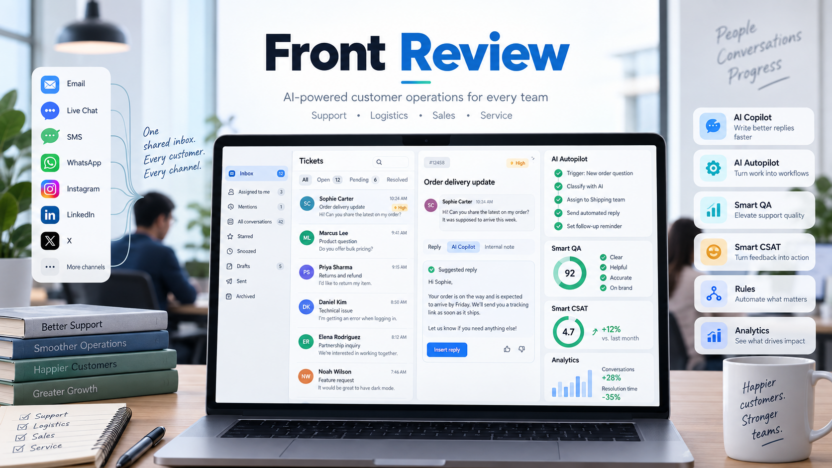
Front is worth considering if your team needs more than a normal shared inbox but does not want customer conversations trapped in a traditional ticketing queue. It combines shared inboxes, ticketing, omnichannel support, live chat, knowledge base, workflow automation, analytics, and AI features such as AI Copilot, Autopilot, Smart QA, Smart CSAT, and AI Topics.
The short answer: Front is strongest for customer-facing teams that need collaboration across support, logistics, sales, success, and operations. It is less suitable if your team only needs a personal inbox, a simple Gmail-based help desk, or the lowest-cost ticketing tool.
This Front review covers key features, official pricing, AI add-ons, real use cases, pros and cons, alternatives, and buyer guidance for teams comparing AI customer operations platforms.
Quick Verdict
Front is a strong shared inbox and customer operations platform for teams that want customer conversations, internal collaboration, automation, and analytics in one workspace. It is more operational than a lightweight team inbox and more collaborative than a classic ticket queue.
The clearest fit is a team where customer work moves across departments. A shipping question may touch logistics, support, finance, and sales. A customer escalation may need internal comments, connected systems, QA review, and a follow-up workflow. Front is built for those cross-functional conversations.
The main drawback is cost and complexity. Front’s Professional and Enterprise plans are more expensive than many basic shared inbox tools. AI features are also partly plan-dependent or add-on based. Teams should map the exact workflows they need before buying.
Best For
Front is best for customer operations teams, support teams, logistics teams, customer success teams, sales teams, ecommerce teams, travel teams, and service businesses where communication comes through multiple channels and several people may need to collaborate behind the scenes.
It is especially relevant when work is not just “reply to this email.” Front can help when teams need to route messages, coordinate handoffs, review quality, infer customer satisfaction, automate routine workflows, manage knowledge, and connect conversations to operational systems.
Not Best For
Front is not the best fit if you only need personal email productivity. Superhuman, Shortwave, Gmail, or Outlook may fit better for individual inbox speed.
It may also be more than a small team needs if the workflow is simple support@ email assignment. Missive, Hiver, Help Scout, or Freshdesk may be easier to adopt depending on the setup.
Front is also not the cheapest option for basic ticketing. Buyers should choose it for collaboration, customer operations, omnichannel work, and AI-assisted workflows, not only because they need a queue.
Our Evaluation Criteria
| Criteria | What We Looked For | Why It Matters |
|---|---|---|
| Customer operations fit | Shared inbox, ticketing, omnichannel support, and cross-team handoffs | Front is most valuable when work crosses teams and systems. |
| AI usefulness | Copilot, Autopilot, Smart QA, Smart CSAT, AI Topics, and add-on pricing | AI should reduce repetitive work and improve support quality. |
| Workflow automation | Rules, smart rules, macros, workspaces, routing, and playbooks | Customer operations need repeatable processes. |
| Reporting | Basic analytics, advanced analytics, custom reports, QA, and CSAT | Managers need to understand quality, speed, and customer sentiment. |
| Pricing clarity | Starter, Professional, Enterprise, AI add-ons, and limits | Cost changes significantly by plan and AI usage. |
| Collaboration | Internal comments, ownership, workspaces, permissions, and customer context | Shared inbox tools must prevent lost ownership. |
| Alternatives | Help Scout, Hiver, Missive, Zendesk, Freshdesk, and Intercom | Front is not the right fit for every support model. |
What Is Front?
Front is an AI customer operations platform that combines shared inboxes, ticketing, omnichannel support, live chat, knowledge base, workflow automation, analytics, and team collaboration. Its official pricing page positions Starter for single-channel support, Professional for omnichannel support with more automation and reporting, and Enterprise for advanced AI tools and customer operations.
Front is different from a basic email client because it is built around team workflows. A customer conversation can have an owner, internal comments, rules, macros, analytics, QA review, CSAT insights, and connected context.
It is also different from a strict ticketing system because it preserves more conversational collaboration. That makes it useful for customer operations teams where the work often crosses support, logistics, finance, sales, and account management.
Key Features
Shared Inbox and Ticketing
Front includes shared inboxes and ticketing across plans. This gives teams one place to manage customer conversations while tracking ownership, status, and internal collaboration.
For small teams, this solves the basic problem of “who is replying?” For larger teams, it creates a foundation for rules, workspaces, analytics, and AI support.
Omnichannel Communication
Front’s pricing page says Professional and Enterprise support omnichannel communication such as email, SMS, social, WhatsApp, and more. Starter supports a single channel type.
This matters for companies where customers do not use one channel. Ecommerce, logistics, travel, and service teams may receive questions by email, chat, SMS, social, and WhatsApp. Front helps manage these as customer operations, not isolated message streams.
Workflow Automation and Rules
Front includes workflow automation through rules, macros, and smart rules depending on the plan. Starter includes up to 10 automation rules. Professional adds macros and up to 20 automation rules. Enterprise includes smart rules plus unlimited rules and macros.
Rules can route messages, apply tags, prioritize conversations, assign owners, and support repeatable customer operations. Smart rules and macros become important as support volume grows.
AI Copilot
Front AI Copilot is an assistant for agents. Front’s AI page describes Copilot as helping agents get context, summarize conversations, find answers, and draft or revise replies. Its pricing page lists Copilot as a $20 per seat/month add-on or included in Enterprise.
In a typical support workflow, Copilot can help an agent understand a long conversation, draft a response grounded in context, and refine tone or length before sending.
AI Autopilot
Front’s Autopilot is an omnichannel AI agent. Front’s official AI page says it can automate complex customer work and coordinate across customers, internal teams, and connected systems. The pricing page lists Autopilot starting at $0.05 per conversation.
This is more than an FAQ bot. Front positions Autopilot for multi-step customer operations where the AI may need to gather missing information, follow playbook steps, take actions in connected systems, and hand off when needed.
Smart QA and Smart CSAT
Smart QA uses AI-powered scorecards and reporting to assess support quality. Smart CSAT infers customer satisfaction signals without relying only on surveys. Front’s pricing page lists Smart QA at $20 per seat/month as an add-on or included in Enterprise, and Smart CSAT at $10 per seat/month as an add-on or included in Enterprise.
For managers, these features can help identify coaching opportunities, detect quality trends, and understand customer sentiment across more conversations.
AI Topics
Front’s AI features documentation says AI Topics automatically analyze conversations to create topics and organize conversations. The pricing page lists AI Topics on Starter and higher plans.
Topics are useful for spotting recurring issues, product feedback, operational bottlenecks, and common customer questions.
Knowledge Base and Live Chat
Front’s pricing page includes knowledge base and messaging/live chat capabilities. Starter includes a no-code public knowledge base and messaging/live chat if using a single channel type. Professional and Enterprise expand omnichannel capabilities.
This can help teams reduce repetitive questions and give agents a stronger source of truth.
Workspaces, SSO, SCIM, and Permissions
Professional includes multiple workspaces, SSO, and SCIM. Enterprise adds custom roles and permissions, unlimited workspaces, and custom reporting.
These controls matter for teams with separate support, logistics, sales, operations, or regional workflows.
Front Pricing
Pricing last checked on September 14, 2026. Front’s official pricing page lists Starter, Professional, and Enterprise plans with annual billing shown by default.
| Plan | Official Published Price | Best For | Important Notes |
|---|---|---|---|
| Starter | $25 per seat/month billed annually | Teams getting started with single-channel support | Up to 10 seats; shared inbox, ticketing, AI Topics, up to 10 automation rules, basic analytics, no-code public knowledge base, and AI add-ons available. |
| Professional | $65 per seat/month billed annually | Teams needing omnichannel support, automation, and reporting | Up to 50 seats; omnichannel support, macros, up to 20 automation rules, advanced analytics, multiple workspaces, SSO, SCIM, and AI add-ons available. |
| Enterprise | $105 per seat/month billed annually | Advanced customer operations teams | Smart rules, unlimited rules and macros, multi-language knowledge base, custom roles and permissions, AI Copilot, Smart QA, and Smart CSAT included. |
Front AI add-ons include Autopilot starting at $0.05 per conversation, Copilot at $20 per seat/month or included in Enterprise, Smart QA at $20 per seat/month or included in Enterprise, Smart CSAT at $10 per seat/month or included in Enterprise, and a Smart QA plus Smart CSAT bundle at $25 per seat/month.
For the latest details, review the official Front pricing page and Front pricing help article.
Real Use Cases
Customer Support Operations
A support team can use Front to manage email, chat, social, SMS, and WhatsApp conversations in one place. Rules can route tickets, AI Copilot can draft replies, and analytics can show where response time or quality is changing.
This is useful when support is not only an inbox but an operational workflow.
Logistics and Delivery Support
Logistics teams often need to coordinate customer questions with delivery status, warehouse updates, carriers, and account managers. Front can keep customer conversations visible while internal teams coordinate behind the scenes.
Autopilot-style workflows may be useful when requests require multiple steps or missing information.
Sales and Customer Success Handoffs
Front can help teams manage handoffs between sales, support, and customer success. A customer email may include renewal context, a support issue, and a product question. Internal collaboration helps the right team respond without losing context.
Ecommerce Customer Service
Ecommerce teams can use Front for order questions, returns, shipping updates, refunds, and social messages. Omnichannel support matters because shoppers may contact the business through chat, email, Instagram, WhatsApp, or SMS.
Quality Assurance and Coaching
Smart QA can help managers review more conversations and coach agents. Smart CSAT can help identify customer sentiment across interactions without waiting only for survey responses.
This is useful for teams that want to scale service quality without manually reading every conversation.
Pros and Cons
| Pros | Cons |
|---|---|
| Strong fit for customer operations and cross-team collaboration. | More expensive than basic shared inbox tools. |
| Supports shared inbox, ticketing, omnichannel communication, live chat, and knowledge base. | AI Copilot, Smart QA, Smart CSAT, and Autopilot may require Enterprise or add-on spend. |
| Professional adds omnichannel support, advanced analytics, workspaces, SSO, and SCIM. | Starter is limited to one channel type and up to 10 seats. |
| Enterprise includes advanced AI tools and unlimited rules/macros. | Teams with simple Gmail support may prefer Hiver or Help Scout. |
| AI features cover automation, assistance, QA, CSAT, and topic analysis. | Buyers need to plan workflows carefully to avoid paying for unused complexity. |
Front Alternatives
| Alternative | Best For | Main Strength | Limitation |
|---|---|---|---|
| Help Scout | Small support teams wanting a simple help desk | Easy support inbox, docs, and reporting | Less customer-operations-focused than Front. |
| Hiver | Gmail-first support teams | Help desk workflows inside Gmail | Tied more closely to Gmail workflows. |
| Missive | Shared inbox collaboration | Flexible team inbox and internal comments | Less support-operations-heavy than Front. |
| Zendesk | Enterprise support operations | Mature ticketing, routing, and reporting | Heavier and more complex for small teams. |
| Freshdesk | Affordable help desk coverage | Broad support features and AI pricing options | Less focused on collaborative customer operations than Front. |
Front sits between shared inbox collaboration and full customer operations. It may be more powerful than Missive or Hiver, but less traditional than a deep enterprise ticketing system.
Who Should Choose Front?
Choose Front if customer conversations are operationally complex and several teams need to collaborate. It is especially relevant for logistics, ecommerce, customer success, support, sales, and service businesses where a single request may touch multiple systems or departments.
Starter is best for small teams starting with single-channel support. Professional is the practical fit for teams that need omnichannel support, advanced analytics, multiple workspaces, SSO, and SCIM. Enterprise is the serious AI customer operations tier because it includes Copilot, Smart QA, and Smart CSAT.
Avoid Front if the team only needs simple email assignment or personal inbox speed. In those cases, compare Missive, Hiver, Superhuman, Shortwave, or Help Scout.
Buying Checklist
Before choosing Front, answer these questions:
- Does your team need single-channel or omnichannel support?
- How many seats are needed today and in the next year?
- Do you need AI Copilot, Smart QA, Smart CSAT, or Autopilot?
- Are workflows simple enough for Starter, or do you need Professional rules and analytics?
- Do you need SSO, SCIM, multiple workspaces, custom roles, or custom reports?
- Which customer operations workflows should AI automate first?
- What support quality metrics should managers track?
This checklist matters because Front’s value depends on workflow complexity. Buying it for a simple inbox may be overkill. Buying it for cross-functional customer operations can make more sense.
Final Recommendation
Front is a strong platform for teams that treat customer conversations as operations work rather than isolated tickets. It combines shared inbox, ticketing, omnichannel communication, automation, analytics, knowledge base, live chat, and advanced AI features in one customer operations workspace.
For small teams, Starter may be enough if support is single-channel. For growing teams, Professional is the better evaluation tier because it unlocks omnichannel support, advanced analytics, workspaces, SSO, and SCIM. For teams serious about AI-assisted customer operations, Enterprise is the key plan because AI Copilot, Smart QA, and Smart CSAT are included.
If you need a simple Gmail help desk, compare Hiver. If you need a lightweight team inbox, compare Missive. If you need a mature enterprise help desk, compare Zendesk or Freshdesk. If your work spans customers, channels, systems, and internal teams, Front deserves a serious look.
For related Dailytimespro guides, read our Hiver review, Missive review, Help Scout AI review, and Zendesk AI review.
FAQs
Is Front worth it?
Front is worth it for teams that need shared inboxes, omnichannel customer communication, internal collaboration, workflow automation, analytics, and AI support across customer operations. It may be too expensive for basic email assignment.
How much does Front cost?
Front’s official pricing page lists Starter at $25 per seat/month billed annually, Professional at $65 per seat/month billed annually, and Enterprise at $105 per seat/month billed annually.
Does Front have AI features?
Yes. Front AI includes features such as AI Topics, Copilot, Autopilot, Smart QA, and Smart CSAT. Some AI features are included in Enterprise or sold as add-ons on other plans.
What is Front Autopilot?
Front Autopilot is an omnichannel AI agent for complex customer workflows. Front says it can coordinate across customers, internal teams, and connected systems using structured workflows and escalation controls.
Is Front better than Zendesk?
Front is better for collaborative customer operations and shared inbox workflows. Zendesk may be better for large enterprise support organizations that want a traditional ticketing-first platform.
Is Front good for small businesses?
Front can be good for small businesses with high-value customer communication and cross-team workflows. Very small teams with basic email needs may prefer a lighter shared inbox or help desk.
Does Front offer a free trial?
Front’s official help article says the free trial lasts 14 days, provides access to the Professional plan, and does not require a credit card.
Who should not use Front?
Teams that only need personal email productivity, basic Gmail support, or the lowest-cost ticket queue may be better served by Superhuman, Hiver, Missive, Help Scout, or Freshdesk.