
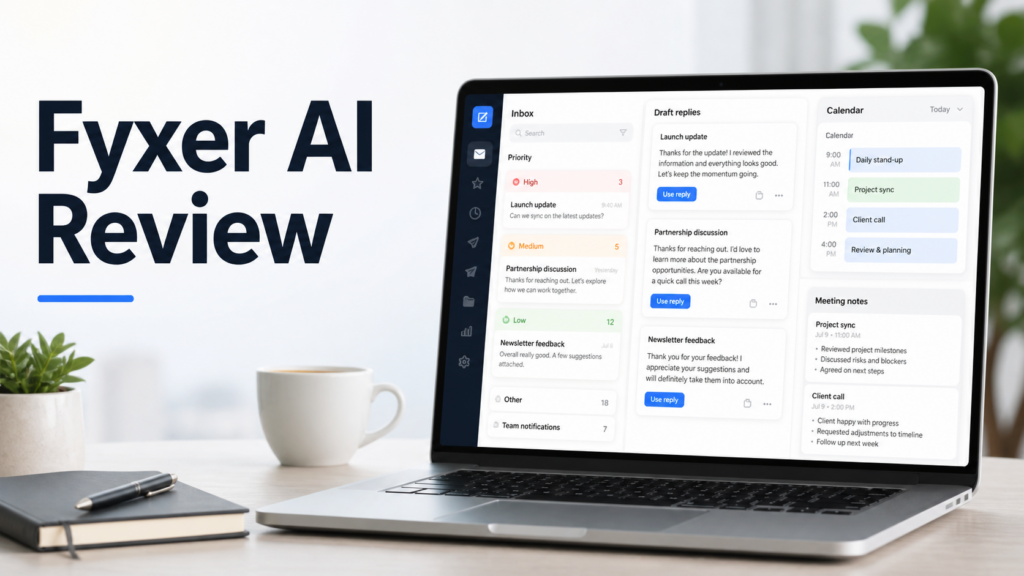
Quick verdict
Fyxer AI is worth considering if your workday is dominated by email triage, reply drafting, calendar context, and meeting notes. It is not just a generic writing assistant. Based on Fyxer's official product pages, the tool is built to work with Gmail and Outlook, organize incoming email, draft replies in your writing style, and capture meeting notes.
The strongest fit is a founder, consultant, manager, salesperson, recruiter, or small team that spends too much time deciding which messages need attention and writing similar replies every day. Fyxer can help reduce that admin load, but it should still be treated as an assistant. You review the drafts, decide what gets sent, and keep responsibility for tone, accuracy, and sensitive communication.
If you only need occasional email copy, a general AI assistant may be enough. If you want an inbox-native workflow that combines prioritization, draft replies, meetings, and search across work context, Fyxer is more purpose-built.
Best for
Fyxer AI is best for professionals who live in Gmail or Outlook and want less manual email handling. It fits founders, agency owners, account managers, sales teams, consultants, customer-facing executives, and busy operators who receive many emails that require judgment but often follow repeatable patterns.
It is also useful for teams that want meeting notes and email follow-up in the same workflow. Fyxer's official site describes it as an email assistant that organizes your inbox, writes draft replies in your tone, and takes meeting notes. That combination is practical because the follow-up after a meeting often happens through email.
Not best for
Fyxer AI is not the best choice for users who want a free, lightweight email writing tool. Official pricing positions it as a paid productivity product with a free trial rather than a permanent free plan. It is also not ideal for people who do not want an AI tool connected to their inbox or calendar.
It may also be too focused if your main need is broad project management, document drafting, CRM reporting, or marketing content. In those cases, tools such as ChatGPT, Claude, Microsoft Copilot, or a CRM-specific assistant may fit better.
What is Fyxer AI?
Fyxer AI is an AI email assistant for Gmail and Outlook. According to Fyxer's official website, it organizes your inbox, drafts replies in your tone, and takes meeting notes. The product is designed to reduce repetitive communication work without forcing users into a completely separate email client.
That last point is important. Many productivity tools fail because they create another dashboard to monitor. Fyxer's value proposition is that it works around your existing inbox and calendar habits. For a small business owner, that can matter more than having dozens of extra features.
The product also includes Fyxer Chat, which Fyxer describes as a way to search across emails, meeting notes, and uploaded files, then draft emails from that context. This makes it closer to an AI work assistant for communication-heavy roles than a simple email template generator.
Our evaluation criteria
This review uses practical buying criteria for small businesses and solo professionals.
| Criteria | What matters |
|---|---|
| Ease of use | Whether the tool fits Gmail or Outlook without a heavy setup process |
| Email triage | Whether it helps separate urgent messages from routine inbox noise |
| Draft quality | Whether draft replies can reflect the user's tone and context |
| Meeting support | Whether meeting notes and follow-ups reduce admin work |
| Pricing clarity | Whether official pricing is clear enough to plan monthly cost |
| Security posture | Whether official pages explain data handling and compliance claims |
| Team fit | Whether the workflow supports individuals and growing teams |
| Alternatives | Whether a broader assistant or cheaper tool would be enough |
| Value for money | Whether saved time justifies a per-user monthly subscription |
Key features
Inbox organization
Fyxer says it organizes the inbox by highlighting what needs attention and prioritizing urgent messages. This is the core use case for people who start the day with too many unread emails and no clear order of work.
In a typical small business workflow, this could mean surfacing a customer renewal question, a vendor deadline, or a sales reply before newsletters and low-priority updates. The value is not only fewer clicks. It is less decision fatigue at the start of the workday.
Draft replies in your tone
Fyxer's official AI email assistant page says the product drafts replies based on past emails and writing style. This is useful for messages that are important but repetitive: scheduling replies, proposal follow-ups, customer questions, internal updates, and polite declines.
The right workflow is review and send, not auto-send. Fyxer states on its AI email writer page that it does not send emails automatically and that every draft is reviewed by the user. That is the safer model for business communication because the user stays in control.
Gmail and Outlook support
Fyxer positions the product for Gmail and Outlook users. This matters because email assistants are only useful if they fit the system the business already uses. A tool that requires switching inboxes creates adoption friction.
For a founder or sales lead, inbox-native support can be the difference between using the tool daily and abandoning it after a week.
Meeting notetaker
Fyxer's pricing page includes meeting notetaker access on paid plans. Meeting notes are a natural extension of email management because action items usually become follow-ups.
A SaaS team could use this for customer demos, onboarding calls, partner meetings, or internal planning calls. After the meeting, the user can turn decisions and action items into follow-up emails without rebuilding context manually.
Fyxer Chat
Fyxer Chat is positioned as a way to ask questions about emails and meetings, search inbox history, search meeting transcripts, upload files, and draft emails from that context. This is useful when the problem is not writing a sentence but finding the right context before writing.
For example, a consultant could ask what a client last said about a proposal, pull the relevant thread context, and draft a reply. A manager could search meeting notes for agreed next steps before responding to a stakeholder.
Real use cases
Handling daily inbox triage
In a typical small business workflow, the first inbox pass is expensive. The user has to decide what is urgent, what needs a reply, what can wait, and what can be ignored. Fyxer can help by organizing and prioritizing messages so the user starts with the most important communication.
This is useful for founders, account managers, and consultants who cannot afford to miss important client emails but also cannot spend two hours sorting the inbox every morning.
Drafting common replies
Many business replies are not complex, but they still take time. Examples include confirming meetings, answering simple questions, following up on documents, acknowledging receipt, or asking for missing information.
Fyxer can draft those replies in the user's tone. The user still checks the details, but the starting point is faster than writing each message from scratch.
Sales and client follow-up
A sales team could use Fyxer to draft follow-ups after calls, respond to buying questions, and keep conversation threads moving. The benefit is consistency. Instead of delaying a reply because the rep is moving between meetings, Fyxer can prepare a draft that the rep edits and sends.
This is most useful for high-touch sales where tone matters. The draft should sound personal, but the rep should verify the facts before sending.
Meeting notes and action items
Small teams often lose time after meetings because no one writes a clean summary. Fyxer's meeting notetaker can help capture notes and actions. The user can then turn those notes into follow-up emails or task reminders.
This can be useful for customer onboarding calls, project check-ins, recruiting interviews, and partner discussions.
Searching past email context
Fyxer Chat can help when a user needs to find context across old emails and meeting notes. Instead of manually searching several threads, the user can ask a question and use the retrieved context to draft a response.
This can be valuable for consultants and managers who handle long-running client relationships with many scattered conversations.
Fyxer AI pricing
Pricing last checked on August 29, 2026.
Fyxer's official pricing page lists annual and monthly pricing. The annual view shows Starter at $22.50 per user per month when billed annually, reduced from $30, and includes a 7-day free trial. The AI email assistant page states that Fyxer starts at $30 per month for individuals and $50 per month for the Professional plan, with Enterprise pricing available for teams of 50 or more.
Based on the official pricing information available at the time of writing, the plan structure is straightforward: Starter for one inbox and calendar, Professional for users who need multiple inboxes and additional workflow features, and Enterprise for larger teams that need sales-led pricing.
| Plan | Official price information | Best fit |
|---|---|---|
| Starter | $30/user/month monthly or $22.50/user/month billed annually | Individuals managing one inbox and calendar |
| Professional | $50/user/month monthly or $37.50/user/month billed annually | Professionals with multiple inboxes, scheduling, chat, and extra workflow needs |
| Enterprise | Custom pricing | Teams of 50+ and organizations with larger support or security requirements |
For one user, the pricing may be easy to justify if Fyxer saves meaningful time every week. For a team, the per-seat cost should be compared with the number of people who truly need inbox automation, meeting notes, and AI search.
Sources: Fyxer official pricing, Fyxer AI email assistant page, and Fyxer security page.
Pros and cons
| Pros | Cons |
|---|---|
| Purpose-built for Gmail and Outlook email workflows | Paid product, so occasional users may not get enough value |
| Combines inbox organization, reply drafting, and meeting notes | Requires comfort with connecting AI to email and calendar data |
| Drafts are positioned around the user's tone | Still requires human review before sending |
| Fyxer Chat can search inbox and meeting context | Broader productivity platforms may be better for non-email workflows |
| Official security page explains control, privacy, and compliance claims | Enterprise pricing requires sales conversation |
Fyxer AI alternatives
| Tool | Best for | Main strength | Limitation |
|---|---|---|---|
| Fyxer AI | Email-heavy professionals using Gmail or Outlook | Inbox organization, reply drafts, meeting notes, and email context search | Paid per-user workflow focused mainly on communication |
| SaneBox | Inbox filtering and email prioritization | Strong email cleanup and sorting focus | Less focused on AI reply drafting and meetings |
| Shortwave | Gmail-based AI inbox productivity | Modern email client experience with AI features | Best fit depends on willingness to use a different email interface |
| Microsoft 365 Copilot | Microsoft workspace users | Broad Microsoft app integration | May be broader and more expensive than email-only needs |
| ChatGPT or Claude | Flexible writing and editing help | Useful for custom replies and rewriting | Requires manual copy-paste and does not organize the inbox directly |
Choose Fyxer if your bottleneck is daily inbox work and follow-up. Choose SaneBox if your main problem is filtering and inbox cleanup. Choose Microsoft 365 Copilot if your company already works deeply in Microsoft apps and wants a broader AI layer. Use ChatGPT or Claude if you only need occasional writing help and do not need inbox automation.
Final recommendation
Fyxer AI is a practical choice for people who spend enough time in email that automation can create a real time saving. Its strongest angle is combining inbox prioritization, draft replies, meeting notes, and context search in one communication workflow.
For small businesses, the decision should be based on time saved and communication risk. If your inbox contains sales, client, hiring, vendor, or support conversations, Fyxer can help you move faster. But because those messages matter, every draft should be reviewed before sending.
Fyxer is worth a trial if email is one of your main daily bottlenecks. It is less necessary if you only need occasional AI writing help or if your biggest productivity problem sits outside email.
For related tools, compare this review with DailyTimesPro's guides to best AI meeting assistants for sales teams, best AI work management tools for small teams, AI sales call summaries, and AI customer onboarding tools.
FAQs
Is Fyxer AI an email assistant?
Yes. Fyxer describes itself as an AI email assistant for Gmail and Outlook. Its main features include inbox organization, draft replies, meeting notes, and AI search across communication context.
Does Fyxer send emails automatically?
No. Fyxer's official AI email writer page says it does not send emails on your behalf. Drafts are prepared for review, and the user decides what gets edited and sent.
Does Fyxer work with Gmail?
Yes. Fyxer says it works with Gmail and offers one-click setup for Gmail users. It is designed to work inside the user's existing email workflow.
Does Fyxer work with Outlook?
Yes. Fyxer says it works with Outlook as well as Gmail. This makes it relevant for both Google Workspace and Microsoft 365 users.
How much does Fyxer AI cost?
Pricing last checked on August 29, 2026. Fyxer's official pages show Starter at $30 per user per month monthly or $22.50 per user per month billed annually, Professional at $50 monthly or $37.50 billed annually, and Enterprise with custom pricing.
Is Fyxer AI good for sales teams?
It can be useful for sales teams that handle many prospect replies, meeting follow-ups, and client threads. The strongest use case is drafting and organizing communication, while the salesperson keeps control of the final message.
Is Fyxer better than SaneBox?
Fyxer is better if you want AI reply drafting and meeting notes along with inbox organization. SaneBox may be enough if your main need is filtering and prioritizing email without a broader AI communication workflow.
Is Fyxer AI safe to use?
Fyxer's official security page states that users control every email sent, meeting participants are notified before Fyxer joins calls, and user data is not used to train third-party AI models. Businesses should still review security needs against their own policies before connecting inbox and calendar data.
Who should avoid Fyxer AI?
Users who only need occasional writing help, dislike connecting AI tools to email, or already have a strong inbox process may not need Fyxer. A general assistant may be enough for light rewriting or one-off replies.
Is Fyxer AI worth it?
Fyxer is worth it if email, meetings, and follow-up consume enough time to justify a paid productivity tool. It is most compelling for professionals who handle high-volume, high-value communication every week.