Quick Verdict
Help Scout AI is worth considering if your small business wants a calm, email-first customer support platform with shared inboxes, a knowledge base, lightweight automation, and AI features that support human agents instead of replacing the entire support process. It is strongest for SaaS teams, ecommerce teams, agencies, and service businesses that already answer many repeat questions through email, chat, Docs, or Beacon.
It is not the best choice if you need a heavy enterprise ticketing suite, complex omnichannel routing, native call center depth, or a fully custom AI agent platform. Help Scout works best when the support workflow is already clear: common questions live in Docs, agents use saved replies, and AI helps with drafting, summarizing, editing, translating, and resolving straightforward self-service questions.
Pricing last checked on August 20, 2026. Help Scout lists Standard at $25 per user/month, Plus at $45 per user/month, and Pro at $75 per user/month on its official pricing page. AI Answers is listed as a $0.75 per resolution add-on, and Help Scout says new accounts receive a three-month free AI Answers trial. Help Scout documentation also lists AI Drafts pricing at $50 per 100 conversations where an AI-generated draft is created.
Related Dailytimespro reading: Best AI Help Desk Tools, Best AI Knowledge Base Tools, Tidio AI Review, and Zendesk AI Pricing.
Best For
Help Scout AI is best for small support teams that want a simple shared inbox, knowledge base, live chat, customer context, and practical AI help inside normal support conversations. It is especially useful for teams that answer FAQs, billing questions, onboarding questions, order-status questions, account setup questions, and product how-to requests.
It also fits teams that want support to feel personal. Help Scout is less ticket-system heavy than some enterprise platforms, so it can be easier for founders, operators, and small support teams to adopt. A SaaS team could use Help Scout AI to summarize long threads before escalation, draft replies from help content, and let AI Answers handle simple Beacon questions before a human agent steps in.
Not Best For
Help Scout AI is not ideal for teams that need deep call center operations, highly customized enterprise workflows, advanced workforce management, or complex routing across dozens of departments. It can support multi-channel customer service, but companies with large contact-center needs may prefer Zendesk, Freshdesk, Salesforce Service Cloud, or Intercom depending on the workflow.
It is also not a good fit when the help center is outdated. AI Answers depends on knowledge sources, so weak documentation can lead to weak self-service. A business that has not organized FAQs, product docs, billing rules, and escalation policies should fix that foundation before expecting AI to improve support quality.
Our Evaluation Criteria
This Help Scout AI review uses practical small-business criteria: ease of setup, agent workflow fit, AI usefulness, pricing clarity, knowledge base quality, handoff control, integrations, reporting, and value for money. The goal is not to crown a universal winner. The better question is whether Help Scout matches the way your team actually supports customers.
For customer support software, AI quality matters only after workflow quality. If support articles are accurate, inbox ownership is clear, and escalation paths are defined, AI can save time. If those pieces are messy, AI can make the mess faster. That is why Help Scout is most compelling for teams that want to improve a real support process, not buy an AI chatbot and hope it solves support by itself.
Key Features
AI Answers for Beacon and self-service
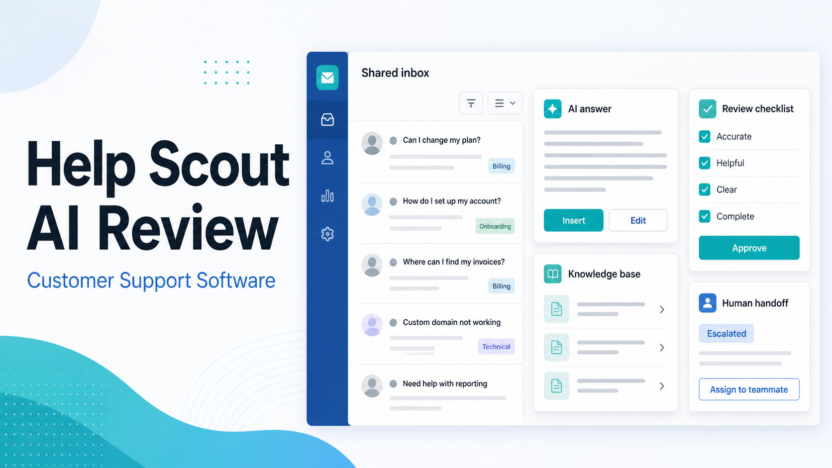
Help Scout's AI Answers is designed to answer customer questions through Beacon using knowledge sources such as Docs and other configured content. The official Help Scout documentation says AI Answers is enabled at the Beacon level, and Beacon can be set to self-service mode or neutral mode. That matters because a small business can choose whether customers meet AI first or see AI alongside other contact options.
The practical use case is ticket deflection. In a typical small business workflow, customers often ask where invoices are, how billing works, how to reset a password, how to change a plan, or how to complete onboarding. AI Answers can answer straightforward questions when the answer exists in the knowledge base, while complex cases can move to a human.
AI Assist for replies
Help Scout lists AI Assist as an inbox assistant that can expand, shorten, edit, or translate replies. This is useful for teams that already know the answer but need to write it more clearly. A support rep can turn a rough internal note into a cleaner customer-facing reply, adjust tone, or make a response shorter without starting from a blank page.
The limitation is that AI Assist should not replace review for sensitive cases. Billing disputes, policy exceptions, legal questions, refunds, account closures, and frustrated customer escalations still need human judgment.
AI Drafts for first replies
Help Scout documentation describes AI Drafts as generating replies based on past conversations and help content. For small teams, this can reduce the blank-page problem. A rep can review the draft, correct anything that does not fit the customer's situation, and then send a stronger response faster.
AI Drafts is most useful when the team already has accurate help content and a consistent support voice. It is less useful when products change often and documentation is not maintained.
AI Summarize for long threads
AI Summarize helps condense back-and-forth conversations into a short summary. This is valuable for handoffs. If a billing specialist, technical support rep, or manager joins the conversation late, they can understand the case without reading every message first.
A SaaS team could use this when onboarding issues move from frontline support to implementation. An ecommerce team could use it when a simple order question turns into a shipping exception. A service business could use it when a customer request needs manager approval.
Shared inbox, Docs, workflows, and integrations
Help Scout is more than AI. The core platform includes shared inboxes, Docs, Beacon, saved replies, tags, workflows, reporting, and integrations. The official pricing page lists access to more than 100 apps, plus integrations such as Salesforce, HubSpot, Jira, Linear, Aircall, API access, webhooks, and OAuth apps across plan tiers and limits.
That broader platform matters because AI support tools rarely work well alone. A customer support team needs a place to route conversations, track owners, reuse answers, review trends, and improve documentation.
Help Scout AI Pricing
| Plan or AI item | Official pricing detail | Best fit |
|---|---|---|
| Free | Help Scout lists 5 users, 1 Inbox, and 1 Docs site | Very small teams testing the basics |
| Standard | $25 per user/month | Growing teams moving beyond email |
| Plus | $45 per user/month | Higher-volume teams with more workflow complexity |
| Pro | $75 per user/month | Teams needing more scale and security |
| AI Answers | $0.75 per resolution | Customer-facing self-service through Beacon |
| AI Drafts | $50 per 100 conversations where a draft is generated | Teams that want AI-generated reply drafts |
Pricing last checked on August 20, 2026. Plan costs, add-ons, included features, and billing rules can depend on user count, billing period, AI usage, support channels, extra inboxes, extra Docs sites, integrations, and security requirements.
The important buying point is that Help Scout's AI costs are not all the same type. AI Assist and AI Summarize are listed as unlimited on paid tiers in the official plan comparison, AI Answers is resolution-based, and AI Drafts has conversation-based billing in Help Scout documentation. A small team should estimate support volume before choosing a plan.
Real Use Cases
Handling FAQs
In a typical small business workflow, Help Scout AI can help with repeat questions such as password resets, shipping steps, product setup, cancellation steps, invoice access, and account changes. The team should first turn these answers into clear Docs articles. AI Answers can then use that knowledge base to answer common questions in Beacon.
Billing questions
Billing questions often need care because the customer may be frustrated or confused. Help Scout AI can help summarize the issue, draft a first response, or point the customer toward a billing help article. A human should review exceptions, refund requests, subscription disputes, and account-specific payment issues.
Customer onboarding
A SaaS team could use Help Scout to answer onboarding questions such as setup steps, workspace invitations, login issues, and feature configuration. AI can draft responses and summarize prior context, while support or customer success owns the final answer.
Ticket deflection
AI Answers can reduce simple inbound conversations when the answer is clear and documented. This is most useful for teams with high volumes of repetitive questions. It is less useful for complex technical support where every case depends on account state, product logs, or custom configuration.
Human handoff
Good support automation should not trap customers. Help Scout's documentation explains Beacon modes and settings that allow AI Answers to sit inside a support flow. The practical value is that customers can get fast answers for simple requests and still reach a person when the issue is complex.
Pros
- Help Scout keeps the support experience simple enough for small teams to adopt.
- AI Answers, AI Assist, AI Drafts, and AI Summarize cover practical support tasks rather than abstract AI features.
- Beacon and Docs make self-service part of the same support workflow.
- Shared inbox features help teams manage ownership, saved replies, tags, and conversation context.
- Pricing is public enough to estimate base plan and AI usage costs.
- The platform is useful even before AI is fully rolled out, which lowers adoption risk.
Cons
- AI Answers depends heavily on the quality of your knowledge sources.
- AI usage can add variable cost when resolution or draft volume grows.
- Larger contact centers may need deeper routing, workforce, reporting, or omnichannel controls.
- Some advanced integrations, routing, security, and workflow capabilities sit on higher plans or add-ons.
- Teams still need human review for billing, account, legal, policy, and customer-trust-sensitive replies.
Help Scout AI Alternatives
| Tool | Best for | Main strength | Limitation |
|---|---|---|---|
| Help Scout | Small teams wanting simple support plus AI | Shared inbox, Docs, Beacon, and practical AI tools | Less ideal for heavy enterprise service operations |
| Zendesk | Larger support teams and complex ticketing | Deep service workflows and ecosystem | Can feel heavier for small teams |
| Intercom | Product-led support and in-app messaging | Messenger-style support and AI agent workflows | Pricing model can be more complex |
| Freshdesk | Omnichannel support on a budget | Ticketing, automation, and broad support suite | Setup depth can be more than a small team needs |
| Tidio | Ecommerce chat and small business live chat | Website chat and AI chatbot workflows | Less complete as a full help desk for some teams |
| Gorgias | Ecommerce support teams | Shopify-oriented ecommerce support | Narrower fit outside ecommerce |
Help Scout should be on the shortlist when your support process is email-first, knowledge-base-driven, and personal. Zendesk and Freshdesk are better fits when ticketing complexity is the main problem. Intercom is stronger when in-app messaging and product-led support are central. Tidio and Gorgias can be better when ecommerce chat is the main workflow.
Final Recommendation
Help Scout AI is a strong choice for small businesses that want useful AI inside a friendly support platform. It is especially good when your team wants to answer repeat questions faster, improve reply quality, summarize long conversations, support customers through Beacon, and keep humans available for complex issues.
Choose Help Scout AI if your team values simple operations, clear documentation, shared inbox collaboration, and customer support that still feels human. Avoid it if your main requirement is enterprise-grade ticketing complexity, advanced call center operations, or a fully custom AI agent stack. For many small teams, the best rollout is narrow: clean up the top 20 help articles, enable AI on a focused Beacon, set review and escalation rules, monitor resolution quality, and expand only after the workflow is stable.
FAQs
Is Help Scout AI worth it for small business customer support?
Yes, Help Scout AI can be worth it when your team already uses or wants a shared inbox, Docs, Beacon, and repeatable support workflows. It is most valuable for FAQs, onboarding questions, billing guidance, reply drafting, thread summaries, and clear human handoff.
What does Help Scout AI include?
Help Scout's AI capabilities include AI Answers, AI Assist, AI Drafts, and AI Summarize. These support customer-facing self-service, reply improvement, draft creation, and conversation summaries. Availability and billing depend on plan and feature type.
How much does Help Scout AI cost?
Help Scout lists Standard at $25 per user/month, Plus at $45 per user/month, Pro at $75 per user/month, and AI Answers at $0.75 per resolution. Help Scout documentation lists AI Drafts at $50 per 100 conversations where a draft is generated. Pricing last checked on August 20, 2026.
Does Help Scout AI replace human support agents?
No. Help Scout AI is better viewed as support assistance and self-service automation. It can answer straightforward questions, draft replies, and summarize conversations, but humans should handle complex, sensitive, high-value, or policy-heavy issues.
What is AI Answers in Help Scout?
AI Answers is Help Scout's customer-facing AI experience for Beacon. It uses configured knowledge sources to answer customer questions and can be managed at the Beacon and AI Agent level.
Is Help Scout better than Zendesk?
Help Scout may be better for smaller teams that want a simpler, more personal support platform. Zendesk may be stronger for larger teams with complex ticketing, routing, and enterprise service operations.
What should I prepare before using Help Scout AI?
Prepare clear help articles, billing policies, onboarding docs, escalation rules, and support ownership. AI works better when the knowledge base and support process are already reliable.
What are the main limitations of Help Scout AI?
The main limitations are knowledge-base dependency, variable AI usage costs, and less depth for teams that need large-scale enterprise contact-center workflows. Human review is still important for sensitive support cases.
Which Help Scout AI feature matters most?
For customer-facing self-service, AI Answers matters most. For agent productivity, AI Assist, AI Drafts, and AI Summarize may matter more because they help the team reply faster and hand off context more cleanly.
What is the best first rollout?
Start with one Beacon, one Docs site, and a small set of high-volume questions. Review AI sessions, improve weak articles, set spending limits where relevant, and expand only when the team trusts the workflow.