Quick Answer
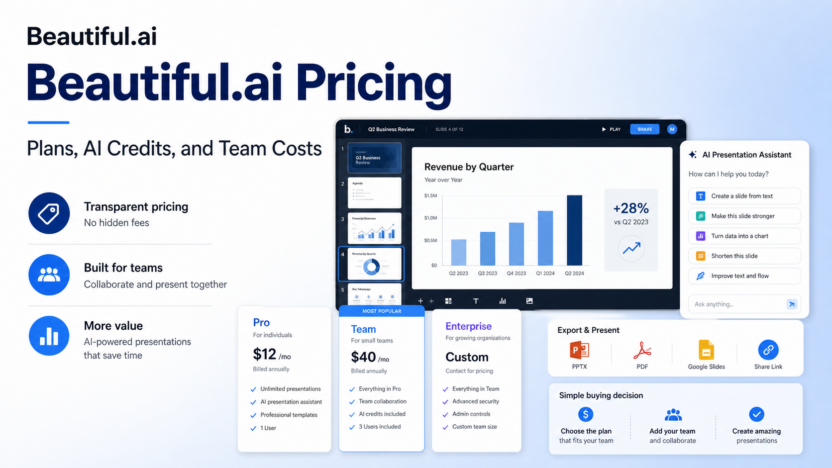
Beautiful.ai pricing is easiest to understand by separating individual presentation work from team collaboration. Pricing last checked on July 30, 2026. The official Beautiful.ai pricing page lists Pro for individual users at $12 per month when billed annually, Team for 2-20 users at $40 per user per month when billed annually, a $45 monthly option for single-presentation work, and custom Enterprise pricing for larger organizations.
For most small businesses, Pro makes sense for one person creating polished business decks. Team makes sense when several people need shared templates, collaboration, shared slides, analytics, and workspace controls. Enterprise is for larger teams that need advanced security, admin support, onboarding, and procurement requirements.
Official pricing source: https://www.beautiful.ai/pricing
Best For
Beautiful.ai is best for small businesses, consultants, sales teams, founders, marketers, and client-service teams that create presentations often but do not want to design every slide manually. It is useful for sales decks, investor updates, training decks, quarterly reports, client proposals, and internal strategy presentations.
Not Best For
Beautiful.ai is not the best choice if your team needs a broad design suite for social posts, brand kits, image editing, and marketing assets. Canva may be broader for that. It is also not the best fit if your company requires advanced PowerPoint animation, complex spreadsheet-linked decks, or a strict corporate slide-master workflow.
Beautiful.ai Pricing Table
| Plan | Official public pricing | Best for | Main limitation |
|---|---|---|---|
| Pro | $12 per month, billed annually | Solo users and individual presenters | Not built for larger shared team workflows |
| Team | $40 per user per month, billed annually | 2-20 person teams | Seat costs rise as the team grows |
| Single Presentation | $45 per month | One-off presentation projects | Not ideal for ongoing presentation operations |
| Enterprise | Custom pricing | Larger organizations | Requires sales conversation |
Pricing may vary based on billing term, team size, enterprise requirements, add-ons, and the current product packaging shown by Beautiful.ai.
What You Get With Pro
The Pro plan is the practical starting point for a solo founder, consultant, marketer, or salesperson who creates presentations regularly. It is designed for individual users who want Beautiful.ai's AI-assisted presentation creation, Smart Slides, templates, custom branding options, and export capabilities.
In a typical small business workflow, one person might use Pro to create a product pitch, investor update, webinar deck, or proposal. The value is speed and design consistency. Instead of manually spacing every slide, the user can start with a template or AI-assisted outline, then edit the content for accuracy.
Pro is not a team workspace. If multiple people need to collaborate, comment, reuse shared content, or maintain brand consistency across a department, Team is usually the more relevant plan.
What You Get With Team
The Team plan is for small groups that create and review presentations together. Beautiful.ai positions Team for 2-20 users. It adds collaboration, shared workspaces, team templates, and business presentation workflows that make more sense when a company wants consistent slides across several contributors.
A sales team could use Team to maintain reusable pitch decks. A marketing team could use it for campaign reports. A customer success team could use it for onboarding presentations and business reviews. An agency could use it to standardize proposal quality across account managers.
The main cost issue is seat count. At $40 per user per month when billed annually, a five-person team means a larger annual commitment than one Pro user. Small teams should decide which roles really need edit access and which stakeholders can review exported files.
Single Presentation Option
Beautiful.ai also shows a single-presentation option for ad hoc projects. This can be useful when a small business needs one polished presentation but does not plan to create decks every month. It is not usually the best long-term value if presentations are part of weekly sales, marketing, or operations work.
Use this option when the workload is narrow: one investor update, one client proposal, one event presentation, or one strategic deck. For ongoing use, Pro or Team is usually easier to justify.
Enterprise Pricing
Enterprise pricing is custom. This is normal for larger organizations that need security reviews, admin controls, procurement support, onboarding, and broader deployment. If your company needs SSO, stronger governance, or large-team rollout support, Enterprise is the plan to discuss with Beautiful.ai directly.
For small businesses, Enterprise is usually unnecessary unless a buyer, client, or internal IT policy requires enterprise controls.
Real Use Cases
Sales decks
A small sales team can use Beautiful.ai to create product explainers, demo follow-up decks, and proposal presentations. The Team plan becomes more useful when several reps need consistent slides and shared assets.
Investor or leadership updates
A founder can use Pro to create monthly updates, financial summaries, roadmap overviews, and strategy decks. The AI and Smart Slides workflow helps reduce design friction, but the founder still needs to verify every claim and number.
Client proposals
Agencies and consultants can use Beautiful.ai for recurring proposal decks. Team workspaces can help keep services, case examples, process slides, and pricing pages consistent.
Training and onboarding
Operations and HR teams can create onboarding decks, process walkthroughs, and internal training materials. Beautiful.ai is useful when the content needs to look professional but does not require custom animation.
Quarterly business reviews
Customer success teams can use presentation templates for QBRs, renewal reviews, and account updates. The most valuable workflow is reusable structure plus human-verified customer data.
Pros and Cons
| Pros | Cons |
|---|---|
| Clear public pricing for Pro and Team annual plans | Team pricing can become expensive as seats increase |
| Strong fit for professional presentation creation | Not a full graphic design suite |
| Smart Slides reduce manual layout work | Advanced PowerPoint users may want more control |
| Team plan supports shared business presentation workflows | Monthly and enterprise details should be verified before purchase |
| Single-presentation option can help with one-off projects | Not ideal if your team only creates decks occasionally |
Beautiful.ai vs Alternatives
| Tool | Best for | Main strength | Limitation |
|---|---|---|---|
| Beautiful.ai | Structured professional presentations | Smart Slides and business deck automation | Less broad than Canva for design assets |
| Canva | Broad visual design and presentation templates | Huge template and asset ecosystem | Presentation automation is not the only focus |
| Gamma | AI-first visual documents and fast drafts | Quick deck-style pages from prompts | Different card-based workflow may not fit every team |
| Plus AI | Google Slides and PowerPoint workflows | Works close to traditional slide tools | Less of a standalone presentation platform |
| PowerPoint | Enterprise slide control | Deep formatting and corporate template support | More manual design work for many users |
If you are evaluating broader presentation software, see our best AI presentation tools guide. If you are comparing AI work platforms more generally, see our best AI work management tools for small teams article.
How To Choose The Right Plan
Choose Pro if one person owns presentations and mainly needs faster, cleaner deck creation. Choose Team if multiple people need shared assets, collaboration, and consistent business decks. Consider the single-presentation option only when the need is temporary. Discuss Enterprise only when governance, procurement, security, or admin requirements justify it.
The main buyer mistake is paying for too many seats. Start with the people who actively create and edit presentations. Viewers and occasional reviewers may not need full paid access if exported decks are enough.
Final Recommendation
Beautiful.ai pricing is reasonable for teams that create business presentations regularly. Pro is the cleanest entry point for a solo user. Team is better when several people need to collaborate and maintain consistent presentation quality. The single-presentation option can work for short projects, while Enterprise should be reserved for larger organizations with governance requirements.
For a small business, the practical test is simple: estimate how many decks you create each month and how many people edit them. If Beautiful.ai saves design time on recurring sales, marketing, proposal, or training decks, the paid plan can make sense. If you only need one occasional presentation, keep the commitment small.
FAQs
Does Beautiful.ai have a free plan?
Beautiful.ai promotes trial access, but its main ongoing public plans are paid. Review the official pricing page for current trial and plan details.
How much is Beautiful.ai Pro?
Pricing last checked on July 30, 2026. Beautiful.ai lists Pro at $12 per month when billed annually on its official pricing page.
How much is Beautiful.ai Team?
Beautiful.ai lists Team at $40 per user per month when billed annually for 2-20 users. Monthly billing and enterprise requirements may change the effective cost.
Is the single-presentation option worth it?
It can be worth it for one-off projects when you need one polished deck and do not expect ongoing use. For recurring presentation work, Pro or Team is usually a better fit.
Is Beautiful.ai better than Canva?
Beautiful.ai is better for structured presentation automation. Canva is broader for general design, social content, and brand assets. The better choice depends on your main workflow.
Should a small team choose Pro or Team?
Choose Pro for one creator. Choose Team when several people need collaboration, shared assets, and consistent presentation templates.
What should I confirm before buying?
Confirm current plan prices, billing term, seat count, export needs, collaboration needs, branding needs, and whether your team requires enterprise security or admin controls.