Quick Verdict
Read AI is worth considering if your team wants meeting summaries, transcripts, search, and meeting follow-up context across calls, email, and messages. It is strongest for teams that have many recurring meetings and want a central AI assistant for meeting intelligence. It is less useful if the team only needs occasional personal notes or if sensitive meeting data cannot be shared with a third-party meeting tool.
Pricing last checked on July 26, 2026. Pricing details below are based on official Read AI sources: Read AI pricing and Read AI paid plans help.
Related Dailytimespro reading:
Best For
Read AI is best for managers, consultants, founders, customer success teams, sales teams, recruiting teams, and project leads who attend frequent meetings and need better summaries, searchable context, and follow-up visibility.
Not Best For
Read AI is not the best fit for teams that need a simple private notepad, legal-grade meeting records, full revenue forecasting, or a tool that avoids meeting assistants entirely. Teams with strict privacy rules should review admin controls, meeting consent expectations, and data policies before rollout.
Our Evaluation Criteria
This article evaluates Read AI through practical small-business criteria: ease of setup, pricing clarity, AI quality, workflow fit, integrations, admin controls, reporting, support process, and value for money. The goal is to help small teams evaluating AI meeting assistants make a real buying or implementation decision, not to list every feature on a vendor page.
The strongest option is the one a team can explain in one sentence: what data goes in, what AI creates, who reviews it, and where the approved result goes. If those steps are unclear, the tool may still be capable, but the workflow is not ready for a wider rollout.
Switching cost matters as much as feature depth. A tool that looks stronger on paper may be the wrong choice if it forces the team to rebuild habits, duplicate records, or add review work that cancels out the AI benefit. A narrower tool can be the better first purchase when it solves one repeated job cleanly and leaves room to expand later.
What Is Read AI?
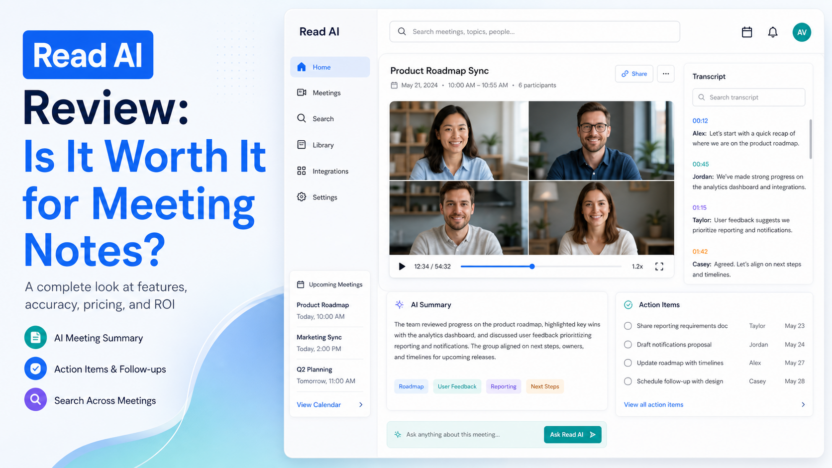
Read AI describes itself as an AI meeting agent that turns meetings, emails, and messages into summaries, insights, and instant answers. The product is positioned around meeting summaries, transcription, search, coaching, integrations, and workspace-level use cases.
For small businesses, the practical value is not just the transcript. The useful value is whether the tool helps the team remember decisions, assign follow-up work, find old context, and reduce manual meeting cleanup.
Key Features
Meeting summaries and transcripts
Read AI's free and paid plan language includes meeting transcripts, summaries, search, and meeting-related productivity features. This helps teams that otherwise lose decisions inside calls or private notes.
Search across meeting context
Search matters when a team has many recurring customer, sales, product, or internal meetings. A searchable meeting history can reduce repeated questions, but only if the team agrees which meetings should be captured.
Coaching and meeting metrics
Read AI includes meeting coach language in its plan materials. This can help managers review meeting behavior, but teams should introduce coaching carefully so it supports improvement rather than creating surveillance concerns.
Integrations and workspace use
Paid plan language includes integrations and workspaces. Those features matter when meeting summaries need to move into a CRM, documentation workspace, project system, or customer follow-up process.
Pricing
| Plan | Official pricing signal | Best fit |
|---|---|---|
| Free | $0 and 5 meetings per month according to Read AI pricing | Individuals testing summaries and transcripts |
| Pro | Read AI help lists Pro at $19.75/month or $15/month with annual payment | Individuals or small teams needing unlimited meetings and integrations |
| Enterprise | Read AI help lists Enterprise at $29.75/month or $22.50/month with annual payment | Teams needing more advanced playback, uploads, and organization features |
Read AI pricing should be evaluated by meeting volume, number of seats, needed integrations, upload needs, recording review needs, and whether summaries become part of an official workflow.
Real Use Cases
Sales discovery calls
A sales team can use Read AI to summarize customer pain points, objections, buying criteria, and next steps after discovery calls. The summary should be reviewed before it is copied into a CRM.
Customer onboarding
A SaaS team can capture setup calls, product questions, risks, and promised follow-ups. This helps the onboarding owner keep implementation work visible.
Recruiting screens
A recruiter can summarize candidate conversations and share structured notes with hiring managers. Sensitive candidate details should be handled under the team's HR process.
Internal leadership meetings
A founder or operations lead can turn weekly meetings into decisions, open risks, owners, and deadlines. This is useful when notes are usually scattered across personal documents.
Consulting calls
A consultant can use summaries to prepare client follow-up emails, scope notes, and action lists. The consultant should edit the final output for tone, accuracy, and client context.
Pros and Cons
Pros
- Clear free plan entry point for limited meeting use.
- Useful for teams with frequent calls and scattered notes.
- Search and summaries can reduce repeated context gathering.
- Paid plans add stronger usage capacity and integrations.
- Works across common meeting-heavy workflows such as sales, support, recruiting, and operations.
Cons
- Not every meeting should be recorded or summarized by an assistant.
- Teams still need consent, privacy, and review rules.
- The free plan is limited by monthly meeting count.
- It is not a full revenue intelligence or project management platform.
- Meeting summaries lose value if no one assigns or reviews follow-up work.
Alternatives
| Tool | Best for | Main strength | Limitation |
|---|---|---|---|
| Granola | Clean meeting notes | Simple meeting summaries and notes | Less focused on broad meeting intelligence |
| Fireflies.ai | Meeting transcription at scale | Searchable call library and summaries | Can be more than some small teams need |
| Fathom | Fast call summaries | Quick meeting capture and sharing | Fit depends on team admin needs |
| Sembly AI | Meeting summaries and task extraction | Structured meeting intelligence | Workflow fit varies by organization |
Realistic Small-Business Use Cases
In a typical small business workflow, AI meeting assistant software should improve one repeated job. A team might use AI to turn raw notes into tasks, summarize support patterns, classify customer requests, build a first draft, compare records, or prepare a manager-ready report. The important point is that a person still owns the final decision.
A SaaS team could use the same pattern for weekly operating work. The workflow owner reviews examples from the previous week, updates the source material, checks which outputs were accepted or edited, and adjusts prompts or connected records before expanding usage.
An agency could use it for client work when the review path is clear. AI can prepare a first summary, brief, comparison, or table, but the agency should still check claims, pricing, brand language, and client-specific details before anything is shared.
An ecommerce team could use it for product, support, inventory, or marketing work. Useful examples include cleaning product copy, summarizing customer questions, finding repeated stock issues, routing returns questions, or preparing weekly performance summaries.
Practical Rollout Plan
Start with one workflow that happens every week. For Read AI, that means choosing a small, repeatable process rather than trying to automate the whole department. Write down the source material, the owner, the review step, and the place where the approved output should live.
During the first week, configure the smallest useful version. Use real internal examples, but keep sensitive customer, employee, legal, or financial information out of the workflow until permissions are clear. The goal is to understand setup effort and output quality.
During the second week, compare the reviewed output against the old process. Look for concrete workflow signals: clearer handoffs, fewer repeated questions, faster summaries, cleaner status updates, better task routing, or shorter editing cycles. Do not judge the tool only by whether the first output looks polished.
During the third week, involve the people who will actually depend on the result. If they ignore the output, rewrite it manually, or keep separate notes, the process needs adjustment. Adoption problems often reveal unclear ownership, weak source material, or a tool that does not fit the daily workflow.
During the fourth week, decide whether to keep, expand, or pause. Keep the setup if the team can name a repeated improvement. Pause expansion if output quality is inconsistent, review takes too long, pricing depends on usage the team has not estimated, or the tool duplicates software already in the stack.
Buyer Decision Framework
Before choosing a tool for Read AI, separate the buying decision into three parts: workflow fit, data fit, and operating cost. Workflow fit asks whether the product improves a real repeated process. Data fit asks whether the source material is clean enough for AI to produce useful output. Operating cost asks whether the plan, seats, usage limits, add-ons, and review time make sense after the first month.
The safest buyer path is to score each option against the same internal checklist. Use simple labels such as strong fit, workable fit, weak fit, or not needed. Avoid fake precision. A small business does not need a complex scoring model to make a good software decision. It needs a clear reason why the tool improves a job that already matters.
Ask these questions before buying:
| Decision area | Question to answer | Why it matters |
|---|---|---|
| Workflow owner | Who will configure, review, and maintain the process? | AI workflows fail when ownership is vague |
| Source quality | Is the input data, document, ticket, call, or table reliable? | Bad source material creates confident but weak output |
| Review path | Who approves customer-facing or business-critical results? | Human review protects trust and accuracy |
| Integration fit | Where does the approved output go next? | Value drops when teams copy data manually |
| Pricing trigger | What makes the monthly cost rise? | Seats, usage, credits, sessions, and add-ons can change the real cost |
| Stop condition | What result would make the team cancel or pause? | Clear stop rules prevent subscription sprawl |
For most small businesses, the best tool is not the most advanced one. It is the one that fits the existing team rhythm, reduces repeated manual effort after review, and can be explained to a new team member without a long training session.
Common Mistakes to Avoid
1. Capturing every meeting before deciding which meetings need summaries. 2. Treating AI summaries as final notes without owner review. 3. Forgetting to connect summaries to tasks, CRM notes, or follow-up emails. 4. Ignoring consent and privacy expectations. 5. Paying for team seats before checking actual monthly meeting volume.
Final Recommendation
Choose Read AI if your team has enough recurring meetings to justify a central meeting assistant and wants summaries, transcripts, search, and follow-up context in one workflow. Start with a small group, define meeting capture rules, and expand only if the summaries are actually used after meetings.
FAQs
Is Read AI free?
Read AI lists a free plan with 5 meetings per month, summaries, transcription, search, and basic meeting features.
How much does Read AI Pro cost?
Read AI help lists Pro at $19.75/month or $15/month with annual payment.
Is Read AI good for sales teams?
It can help sales teams summarize calls and next steps, but teams needing forecasting, coaching dashboards, and revenue analytics may need a revenue intelligence platform.
Can Read AI replace manual meeting notes?
It can reduce manual note work, but a human should still review decisions, commitments, and customer-facing follow-ups.
Who should avoid Read AI?
Teams with rare meetings, strict no-recording policies, or no clear owner for meeting follow-up may not get enough value.