Quick Verdict
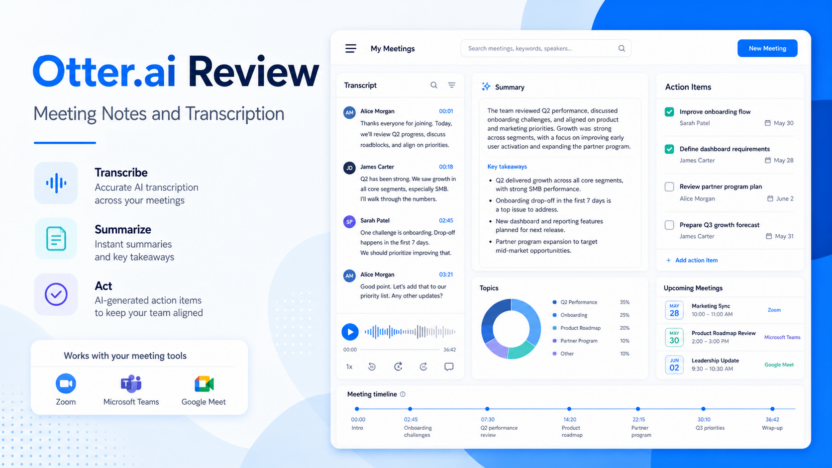
Otter.ai is worth considering if your team needs reliable meeting transcription, summaries, action items, and searchable meeting knowledge across Zoom, Microsoft Teams, and Google Meet. It is not the best fit if you only need occasional free notes or if your team cannot review sensitive meeting summaries before sharing them.
This article is written for small business owners, operators, marketers, support leaders, and team managers who need a practical software decision, not a broad AI overview. Official product and pricing sources reviewed include Otter.ai, Fireflies.ai, Fathom, Read AI. Pricing last checked on July 28, 2026.
Related Dailytimespro reading:
Best For
- sales, customer success, recruiting, and operations teams with recurring calls.
- small teams that need searchable meeting transcripts and summaries.
- managers who want action items and meeting context after live conversations.
Not Best For
- users with only one or two meetings per month.
- teams that record sensitive calls without consent or review policies.
- companies needing advanced contact-center analytics instead of meeting notes.
Our Evaluation Criteria
We evaluated Otter AI review by ease of use, setup effort, pricing clarity, AI usefulness, integration fit, review controls, support workflow, realistic use cases, and value for money. The best option is not automatically the tool with the most AI features. The best option is the one that improves a workflow your team already understands.
For small businesses, the decision should start with one repeated job. If the tool helps prepare useful work, keeps the review step visible, and fits the budget model, it deserves a deeper trial. If the tool creates polished drafts that still require heavy cleanup or unclear ownership, the business case is weaker.
Quick Comparison
| Decision factor | What to compare | Why it matters |
|---|---|---|
| Best fit | User type, team size, and repeated workflow | A tool is only valuable when it fits regular work |
| Setup | Data sources, prompts, integrations, permissions | Setup cost can erase AI time savings |
| AI quality | Accuracy, control, explainability, editability | Good first drafts still need review |
| Pricing | Seats, credits, outcomes, minutes, tasks, or usage | The pricing model should match real volume |
| Integrations | CRM, helpdesk, docs, meetings, analytics, or publishing stack | AI output is more useful when it lands where work happens |
| Review controls | Approvals, handoffs, transcripts, logs, admin roles | Teams need accountability before outputs reach customers |
| Scalability | Limits, workspace features, team controls, enterprise options | The starter plan may not match a growing workflow |
| Limitations | What the tool cannot safely do alone | Trust improves when limits are visible |
| Adoption | How easily a team can use it every week | Unused AI tools are expensive even when cheap |
Key Tools and Product Fit
Otter.ai
Otter.ai is relevant because its official product material points to AI Meeting Agent, live transcription, summaries, action items, chat, and app integrations. For this article, the practical fit is teams that want meeting notes, transcripts, and follow-up context in one workflow. The useful question is not whether Otter.ai has the longest feature list. The useful question is whether it improves one repeated workflow with clearer inputs, cleaner review, and less manual follow-up.
Pricing source: Otter.ai pricing.
Fireflies.ai
Fireflies.ai is relevant because its official product material points to meeting recording, transcription, summaries, CRM notes, and conversation intelligence. For this article, the practical fit is sales and support teams that need searchable meeting records. The useful question is not whether Fireflies.ai has the longest feature list. The useful question is whether it improves one repeated workflow with clearer inputs, cleaner review, and less manual follow-up.
Pricing source: Fireflies.ai pricing.
Fathom
Fathom is relevant because its official product material points to AI meeting notes, clips, summaries, and CRM sync. For this article, the practical fit is teams that want a simpler meeting assistant with strong follow-up notes. The useful question is not whether Fathom has the longest feature list. The useful question is whether it improves one repeated workflow with clearer inputs, cleaner review, and less manual follow-up.
Pricing source: Fathom pricing.
Read AI
Read AI is relevant because its official product material points to meeting summaries, coaching signals, and productivity analytics. For this article, the practical fit is teams that want meeting intelligence beyond the transcript. The useful question is not whether Read AI has the longest feature list. The useful question is whether it improves one repeated workflow with clearer inputs, cleaner review, and less manual follow-up.
Pricing source: Read AI pricing.
Real Use Cases
Recording Weekly Sales Calls
In a typical small business workflow, recording weekly sales calls works best when the source material is already clear and a person owns the final review. AI can prepare a draft, summarize context, classify a request, or create a first version faster than manual work. The output should still be checked before it affects customers, published pages, budget decisions, or sales commitments. This is where the strongest AI tools create value: they reduce repetitive preparation while keeping the responsible person in control.
Summarizing Customer Onboarding Meetings
In a typical small business workflow, summarizing customer onboarding meetings works best when the source material is already clear and a person owns the final review. AI can prepare a draft, summarize context, classify a request, or create a first version faster than manual work. The output should still be checked before it affects customers, published pages, budget decisions, or sales commitments. This is where the strongest AI tools create value: they reduce repetitive preparation while keeping the responsible person in control.
Extracting Action Items From Team Standups
In a typical small business workflow, extracting action items from team standups works best when the source material is already clear and a person owns the final review. AI can prepare a draft, summarize context, classify a request, or create a first version faster than manual work. The output should still be checked before it affects customers, published pages, budget decisions, or sales commitments. This is where the strongest AI tools create value: they reduce repetitive preparation while keeping the responsible person in control.
Searching Past Call Transcripts For Context
In a typical small business workflow, searching past call transcripts for context works best when the source material is already clear and a person owns the final review. AI can prepare a draft, summarize context, classify a request, or create a first version faster than manual work. The output should still be checked before it affects customers, published pages, budget decisions, or sales commitments. This is where the strongest AI tools create value: they reduce repetitive preparation while keeping the responsible person in control.
Sharing Reviewed Notes After Interviews
In a typical small business workflow, sharing reviewed notes after interviews works best when the source material is already clear and a person owns the final review. AI can prepare a draft, summarize context, classify a request, or create a first version faster than manual work. The output should still be checked before it affects customers, published pages, budget decisions, or sales commitments. This is where the strongest AI tools create value: they reduce repetitive preparation while keeping the responsible person in control.
Pricing
Otter.ai publishes a Basic free plan, Pro, Business, and Enterprise options. The official pricing page lists Basic with 300 monthly transcription minutes and Pro from $8.33/user/month on annual billing. Business and Enterprise add team-oriented controls and higher usage. Pricing last checked on July 28, 2026.
| Tool or plan | Official pricing note | Best-fit buying context |
|---|---|---|
| Basic | Free; 300 monthly transcription minutes and 3 lifetime audio/video file imports | Trying meeting transcription |
| Pro | $8.33/user/month on annual billing from the official Otter pricing page | Individuals and small teams needing more regular notes |
| Business | Team-oriented paid plan with admin and collaboration features | Shared workspaces and recurring team meetings |
| Enterprise | Custom path | Larger organizations with security, support, and admin requirements |
Pricing should be judged against the workflow you will actually run. Count users, conversations, minutes, voice credits, support outcomes, automation tasks, contacts, projects, or workspace seats where those factors apply. A lower entry plan is not always cheaper if the required feature sits in a higher tier. A higher plan is not always better if the team only needs one narrow workflow.
Pros
- Helps teams reduce repeated preparation work such as drafts, summaries, routing, scoring, voiceovers, support answers, or research notes.
- Makes workflows easier to document when prompts, source material, and review steps are clear.
- Can improve consistency when a team uses the same criteria for every output.
- Supports faster handoff between marketing, sales, support, operations, and management.
- Works well when paired with official sources, internal guidelines, and responsible human approval.
Cons
- AI output still needs review before it reaches customers or public content.
- Pricing can depend on seats, usage, credits, minutes, outcomes, messages, projects, or add-ons.
- Some tools are excellent for one workflow but poor replacements for a full operating system.
- Teams may overvalue a polished demo and undervalue setup, governance, and maintenance.
- Integrations and admin controls can matter more than the visible AI feature list.
Alternatives
| Alternative | Best for | Main strength | Limitation |
|---|---|---|---|
| Fireflies.ai | CRM-connected meeting records | Useful when crm-connected meeting records is the main priority | Still needs workflow fit and pricing review |
| Fathom | simple meeting summaries | Useful when simple meeting summaries is the main priority | Still needs workflow fit and pricing review |
| Read AI | meeting analytics and productivity signals | Useful when meeting analytics and productivity signals is the main priority | Still needs workflow fit and pricing review |
Alternatives matter because most AI software decisions are workflow decisions. A product that looks weaker in a generic comparison may be stronger for a specific use case, existing stack, or review process. Compare alternatives with the same input, the same expected output, and the same approval standard.
Implementation Checklist
1. Define the workflow in one sentence. 2. List the source inputs the tool needs. 3. Decide who reviews the output. 4. Identify which official plan matches likely usage. 5. Run two or three realistic examples. 6. Record what had to be corrected. 7. Compare alternatives using the same criteria. 8. Choose the tool only if the reviewed output saves real time.
Which One Should You Choose?
Choose the option that matches the work your team repeats most often. For Otter AI review, that means comparing real usage, review effort, integration fit, and official pricing. Do not buy a tool because it can generate a good sample in isolation. Buy it only when it improves a repeatable workflow after review.
If two choices look close, choose the one that is easier to maintain. A slightly narrower product with clear pricing, clean handoff, and strong adoption can be a better business decision than a broader platform that nobody uses consistently.
Final Recommendation
Otter.ai is worth considering if your team needs reliable meeting transcription, summaries, action items, and searchable meeting knowledge across Zoom, Microsoft Teams, and Google Meet. It is not the best fit if you only need occasional free notes or if your team cannot review sensitive meeting summaries before sharing them.
The practical buying rule is simple: start narrow, verify pricing from official sources, keep review ownership explicit, and expand only after the workflow saves time in real work. AI tools are most useful when they make responsible people faster, not when they remove responsibility from the process.