Quick Verdict
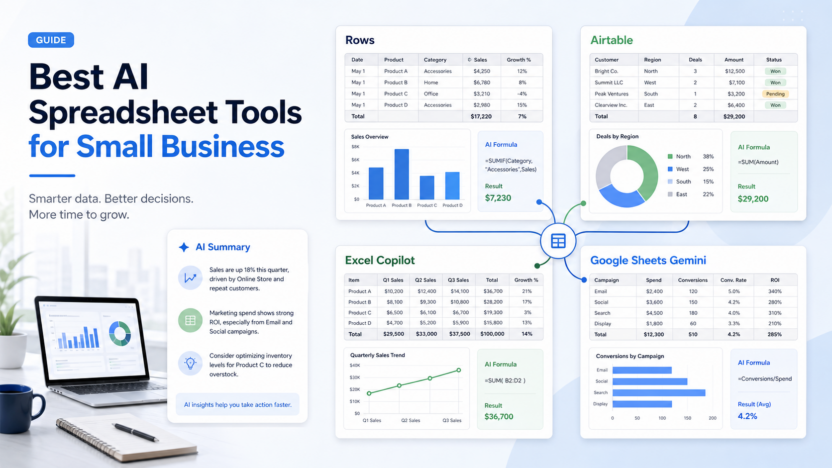
The best AI spreadsheet tool for a small business depends on whether the team needs a familiar spreadsheet, a no-code reporting layer, or a database-style workflow. Rows is strongest when a team wants an AI analyst inside a modern spreadsheet. Airtable is better when spreadsheet-like work has become an operational database. Microsoft Excel with Microsoft 365 Copilot fits teams already standardized on Microsoft 365. Google Sheets with Gemini fits teams already using Google Workspace and collaborative spreadsheets.
Pricing last checked on July 26, 2026. Pricing details below are based on official vendor sources: Rows pricing, Airtable pricing, Microsoft 365 Copilot pricing, and Google Workspace pricing.
Related Dailytimespro reading:
- How to Use ChatGPT for Excel
- Best AI Work Management Tools
- Best AI Workflow Automation Tools
- Best AI Knowledge Base Tools
Best For
These tools are best for operators, founders, analysts, marketers, finance leads, ecommerce managers, and agencies that work in spreadsheets every week and want faster analysis, cleaner formulas, better reporting, or easier collaboration.
Not Best For
They are not the right choice when the business needs a governed data warehouse, strict BI modeling, production financial controls, or legal-grade audit workflows. AI spreadsheet tools can speed up analysis, but they do not replace data ownership, review, or source control.
Our Evaluation Criteria
This article evaluates AI spreadsheet tools through practical small-business criteria: ease of setup, pricing clarity, AI quality, workflow fit, integrations, admin controls, reporting, support process, and value for money. The goal is to help small businesses comparing spreadsheet and data-analysis software make a real buying or implementation decision, not to list every feature on a vendor page.
The strongest option is the one a team can explain in one sentence: what data goes in, what AI creates, who reviews it, and where the approved result goes. If those steps are unclear, the tool may still be capable, but the workflow is not ready for a wider rollout.
Switching cost matters as much as feature depth. A tool that looks stronger on paper may be the wrong choice if it forces the team to rebuild habits, duplicate records, or add review work that cancels out the AI benefit. A narrower tool can be the better first purchase when it solves one repeated job cleanly and leaves room to expand later.
Quick Comparison
| Tool | Best for | Main strength | Limitation | Official pricing signal |
|---|---|---|---|---|
| Rows | AI-assisted reports and lightweight analysis | AI Analyst, connected data, dashboards | Not a full BI warehouse | Free, Plus, Pro, Enterprise plans shown on official pricing |
| Airtable | Database-style workflows | Apps, records, automations, AI credits | Can become complex if used as a generic spreadsheet | Seat pricing and AI credit billing documented officially |
| Excel with Copilot | Microsoft 365 teams | Familiar spreadsheet environment with Copilot | Requires qualifying Microsoft plans | Copilot pricing depends on Microsoft 365 plan eligibility |
| Google Sheets with Gemini | Google Workspace teams | Collaborative sheets plus Gemini in Workspace apps | Best value when the team already uses Workspace | Gemini availability shown across Workspace pricing tiers |
Key Features to Compare
Natural-language analysis
The first reason to evaluate an AI spreadsheet tool is plain-language analysis. A user should be able to ask for a summary, trend, formula, chart, cleanup step, or comparison without manually building every formula. Rows positions its AI Analyst around this idea, while Microsoft and Google bring AI into existing productivity suites.
Connected data
Small businesses often keep data in payment tools, ad platforms, CRMs, website analytics, ecommerce systems, bank exports, and CSV files. Rows emphasizes connected sources and live reports. Airtable is useful when data also needs structure, ownership, permissions, and workflow automation.
Collaboration
Excel and Google Sheets remain strong when team habits already exist. Airtable is stronger when records, views, forms, and automations matter. Rows is stronger when the work is analysis-first and the final output needs to become a shareable report.
Governance
AI can make a spreadsheet faster, but it can also hide weak source data. Before using AI-generated formulas, summaries, or charts in a decision, the team should know where the data came from and who checked the result.
Real Use Cases
Weekly sales analysis
A sales lead can import pipeline, win-loss, meeting, and revenue exports, then ask AI to summarize changes by segment. The useful output is not a dramatic prediction. It is a cleaner weekly explanation of what changed and what needs follow-up.
Ecommerce stock review
An ecommerce manager can combine order exports, product inventory, refunds, and ad spend. AI can help flag products that sell quickly, products with slow movement, or mismatches between campaign spend and stock availability.
Marketing reporting
A small agency can use AI spreadsheet tools to combine ad, SEO, social, and email campaign data into client-ready summaries. Human review still matters because campaign context, seasonality, and tracking issues can change the interpretation.
Finance cleanup
A finance lead can use AI to classify transaction notes, clean inconsistent labels, or create formulas for a monthly review. Sensitive or accounting-critical outputs should still be reviewed before a report is finalized.
Operations dashboards
A founder can track leads, projects, tickets, renewals, and invoices in a lightweight dashboard. The best setup connects AI summaries to reliable source tables rather than scattered manual notes.
Pricing
| Product | Official pricing notes | Buyer guidance |
|---|---|---|
| Rows | Official pricing lists Free, Plus, Pro at $79/month plus $8/month per user, and Enterprise contact options | Good when AI analysis and connected reports are central |
| Airtable | Official pricing and billing docs describe seat-based plans and additional AI credit packages | Good when records, apps, and workflow ownership matter |
| Microsoft 365 Copilot | Official Microsoft pricing explains Copilot plans for qualifying business or enterprise subscriptions | Good when the team already works in Microsoft 365 |
| Google Workspace with Gemini | Google Workspace pricing shows Gemini availability across Workspace plans | Good when the team already works in Google Sheets and Workspace |
Pros and Cons
Pros
- Speeds up formula creation, cleanup, analysis, and reporting.
- Helps non-technical users ask better questions of business data.
- Fits common small-business workflows without requiring a data science team.
- Can turn repetitive spreadsheet reporting into a more repeatable process.
Cons
- Output quality depends on clean source data.
- AI summaries can miss context, seasonality, or tracking issues.
- Suite-based pricing may require broader subscription commitments.
- Not every spreadsheet problem should become an AI workflow.
Which One Should You Choose?
Choose Rows if the main job is turning messy inputs into reports, summaries, and lightweight analysis. Choose Airtable if spreadsheet work has become a business app with records, owners, views, forms, and automation. Choose Microsoft 365 Copilot if Excel is already the team's spreadsheet standard. Choose Google Sheets with Gemini if the business lives inside Google Workspace.
Realistic Small-Business Use Cases
In a typical small business workflow, AI spreadsheet software should improve one repeated job. A team might use AI to turn raw notes into tasks, summarize support patterns, classify customer requests, build a first draft, compare records, or prepare a manager-ready report. The important point is that a person still owns the final decision.
A SaaS team could use the same pattern for weekly operating work. The workflow owner reviews examples from the previous week, updates the source material, checks which outputs were accepted or edited, and adjusts prompts or connected records before expanding usage.
An agency could use it for client work when the review path is clear. AI can prepare a first summary, brief, comparison, or table, but the agency should still check claims, pricing, brand language, and client-specific details before anything is shared.
An ecommerce team could use it for product, support, inventory, or marketing work. Useful examples include cleaning product copy, summarizing customer questions, finding repeated stock issues, routing returns questions, or preparing weekly performance summaries.
Practical Rollout Plan
Start with one workflow that happens every week. For AI spreadsheet tools, that means choosing a small, repeatable process rather than trying to automate the whole department. Write down the source material, the owner, the review step, and the place where the approved output should live.
During the first week, configure the smallest useful version. Use real internal examples, but keep sensitive customer, employee, legal, or financial information out of the workflow until permissions are clear. The goal is to understand setup effort and output quality.
During the second week, compare the reviewed output against the old process. Look for concrete workflow signals: clearer handoffs, fewer repeated questions, faster summaries, cleaner status updates, better task routing, or shorter editing cycles. Do not judge the tool only by whether the first output looks polished.
During the third week, involve the people who will actually depend on the result. If they ignore the output, rewrite it manually, or keep separate notes, the process needs adjustment. Adoption problems often reveal unclear ownership, weak source material, or a tool that does not fit the daily workflow.
During the fourth week, decide whether to keep, expand, or pause. Keep the setup if the team can name a repeated improvement. Pause expansion if output quality is inconsistent, review takes too long, pricing depends on usage the team has not estimated, or the tool duplicates software already in the stack.
Buyer Decision Framework
Before choosing a tool for AI spreadsheet tools, separate the buying decision into three parts: workflow fit, data fit, and operating cost. Workflow fit asks whether the product improves a real repeated process. Data fit asks whether the source material is clean enough for AI to produce useful output. Operating cost asks whether the plan, seats, usage limits, add-ons, and review time make sense after the first month.
The safest buyer path is to score each option against the same internal checklist. Use simple labels such as strong fit, workable fit, weak fit, or not needed. Avoid fake precision. A small business does not need a complex scoring model to make a good software decision. It needs a clear reason why the tool improves a job that already matters.
Ask these questions before buying:
| Decision area | Question to answer | Why it matters |
|---|---|---|
| Workflow owner | Who will configure, review, and maintain the process? | AI workflows fail when ownership is vague |
| Source quality | Is the input data, document, ticket, call, or table reliable? | Bad source material creates confident but weak output |
| Review path | Who approves customer-facing or business-critical results? | Human review protects trust and accuracy |
| Integration fit | Where does the approved output go next? | Value drops when teams copy data manually |
| Pricing trigger | What makes the monthly cost rise? | Seats, usage, credits, sessions, and add-ons can change the real cost |
| Stop condition | What result would make the team cancel or pause? | Clear stop rules prevent subscription sprawl |
For most small businesses, the best tool is not the most advanced one. It is the one that fits the existing team rhythm, reduces repeated manual effort after review, and can be explained to a new team member without a long training session.
Common Mistakes to Avoid
1. Asking AI to analyze data before fixing column names, missing values, and duplicate records. 2. Treating AI-generated charts as final without checking formulas and source rows. 3. Buying a broad suite only for one spreadsheet task. 4. Letting every department build separate spreadsheets with no owner. 5. Comparing only AI features instead of checking collaboration, permissions, and reporting workflow.
Final Recommendation
For most small businesses, Rows is the most focused choice when the problem is AI-assisted spreadsheet analysis and reporting. Airtable is better when the work is becoming an operational database. Microsoft Excel with Copilot and Google Sheets with Gemini are strongest when the team already pays for and uses those productivity ecosystems every day.
FAQs
What is the best AI spreadsheet tool for small business?
Rows is a strong focused choice for AI-assisted analysis, while Excel with Copilot and Google Sheets with Gemini fit teams already using Microsoft 365 or Google Workspace.
Can AI spreadsheet tools replace an analyst?
They can reduce formula, cleanup, and summary work, but a person still needs to review the data source, business context, and final recommendation.
Is Airtable a spreadsheet tool?
Airtable looks familiar to spreadsheet users, but it is better understood as a database-style app builder for structured business workflows.
What should I compare before choosing?
Compare data sources, collaboration, AI limits, pricing model, permissions, export options, and the review process your team will actually follow.
Should sensitive financial data go into AI tools?
Only after the business reviews permissions, vendor terms, retention settings, and internal approval rules.