Quick Verdict
Framer AI pricing is worth evaluating if your team wants fast website drafts, landing pages, portfolio pages, SaaS pages, or campaign pages with a designer-friendly editing workflow. The key buying question is not only the monthly site plan. It is how often the team will use AI generation, how many pages need to be published, who reviews the generated copy and layout, and whether Framer is the right long-term website platform for the business.
Pricing last checked on July 25, 2026. Pricing details in this guide are based on official Framer sources: Framer pricing, Framer AI, and Framer AI credits help. Review the vendor's current plan table and workspace terms before purchase because plan names, billing cycles, usage limits, add-ons, and enterprise terms can vary.
Related Dailytimespro reading:
- Framer AI vs Wix AI
- Webflow AI vs Framer AI
- Best AI Website Builders for Agencies
- How to Use AI for Product Demo Videos
Best For
Framer AI is best for founders, designers, agencies, marketers, product teams, consultants, and small businesses that need attractive web pages quickly. It is especially useful for landing pages, startup websites, product pages, lead capture pages, portfolios, service pages, and campaign pages where visual quality and iteration speed matter.
Not Best For
Framer AI is not the best fit when the business needs complex ecommerce operations, a deep CMS architecture, custom backend application logic, or strict regulated-content workflows without human review. It can create a strong first version, but the site still needs reviewed positioning, accurate claims, clear calls to action, accessibility checks, and SEO basics before publishing.
Our Evaluation Criteria
This guide evaluates Framer AI pricing through practical small-business criteria: plan clarity, AI credit availability, ease of setup, publishing needs, design control, collaboration, SEO readiness, review effort, alternatives, and value for money. The goal is to help a buyer understand whether Framer's pricing structure fits the work the team actually needs to do.
The most important point is workflow fit. A website builder is not only a place to generate pages. It becomes the operating home for public pages, revisions, landing page tests, conversion work, and sometimes client delivery. A low-friction AI builder is valuable when it helps the team move from idea to reviewed page faster. It is less valuable when the team later discovers that the platform does not fit the content model, maintenance process, or collaboration pattern.
Key Features That Affect Pricing Value
- AI page and section generation from prompts.
- Editable website builder canvas for design refinement after generation.
- Monthly AI credits according to Framer's AI credits help article.
- Free workspace AI credit allowance for testing.
- Paid site plans for published website needs.
- Design, publishing, responsive preview, and team collaboration capabilities.
- Enterprise option for larger organizations with more advanced requirements.
Real Use Cases
Startup Landing Page
A founder can use Framer AI to create a first landing page for a product idea, then edit the headline, feature sections, proof points, and call to action. This is useful when the team needs to validate positioning quickly. The AI draft should be treated as a starting point. The founder still needs to check whether the page explains the product clearly and avoids claims the product cannot support.
Agency Campaign Page
An agency can use Framer AI to speed up page ideation for a client campaign. The designer can generate a starting structure, adjust sections, replace generic copy, add approved brand assets, and publish after review. The pricing question is whether the plan supports the number of client pages, collaborators, and revisions the agency needs each month.
SaaS Product Page
A SaaS team can use Framer AI to draft a feature page, integration page, or waitlist page. The marketing lead should then review technical claims, feature names, product screenshots, and conversion flow. Framer is useful when visual iteration is more important than building a complex CMS-backed content system.
Portfolio or Service Site
A freelancer, consultant, or small service business can use Framer AI to create a professional site faster than starting from a blank canvas. The team should still rewrite the service descriptions, add real work samples, and test the contact path before launch.
Internal Prototype
A product or growth team can generate a quick public-page prototype before committing engineering time. The value is speed and clarity: stakeholders can react to a real page instead of a static document. This use case may fit a free or lower-cost testing phase before the team commits to a production plan.
Pricing
| Plan or product | Official pricing signal | Buyer note |
|---|---|---|
| Free | Framer lists a free starting option on its pricing page | Useful for testing the editor, AI workflow, and small experiments |
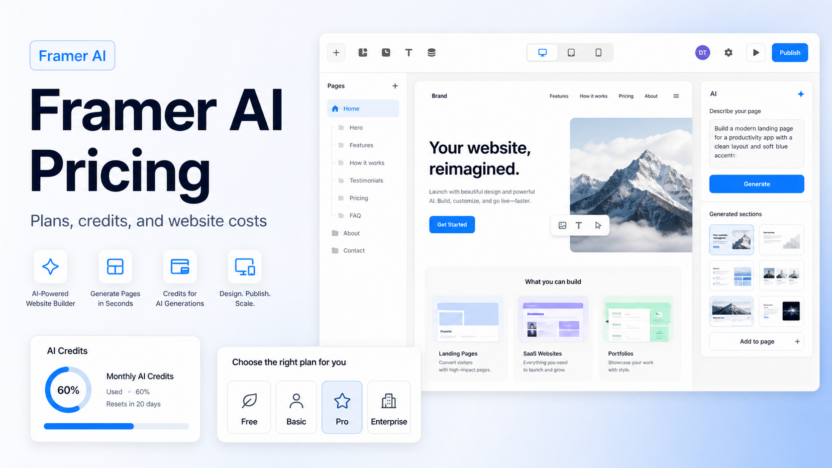
| Basic | Framer lists Basic as a paid site plan; AI credits help states Basic Site plans include 2,000 monthly AI credits | Good for a simple site when publishing needs move beyond free testing |
| Pro | Framer lists Pro as a paid site plan on its official pricing page | Better for more serious websites, higher needs, and production use |
| Enterprise | Framer lists Enterprise for larger organizations | Relevant when the team needs security, scale, support, or custom terms |
| Free workspace AI credits | Framer help states free workspaces receive 500 monthly AI credits | Important for estimating how much AI generation a tester can use |
The pricing decision should include both the site plan and AI usage. Framer's help center states that free workspaces receive 500 monthly AI credits and Basic Site plans receive 2,000 monthly AI credits. That matters because AI generation is not a one-time event for many teams. A marketer may generate multiple page variations, rewrite sections, create new blocks, and use the assistant repeatedly while refining the page.
For a small business, the safest approach is to estimate the number of pages and revisions. A one-page landing page has a different cost profile than a website with home, pricing, about, resources, product, feature, integration, and campaign pages. Also decide who edits the page after AI creates it. If the designer, founder, marketer, and client all need to work in the project, collaboration and publishing workflow matter as much as the base plan.
Pros and Cons
Pros
- Strong for fast visual page drafts and landing page iteration.
- Helpful free AI credit allowance for early testing.
- Basic Site plan AI credit language gives buyers a concrete usage signal.
- Good fit for startups, designers, and marketers who want speed and polish.
- AI can reduce the blank-page problem when creating website sections.
Cons
- AI-generated pages still need copy, SEO, brand, and accessibility review.
- Credit usage can matter if the team generates many sections and revisions.
- Framer may not be the best fit for deep CMS-heavy websites.
- Enterprise needs require a different buying conversation.
- Comparing website builders only by AI output can hide long-term maintenance needs.
Comparison Table
| Decision area | What to compare | Why it matters | Practical guidance |
|---|---|---|---|
| Site plan | Free, Basic, Pro, Enterprise | Controls publishing and website capability | Start with the smallest plan that supports the actual website |
| AI credits | Monthly credit allowance | Controls how much AI generation is available | Estimate page, section, and assistant usage |
| Traffic and publishing | Site needs and business use | Affects whether a test site can become a production site | Match the plan to the launch goal |
| Team workflow | Editors, designers, marketers, founders | Affects ownership and review | Assign one owner before expanding |
| Alternatives | Webflow, Wix, Squarespace, WordPress | Prevents buying only on AI speed | Compare long-term site operations |
Alternatives
| Alternative | Best for | Main strength | Limitation |
|---|---|---|---|
| Webflow AI | Structured websites and CMS-driven builds | Strong production design control and CMS depth | Can take more setup skill |
| Wix AI | Small business websites | Guided site creation and business features | Less designer-led than Framer |
| Squarespace | Simple polished brand sites | Templates and managed website experience | Less AI-centered and less flexible for some custom design needs |
| WordPress with Elementor AI | Content-heavy sites and plugin workflows | Large ecosystem and ownership flexibility | Requires more maintenance |
Practical Buying Guidance
Start with the website job. If the team needs a fast landing page, product page, launch page, or portfolio, Framer AI can be a strong fit. If the team needs a structured content hub, large blog, documentation library, or complex CMS workflow, compare Framer against Webflow, WordPress, or another content-first platform before deciding.
Use AI credits intentionally. Do not spend the entire evaluation period generating random pages. Pick three realistic prompts: one homepage, one product or service page, and one conversion-focused landing page. Review the results for structure, messaging, responsiveness, section quality, and editing effort. The best signal is not whether the first output looks impressive. The best signal is whether the team can revise it into a publish-ready page quickly.
Small teams should also define ownership. One person should own the final page copy, one person should own design polish, and one person should approve claims before publishing. On a tiny team, that may be the same person, but the responsibilities should still be clear. AI can generate a page quickly; unclear ownership can still delay launch.
Setup Checklist
| Setup area | What to decide |
|---|---|
| Page goal | Lead capture, waitlist, product explanation, portfolio, campaign, or service page |
| Prompt inputs | Audience, offer, product category, proof points, objections, and call to action |
| Review owner | Who checks copy, design, SEO, accessibility, and claims |
| AI credit use | How many generations and revisions the team expects each month |
| Publishing plan | Whether the page is a test, production site, client page, or campaign asset |
| Alternative platform | Whether CMS depth or ecommerce needs point to another builder |
30-Day Pilot Plan
During week one, create one realistic page draft and measure editing effort. Do not judge the tool by a generic prompt. Use the real offer, audience, section requirements, and call to action.
During week two, refine the page into a publish-ready version. Track what AI helped with and what required human rewrite. This shows whether the tool speeds up real work rather than only creating a nice first impression.
During week three, test variations. Create one alternate hero, one alternate feature section, and one alternate call-to-action flow. If Framer AI helps the team explore good options quickly, the value becomes clearer.
During week four, compare Framer against the next-best platform. If the page is a standalone marketing page, Framer may be the better fit. If the site needs a large CMS or complex maintenance model, another platform may make more sense.
Common Mistakes to Avoid
1. Buying before defining the site type and publishing goal. 2. Treating an AI-generated page as launch-ready without copy and SEO review. 3. Ignoring monthly AI credit usage during evaluation. 4. Comparing only entry prices while ignoring collaboration and publishing needs. 5. Choosing a landing-page-first tool for a site that really needs a larger CMS model.
Final Recommendation
Choose Framer AI if speed, visual polish, and landing page iteration are the main priorities. Use the free experience to test realistic prompts, then evaluate paid site needs based on publishing goals and AI credit usage. Choose Webflow or WordPress instead if the business needs deeper CMS structure, complex content operations, or long-term site governance that matters more than rapid AI page generation.
FAQs
Does Framer AI have a free option?
Framer lists a free starting option, and its AI credits help article states that free workspaces receive 500 monthly AI credits.
How many AI credits does Framer Basic include?
Framer's AI credits help article states that Basic Site plans receive 2,000 monthly AI credits.
Is Framer AI good for landing pages?
Yes. Framer AI is a strong fit for landing pages, startup pages, portfolios, and campaign pages where fast visual iteration matters.
Is Framer AI better than Webflow AI?
Framer AI is often better for fast visual landing page drafts. Webflow AI is usually stronger when the website needs deeper CMS structure and production content operations.
Should I use Framer AI for ecommerce?
Use caution for complex ecommerce. Framer can be useful for marketing pages, but businesses with serious ecommerce operations should compare dedicated ecommerce or CMS options before committing.