Quick Verdict
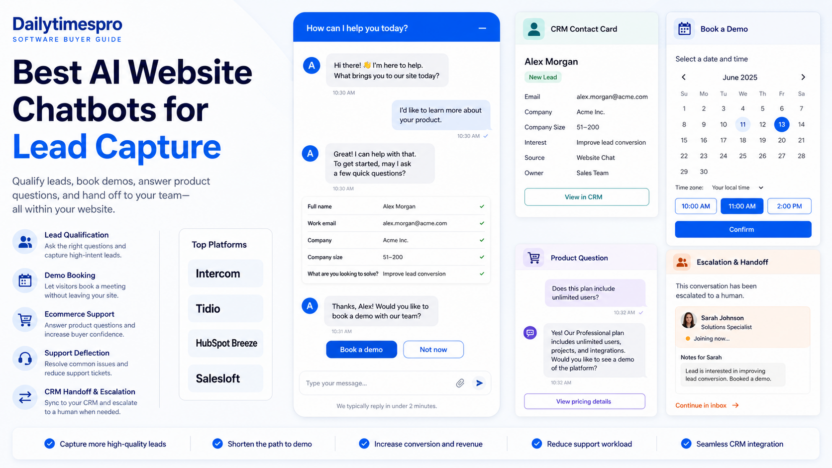
The best AI website chatbot for lead capture depends on whether your main goal is sales qualification, support deflection, product recommendations, or CRM handoff. Intercom is strong when chat, help desk, and AI support workflows are connected. Tidio is attractive for ecommerce and small business websites that want live chat, Lyro AI conversations, and product-oriented assistance. HubSpot Breeze fits teams already using HubSpot CRM. Salesloft Chat Agents fits sales-led teams that want website conversations connected to revenue workflows.
Pricing last checked on July 19, 2026. Intercom's Fin AI Agent pricing is listed at $0.99 per outcome with a minimum monthly outcome commitment. Tidio lists Lyro AI usage starting with free conversations and paid conversation usage, and its Plus plan starts at $300 per month plus usage. HubSpot describes Breeze Customer Agent pricing in HubSpot Credits, including $0.50 per resolved conversation. Salesloft uses sales-led pricing.
Related Dailytimespro reading:
- Best AI Customer Support Tools
- Best AI Sales Prospecting Tools
- Best AI Workflow Automation Tools
- Best AI Translation Tools for Small Business
Best For
AI website chatbots are best for small businesses that already receive repeated website questions: pricing questions, demo requests, product fit questions, shipping or billing questions, booking requests, and support handoffs. They are most useful when the bot can answer from approved content and send qualified conversations to a person at the right time.
Not Best For
They are not a fix for unclear offers, missing pricing pages, weak forms, or poor follow-up. If the website does not explain what the business sells, a chatbot will mostly automate confusion.
Our Evaluation Criteria
We evaluated tools by lead capture workflow, answer quality, CRM fit, handoff controls, setup effort, pricing clarity, website installation, reporting, integrations, and value for small teams. The best chatbot should collect useful context without making visitors feel trapped in a script.
Tool Reviews
Intercom
Intercom is a strong fit when lead capture and customer support overlap. Its AI agent can resolve common questions while the broader platform manages conversations, help desk workflows, and human handoff. A small SaaS company could use Intercom to answer product questions, capture company size, route demo-ready leads, and deflect repetitive onboarding questions.
Tidio
Tidio is practical for ecommerce and service businesses because its official product material emphasizes Lyro AI, live chat, and ecommerce integrations. A small online store could use Tidio to answer shipping questions, recommend products from a connected catalog, capture email addresses, and hand complex questions to a person.
HubSpot Breeze Customer Agent
HubSpot Breeze is compelling for teams already using HubSpot. The value is not only the AI answer. It is the ability to keep lead and customer context inside the CRM. A service business could use it to qualify website visitors, create records, and support follow-up without copying chat notes manually.
Salesloft Chat Agents
Salesloft is better for revenue teams than for a simple support widget. Its chat agents are positioned around website buyer conversations and sales workflows. That makes sense for B2B teams that want conversations routed to account or revenue processes.
Pricing
Pricing last checked on July 19, 2026.
| Tool | Official pricing note | Best-fit buyer |
|---|---|---|
| Intercom Fin | $0.99 per outcome, with minimum outcome volume noted on official Fin pricing | Support-led teams with measurable resolved conversations |
| Tidio Lyro | Free AI conversations are available; paid usage and Plus plan from $300/month plus usage are listed | Ecommerce and small business chat workflows |
| HubSpot Breeze Customer Agent | Listed in HubSpot Credits, including $0.50 per resolved conversation | HubSpot CRM users |
| Salesloft Chat Agents | Pricing is sales-led | B2B revenue teams |
When comparing pricing, calculate real monthly visitor volume, expected conversation volume, answer coverage, escalation rate, CRM seats, and whether resolved conversations are billed differently from chat sessions.
Real Use Cases
Lead Qualification
A SaaS team could use an AI chatbot to ask company size, use case, current tool, timeline, and preferred contact method. The chatbot should not over-qualify visitors. It should collect enough context for a salesperson to respond intelligently.
Demo Booking
For businesses with high-intent traffic, the chatbot can answer basic fit questions and then offer a meeting slot. This works best when the bot connects to calendar and CRM systems.
Ecommerce Product Questions
An online store can use chat to answer sizing, shipping, returns, availability, and product comparison questions. Tidio is especially relevant here because its product materials emphasize ecommerce workflows and product recommendations.
Support Deflection
A chatbot can answer FAQs before a support ticket is created. This is useful for billing questions, onboarding questions, account setup, and basic troubleshooting. Complex billing disputes or account-sensitive issues should still move to a person.
Human Handoff
The most important chatbot feature is often the handoff. Visitors should know when a person will respond, and the teammate should receive the conversation history, lead details, and page context.
Comparison Table
| Tool | Best for | Main strength | Limitation |
|---|---|---|---|
| Intercom | Support and sales chat combined | AI agent plus help desk workflow | Costs depend on outcomes and platform needs |
| Tidio | Ecommerce and small business sites | Lyro AI, live chat, ecommerce fit | Usage planning matters as chat volume grows |
| HubSpot Breeze | HubSpot CRM users | CRM context and customer agent workflow | Best value comes inside HubSpot ecosystem |
| Salesloft | B2B sales teams | Revenue conversation workflow | Sales-led pricing and setup |
Pros
- Captures leads when visitors are active on the website.
- Answers repeated questions without forcing every visitor into a form.
- Can improve CRM context when connected correctly.
- Helps small teams handle after-hours questions.
- Can reduce repetitive support tickets.
Cons and Limitations
- Bad source content leads to weak answers.
- Poor handoff creates frustrated visitors.
- Usage-based pricing can rise with volume.
- Setup requires approved answers, routing rules, and review.
- The bot should not handle sensitive account issues without proper controls.
Alternatives
| Alternative | Best for | Main strength | Limitation |
|---|---|---|---|
| Drift legacy setups | Existing Drift customers | Established B2B chat workflows | Product direction has shifted under Salesloft/1Mind messaging |
| Zendesk AI | Support-heavy teams | Ticket and help center context | Less focused on pure lead capture |
| Custom website form | Very simple qualification | Low cost and predictable | No conversational assistance |
How to Run a Responsible Pilot
Start with one repeated workflow, one owner, and one review rule. For AI lead capture chatbots, define where the work starts, what source material the AI can use, who reviews the output, and what system receives the final result. A useful pilot includes normal cases, incomplete inputs, edge cases, and one situation that should be escalated to a person.
Measure cleanup time, not only draft speed. The practical question is whether the approved result takes less effort after review. Track whether the tool reduced missed follow-ups, shortened review cycles, improved handoffs, created clearer reporting, or helped the team produce a more consistent result.
Keep permissions narrow during the pilot. Connect only the repositories, documents, tickets, call records, survey files, website data, or CRM records required for the first use case. If the tool touches customer data, code, contracts, support conversations, or internal notes, document who can see prompts, outputs, logs, and connected records.
At the end of the pilot, choose one of three outcomes. Adopt the workflow if it produces cleaner approved work. Revise it if prompts, permissions, data sources, or handoff rules need more structure. Stop it if cleanup time cancels the benefit or the team avoids using the process.
Buying Decision Details for Small Teams
The safest way to evaluate best AI website chatbots for lead capture is to start from the workflow, not from the feature page. Write down the repeated task the team wants to improve, the person who owns the task, the source information the tool will use, and the final output that must be approved. This keeps the buying decision grounded in work that already happens instead of a broad promise that sounds useful but is hard to measure.
For a small business, the first question is whether the tool removes friction from a high-frequency process. A tool that saves ten minutes on a task done twice a year is less valuable than a tool that saves five minutes on a task done every business day. This matters in AI Marketing Tools because teams often buy software after seeing an impressive demo, then discover that setup, data cleanup, approvals, and user habits determine most of the value.
The second question is whether the tool fits existing systems. If your team already works in a CRM, help desk, repository, calendar, survey platform, document workspace, or publishing workflow, the tool should reduce handoff work. If it creates another isolated dashboard, adoption will usually be weaker. A practical implementation should make it clear where work starts, where the AI assists, when a person reviews the result, and where the approved output is stored.
The third question is whether pricing scales with real usage. Seat-based plans, credit-based plans, resolved-conversation pricing, annual contracts, API usage, and sales-led packages can all be reasonable, but they need different budget checks. Before buying, estimate monthly volume, required users, required integrations, review time, and the cost of mistakes. The cheapest plan is not always the best plan if it lacks the workflow control that keeps work reliable.
Setup Checklist
| Setup area | What to decide before rollout |
|---|---|
| Workflow owner | Who configures the tool, checks output quality, and decides whether to expand usage |
| Source material | Which repositories, documents, pages, tickets, chats, calls, survey answers, or CRM fields the tool can use |
| Review rule | What the AI may draft or suggest, and what a person must approve |
| Handoff | Where approved work goes after the AI step |
| Measurement | How the team will judge value after two to four weeks |
| Permissions | Which users can see source data, AI output, logs, and connected records |
| Pricing trigger | Which usage level, seat count, credit level, or contract threshold changes the monthly cost |
Common Buying Mistakes
The most common mistake is buying for a broad category instead of a specific workflow. A team may say it wants AI for productivity, lead capture, translation, support, code review, or feedback analysis, but that is not yet a buying requirement. A usable requirement is narrower: qualify website visitors before a sales call, summarize pull requests before maintainer review, translate support replies with human approval, or group survey comments into themes for a monthly product meeting.
Another mistake is treating AI output as the result instead of the starting point for review. The best tools in this category make people faster and more consistent, but they do not remove accountability. A small team should still define what good output looks like, what information must be checked, and which situations require escalation.
A third mistake is ignoring the operating cost. Even when subscription pricing looks acceptable, the team may need time for setup, prompt refinement, data cleanup, workflow mapping, training, and review. That cost is normal, but it should be planned. If the team has no owner for setup, even a strong product can become shelfware.
What Good Looks Like After 30 Days
After 30 days, the team should be able to point to a concrete improvement. For Best AI Website Chatbots for Lead Capture, good outcomes could include faster review cycles, cleaner handoffs, fewer missed follow-ups, better insight summaries, more consistent customer responses, stronger documentation updates, or reduced manual sorting. The metric should match the workflow, not the marketing category.
The team should also know where the tool is not useful. This is an important sign of a mature pilot. If users can explain which tasks still need human judgment, which inputs create weak results, and which cases should be escalated, the workflow is safer and easier to improve. If everyone treats the output as automatically correct, the process needs more control before it expands.
Finally, the tool should have a clear place in the stack. It should not duplicate another subscription without a reason. If two tools cover the same workflow, decide which one owns the process and which one should be removed or kept for a different job. Small teams benefit from fewer, better-defined systems.
Final Recommendation
Use Intercom if support and sales chat need to work together. Use Tidio if ecommerce questions and small business live chat are the priority. Use HubSpot Breeze if your CRM already runs in HubSpot. Use Salesloft when website chat is part of a larger B2B sales motion. The right chatbot should improve lead context and response quality, not simply add another widget.
FAQs
What is the best AI chatbot for lead capture?
Intercom, Tidio, HubSpot Breeze, and Salesloft are all credible options, but the best choice depends on CRM, website traffic, support volume, and handoff needs.
Should every small business use an AI chatbot?
No. A chatbot is useful when the site already receives repeated questions or demo interest. A clear contact form may be enough for lower-volume sites.
How should chatbot ROI be measured?
Track qualified leads captured, meetings booked, support tickets avoided, handoff quality, and response time after review.
Can a chatbot answer pricing questions?
Yes, but only from approved pricing content. If pricing varies by plan, usage, or add-ons, the chatbot should route visitors to the correct page or team.
What is the biggest setup mistake?
The biggest mistake is launching without approved answers and handoff rules. The bot should know when to stop and send the conversation to a person.