Quick Verdict
Sembly AI is worth considering if your team wants AI meeting notes, summaries, action items, and searchable meeting knowledge. It is not the best choice if you only need occasional manual notes or if your team already has a meeting assistant deeply embedded in its workflow.
Sembly AIfits the same broad category as Otter.ai, Fireflies.ai, Fathom, and other AI meeting assistants. Its value depends on whether your team actually turns meeting notes into decisions, tasks, follow-ups, and shared memory.
For category context, see our Best AI Call Transcription Tools and Otter.ai Review articles.
Best For
| User type | Fit |
|---|---|
| Client-facing teams | Useful for meeting summaries, decisions, and action items |
| Managers | Helpful for follow-up and accountability |
| Consultants and agencies | Useful when many client calls need consistent notes |
| Teams building knowledge bases | Meeting notes can become searchable context |
Not Best For
Sembly AI is not best for teams that rarely hold meetings, teams that cannot record meetings for privacy reasons, or teams that need a free-only transcription workflow with minimal structure.
Our Evaluation Criteria
This review evaluates Sembly AI by meeting capture, summary quality, action item handling, collaboration, integrations, pricing clarity, privacy considerations, and workflow fit.
What Is Sembly AI?
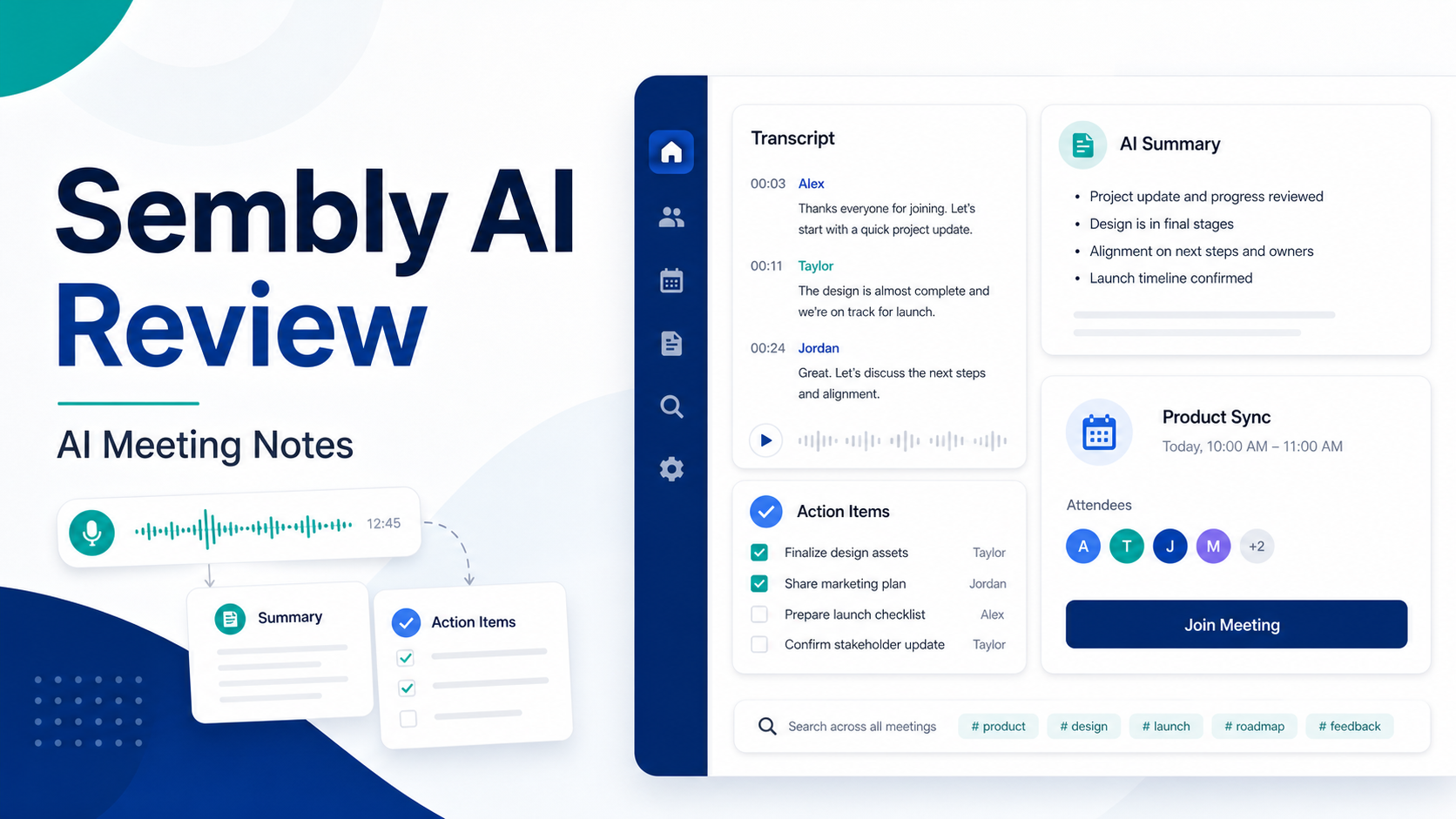
Sembly AI is an AI meeting assistant for capturing and organizing meeting content. The common buyer need is straightforward: meetings create decisions, blockers, follow-ups, and commitments, but those details often disappear into scattered notes. A meeting assistant can create a shared record.
The practical value depends on follow-through. A summary is useful only if people review it, assign tasks, update the CRM or project tool, and use the notes later.
Key Features to Evaluate
Meeting summaries
Meeting summaries help teams understand what happened without reading a full transcript. For managers, the best summaries separate decisions, risks, questions, and action items.
Action items
Action items are often the most useful output. A small team can use them to track who owns follow-up after a client call or internal planning meeting.
Searchable meeting memory
Searchable meeting history is useful when teams need to find what was agreed, what a customer asked for, or why a decision was made.
Integrations
Meeting assistants become more useful when they connect to calendars, video meeting platforms, CRM systems, project tools, or team communication tools. Buyers should verify current integrations from Sembly's official pages before purchase.
Collaboration
Meeting notes should be easy to share and review. If notes stay in one person's inbox, the tool does not solve the workflow problem.
Pricing
Pricing last checked on July 11, 2026. Pricing may vary by region, billing cycle, usage, seats, add-ons, or sales agreement when the vendor lists custom pricing. Sembly publishes current plan information on its official pricing page. Buyers should check free plan availability, meeting limits, transcription or recording limits, workspace features, integrations, and team controls from the official source before buying.
Practical Use Cases
Client calls
A small agency could use Sembly to summarize client meetings, capture promised deliverables, and prepare follow-up emails. The team should review the summary before sending anything externally.
Sales discovery
Sales reps can use meeting notes to capture pain points, objections, next steps, and buying criteria. This should support CRM updates rather than replace rep judgment.
Internal planning
Managers can use summaries to track decisions, owners, deadlines, and blockers from planning meetings.
Customer onboarding
Customer success teams can use meeting notes to remember implementation steps, stakeholder concerns, and promised follow-ups. Our AI Customer Onboardingguide covers that broader process.
Pros and Cons
| Pros | Cons |
|---|---|
| Useful for structured meeting summaries | Value depends on team adoption |
| Can help capture action items | Meeting recording may not fit every privacy context |
| Searchable history can reduce lost context | Buyers must verify integrations and limits |
| Useful for client-facing teams | Not necessary for teams with few meetings |
| Can support handoff between sales, support, and operations | Notes still need human review |
Alternatives
| Tool | Best for | Main strength | Limitation |
|---|---|---|---|
| Otter.ai | Meeting transcription and summaries | Familiar meeting-note workflow | Fit depends on plan limits |
| Fireflies.ai | Searchable meeting notes and team workflows | Broad meeting capture use case | Setup discipline still matters |
| Fathom | Simple meeting summaries | Lightweight workflow | May be less broad for complex teams |
| tl;dv | Meeting recording and summaries | Useful for async review | Pricing and limits should be checked |
Who Should Use Sembly AI?
Choose Sembly AI if meetings are a source of lost decisions and missed follow-ups. Avoid it if your team does not have a clear process for reviewing notes, assigning actions, and updating systems after meetings.
Final Recommendation
Sembly AI is a credible option for teams that want meeting notes to become shared operational memory. It is most valuable for client-facing teams, managers, consultants, and teams that need better follow-up discipline. Before buying, compare it with Otter.ai, Fireflies.ai, Fathom, and tl;dv based on integrations, limits, pricing, privacy needs, and the way your team handles action items.
FAQs
What is Sembly AI?
Sembly AI is an AI meeting assistant for capturing, summarizing, and organizing meeting content.
Is Sembly AI good for small businesses?
It can be useful for small businesses that hold frequent client, sales, project, or internal planning meetings and need better follow-up.
Does Sembly replace manual notes?
It can reduce manual note-taking, but important summaries and external follow-ups should still be reviewed by a person.
What are the best alternatives?
Otter.ai, Fireflies.ai, Fathom, and tl;dv are common alternatives in the AI meeting assistant category.
What should teams check before buying?
Check recording rules, integrations, meeting limits, retention settings, team controls, privacy needs, and pricing from official sources.
Is meeting recording always allowed?
No. Teams should follow local law, customer agreements, and company policy before recording or transcribing meetings.
Setup and Adoption
The first setup decision is meeting policy. Decide which meetings should be recorded, who gets access, how long notes should be retained, and how participants are notified. Meeting assistants can be useful, but they also create privacy and trust questions.
The second decision is where action items go. If Sembly creates action items but nobody moves them into a project tool, CRM, or shared task list, the benefit is limited. Decide the handoff before adopting the tool.
Evaluation Criteria
| Criterion | Why it matters |
|---|---|
| Summary usefulness | Teams need decisions and next steps, not only transcripts |
| Action item clarity | Follow-up should include owner, task, and context |
| Search and retrieval | Meeting history should be findable later |
| Integrations | Notes should connect to calendars, calls, CRM, or tasks |
| Privacy controls | Recording rules and access matter |
| Pricing clarity | Meeting limits and team features affect value |
Common Mistakes
The first mistake is recording every meeting without a reason. Capture meetings where the notes will be used: client calls, sales discovery, project reviews, onboarding calls, and decision meetings.
The second mistake is trusting summaries without review. AI summaries can miss nuance, especially when speakers disagree, action items are implied, or names are unclear.
The third mistake is leaving notes disconnected. Meeting notes should feed tasks, customer records, or project updates.
When Sembly Is Not the Right Choice
Sembly may not be the right fit if your team has strict recording restrictions, if customers are uncomfortable with AI note takers, if you only need occasional transcripts, or if another meeting assistant is already deeply embedded. Also consider whether your video meeting and collaboration tools are supported in the way your team needs.
Buying Checklist
Check official pricing, meeting limits, team seats, recording permissions, integrations, export options, retention settings, and whether the tool supports the meeting platforms your team uses. Run a small pilot with recurring meeting types before rolling it out broadly.
Practical Decision Questions
Before choosing a tool or workflow, answer these questions in writing. Who owns the process? What information must be captured? Which step currently creates delay? Which fields or records must stay accurate? Which integrations are required on day one? Which outputs need human review before they reach a customer, vendor, or employee? These questions prevent the team from buying software for a vague problem.
Small teams should also decide what they will not automate. The highest-risk parts of the process should keep human review: legal terms, payment decisions, customer promises, pricing changes, security-sensitive data, and anything that could create financial or reputation risk. AI should reduce repetitive work, not remove accountability.
Rollout Plan for a Small Team
Start with one workflow, one owner, and one success measure. A practical rollout can be as simple as this:
| Week | Focus | Output |
|---|---|---|
| Week 1 | Map the current process | List steps, owners, tools, and failure points |
| Week 2 | Configure the first workflow | Build the smallest useful version |
| Week 3 | Run with real work | Compare results with the old process |
| Week 4 | Fix gaps | Adjust templates, permissions, fields, and handoffs |
| Month 2 | Expand carefully | Add one more use case only after the first works |
This slower rollout is usually better than a broad launch. It gives the team enough evidence to know whether the tool improves work or simply adds another place to update.
What to Review After 30 Days
After the first month, review adoption, time saved, quality of outputs, errors, exceptions, and whether employees trust the workflow. If people bypass the tool, find out why. The problem may be missing integrations, too many required fields, unclear ownership, or weak training.
Also review cost. AI and automation tools often look affordable at the first seat or starter plan, then become expensive when usage, add-ons, seats, or higher-tier features are required. The right question is not only monthly price. The right question is whether the workflow removes enough manual effort, rework, and missed follow-up to justify the operational cost.
Governance Notes
Every AI-assisted business workflow needs basic governance. Define who can change templates, who can approve outputs, who can invite users, who can export data, and who reviews sensitive information. This matters even for small teams because AI tools often touch customer records, internal tasks, meeting notes, invoices, contracts, or sales information.
Keep a simple review cadence. Once a month, check whether the workflow still reflects the way the team works. Remove unused automations, update stale templates, archive old projects, and review permission levels. A lightweight governance habit prevents the tool from becoming a confusing collection of old experiments.
Bottom Line for Small Businesses
The best tool is not always the tool with the most AI features. The best tool is the one that makes a specific workflow clearer, faster, and easier to review. If a feature does not improve ownership, quality, speed, or decision-making, treat it as optional. Start narrow, prove value, and expand only after the first workflow is reliable.
Red Flags Before You Buy
Pause the purchase if the team cannot describe the current workflow clearly, if the required integrations are unknown, if pricing depends on a sales quote that has not been reviewed, or if the tool will introduce sensitive data into a system without a permission plan. Also pause if the buyer is excited about AI outputs but has no plan for who reviews them.
Another red flag is unclear ownership. If everyone is responsible for follow-up, nobody is responsible. Assign one owner for the workflow, one owner for templates or configuration, and one owner for reviewing results after launch.
Team Workflow Fit
Sembly AI is most useful when meetings have repeatable outputs. Sales discovery should produce CRM notes and next steps. Client delivery calls should produce action items and decisions. Internal planning meetings should produce owners, deadlines, blockers, and status updates. If a meeting has no expected output, AI notes will be less valuable.
Small teams should create a simple meeting-note standard. Decide where summaries go, when action items are reviewed, and which meetings should not be recorded. This keeps the tool from creating a pile of transcripts that nobody uses. The strongest meeting assistant workflow is not recording-first. It is follow-up-first.
Review the standard monthly so old meeting habits do not quietly return.
Leave a Reply