Quick Verdict
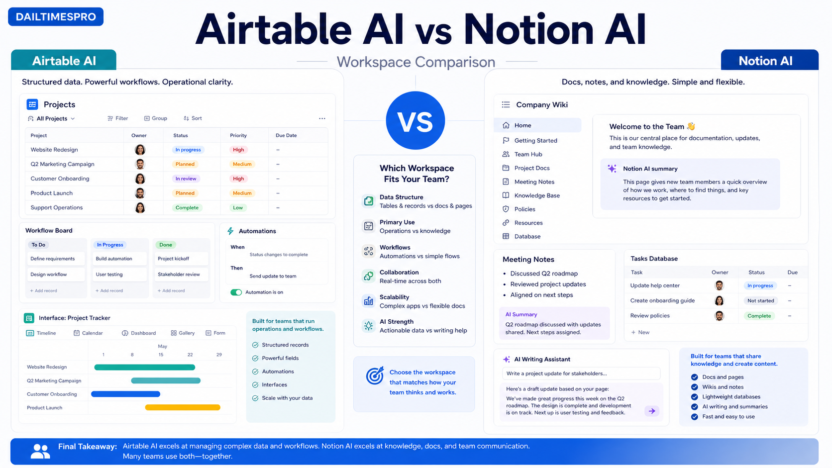
Choose Airtable AI if your team needs structured databases, operational workflows, interfaces, automations, records, approvals, and reporting. Choose Notion AI if your team needs docs, wikis, meeting notes, project knowledge, writing help, summaries, and lightweight databases.
The short version is simple: Airtable AI is stronger for structured operations; Notion AI is stronger for knowledge work. A small business can use both, but if you are choosing one primary workspace, the decision should start with the type of work your team repeats every week.
If you are evaluating Airtable pricing specifically, read our Airtable AI pricing guide. If you are comparing spreadsheet-style analysis instead, see our Rows AI review.
Best For
| Choose | Best for |
|---|---|
| Airtable AI | CRM-lite workflows, content operations, vendor tracking, recruiting pipelines, customer feedback databases, project intake, approval workflows, and operational dashboards |
| Notion AI | Team docs, internal wikis, meeting notes, project briefs, SOPs, research notes, writing support, lightweight task docs, and knowledge sharing |
Not Best For
Airtable AI is not the best first choice if your team mostly writes documents, stores meeting notes, or builds a company wiki. Notion AI is not the best first choice if your team needs relational data, structured records, approval workflows, and reporting across many views.
Quick Comparison Table
| Category | Airtable AI | Notion AI |
|---|---|---|
| Core model | Database and app-building platform | Docs, wiki, and workspace platform |
| Best fit | Structured operations | Knowledge work and writing |
| Data structure | Stronger records, fields, views, interfaces | Flexible pages and lightweight databases |
| AI strengths | App building, summaries, classification, workflow support | Writing, summaries, Q&A, notes, knowledge assistance |
| Reporting | Stronger for operational dashboards | Better for narrative updates and docs |
| Automations | Stronger workflow automation orientation | More doc/workspace oriented |
| Learning curve | Higher if users are new to databases | Easier for document-first teams |
| Small business use | Operations hub | Knowledge hub |
| Pricing source | Airtable pricing | Notion pricing |
What Airtable AI Does Better
Airtable is stronger when the work is structured. If your team needs fields, records, views, automations, interfaces, and reporting, Airtable feels closer to an operations app builder than a document workspace.
For example, a small business could use Airtable AI for vendor tracking, procurement requests, content calendars, lead lists, customer feedback, asset libraries, recruiting pipelines, or lightweight CRM workflows. AI can help summarize records, classify feedback, draft app structures, or support workflow building.
The main advantage is that data has a shape. A customer feedback record can have fields for source, product area, priority, owner, status, and summary. That structure makes reporting and filtering much easier than storing everything in pages.
What Notion AI Does Better
Notion is stronger when the work is knowledge-based. It is useful for team docs, meeting notes, project briefs, internal wikis, research notes, SOPs, and lightweight databases attached to documentation.
Notion AI fits teams that spend a lot of time writing, summarizing, rewriting, and finding information across pages. A founder can summarize meeting notes. A marketing team can draft content briefs. A support team can maintain internal help docs. An operations team can document processes and policies.
The main advantage is flexibility. Notion is easy to adapt when the work is not fully structured yet. You can start with a page, add a database later, and organize knowledge around the way the team thinks.
Pricing Comparison
Pricing last checked on June 30, 2026. Airtable’s official pricing page lists Free, Team at $20 per user per month billed annually, Business at $45 per user per month billed annually, and Enterprise Scale with custom pricing. Notion publishes current plan information on its official pricing page, including personal, team, business, and enterprise-oriented options.
For a small business, do not compare pricing only by headline plan names. Compare who needs paid seats, which AI features are included or added, how many people need edit access, and whether the workspace will run operations or store knowledge.
Real Use Cases
Content operations
Use Airtable AI if content needs structured stages, owners, deadlines, channels, briefs, approvals, and reporting. Use Notion AI if the team mostly needs content briefs, research notes, drafts, editorial guidelines, and meeting notes.
Customer feedback
Use Airtable AI when feedback needs to be tagged, scored, assigned, and reported. Use Notion AI when the feedback is part of broader research notes or product documents.
Employee onboarding
Use Notion AI for onboarding docs, policies, team wiki pages, and role guides. Use Airtable AI if onboarding requires structured task tracking, status fields, owners, and dashboards. For a deeper onboarding workflow, see our NotebookLM employee onboarding guide.
Procurement and vendor tracking
Use Airtable AI for vendor records, approval status, renewal dates, categories, and reporting. This connects well with the AI procurement workflow we covered separately. Notion AI can document procurement policy, but Airtable is better for tracking active vendor records.
Pros and Cons
| Tool | Pros | Cons |
|---|---|---|
| Airtable AI | Strong structured data, workflow views, operational dashboards, useful for recurring business processes | More setup effort, can be overkill for simple docs, requires good base design |
| Notion AI | Flexible docs, strong knowledge management, easy writing and summarization, good for wikis and notes | Less powerful for structured operations, reporting, and app-like workflows |
Which One Should You Choose?
Choose Airtable AI if the work has repeatable records: vendors, leads, applicants, campaigns, feedback items, requests, assets, tasks, or approvals. Airtable is better when the team needs to sort, filter, assign, report, and automate structured work.
Choose Notion AI if the work is mostly text, context, notes, policies, decisions, briefs, and internal knowledge. Notion is better when people need to write, summarize, search, and explain.
Use both if your team has a clear boundary. Airtable can run the operations database, while Notion stores the playbooks, meeting notes, and decisions. Avoid using both for the same job unless ownership is clear.
Setup Examples
Marketing team
A marketing team could use Airtable AI for the content calendar, channel status, campaign records, asset library, and publishing workflow. The same team could use Notion AI for campaign briefs, brand guidelines, meeting notes, and post-campaign analysis. Airtable holds the structured status of work; Notion holds the thinking behind the work.
Operations team
An operations team could use Airtable AI for vendor tracking, purchase requests, employee equipment, approval status, and renewal dates. Notion AI could store the procurement policy, onboarding documents, and SOP notes. This split works because the database and the policy serve different jobs.
Founder-led startup
A founder-led team may start in Notion because it is flexible and quick for notes, plans, and decisions. As the business grows, Airtable becomes more useful when the team needs structured records, owners, statuses, and reporting. The migration point usually appears when people start asking for dashboards, filtered views, and better ownership.
Migration Guidance
If your team is moving from Notion to Airtable, start with one database-heavy workflow. Do not move the whole company wiki. Good first migrations include customer feedback, content production, vendor tracking, recruiting, and project intake. Keep the explanatory docs in Notion until Airtable has a clear reason to own them.
If your team is moving from Airtable to Notion, identify whether the work is actually documentation. If the base mostly stores notes, decisions, meeting summaries, and loosely structured pages, Notion may be easier for the team to maintain. If the base has many fields, filtered views, automations, and reporting needs, moving it to Notion may weaken the workflow.
Data and Governance Notes
Airtable works best when field names, record ownership, views, and interfaces are managed intentionally. Without that structure, bases can become messy. Notion works best when pages, databases, and permissions are organized clearly. Without that discipline, wikis become hard to trust.
Small businesses should assign owners either way. A workspace without ownership becomes stale. For Airtable, the owner should maintain fields, interfaces, automations, and views. For Notion, the owner should maintain page structure, naming conventions, permissions, and outdated docs.
Decision Rules
Use Airtable AI when the workflow has records that move through stages. Examples include lead status, candidate status, content stage, vendor approval, product feedback, asset review, and client onboarding.
Use Notion AI when the workflow starts as writing or knowledge. Examples include meeting notes, decision memos, product specs, onboarding guides, internal policies, research notes, and content briefs.
Use both when the handoff is explicit. For example, a Notion project brief can link to an Airtable campaign tracker. An Airtable vendor record can link to a Notion procurement policy. The key is avoiding duplicate sources of truth.
Common Mistakes
The first mistake is using Notion as a database when the workflow really needs Airtable-style structure. Flexible pages become messy when the team needs reporting.
The second mistake is using Airtable as a document hub when the team mostly needs writing and knowledge management. Airtable can store notes, but Notion is usually more natural for docs.
The third mistake is letting AI hide poor structure. AI summaries are helpful, but they do not fix unclear ownership, stale fields, duplicate pages, or inconsistent naming.
The fourth mistake is buying for everyone too early. Start with the team that owns the workflow, prove adoption, and expand after the structure works.
Final Recommendation
Airtable AI is the better choice for small businesses building operational systems. Notion AI is the better choice for small businesses building a knowledge workspace. If your team keeps asking, "What is the status, owner, category, deadline, and report?" choose Airtable. If your team keeps asking, "Where is the brief, note, policy, summary, or decision?" choose Notion.
FAQs
Is Airtable AI better than Notion AI?
Airtable AI is better for structured data and operational workflows. Notion AI is better for docs, wikis, summaries, and knowledge work. The better choice depends on the work your team repeats.
Can Airtable replace Notion?
It can replace some lightweight tracking workflows, but it is not usually the best replacement for a document-first wiki or knowledge base.
Can Notion replace Airtable?
Notion can handle simple databases, but Airtable is stronger when records, views, automations, and reporting become important.
Which is better for small business operations?
Airtable AI is usually better for operations workflows such as vendor tracking, content pipelines, customer feedback, and approvals.
Which is better for team knowledge?
Notion AI is usually better for team knowledge, meeting notes, internal wikis, research notes, and writing support.
Should a team use both?
Yes, if the boundary is clear. Use Airtable for structured operations and Notion for documentation. Avoid duplicating the same workflow in both tools.
Which has better pricing?
Pricing depends on seats, AI needs, workspace features, and rollout scope. Airtable and Notion both publish official pricing pages, and buyers should compare plan fit against the specific workflow.