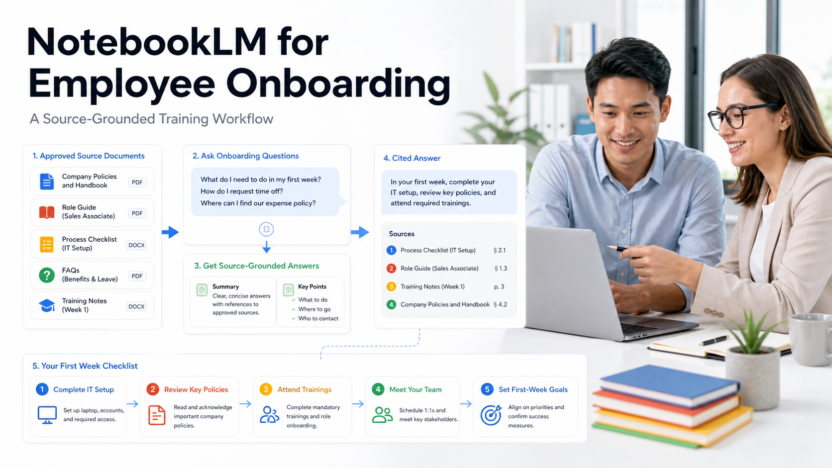
Employee onboarding often fails because information is scattered across policy files, role documents, chat threads, presentations, and unwritten team knowledge. NotebookLM can help a new employee ask questions against a curated set of approved sources. It should be treated as a navigation and learning layer, not as the authority that creates policy.
Quick Verdict
Use NotebookLM for onboarding when the company can provide current, approved, role-relevant sources and assign owners to maintain them. It can help new hires find cited answers, summarize material, and prepare questions. Do not use it to invent HR policy, make employment decisions, or replace a manager, HR contact, security training, or required legal guidance.
Best For
- Source-grounded questions from approved onboarding material.
- Role guides, process documentation, FAQs, and training notes.
- Small teams that need a consistent starting point.
- Managers who want to see where documentation is unclear.
Not Best For
- Creating policy that has not been approved.
- Handling confidential records without confirmed controls.
- Automating employment, performance, or legal decisions.
- Replacing human welcome, coaching, and escalation.
What This Article Evaluates
This guide covers source preparation, notebook design, question patterns, verification, role-based onboarding, maintenance, and limitations. It does not claim that NotebookLM guarantees complete or legally sufficient answers.
Our Evaluation Criteria
Source quality
Answers can only be as reliable as the approved material supplied to the notebook.
Citations
New hires should be able to open the cited source and read the authoritative wording in context.
Role relevance
A notebook should contain what the employee needs without exposing unrelated or sensitive material.
Maintenance
Every policy and process source needs an owner, review date, and replacement process.
Human support
The workflow must show when to ask a manager, HR, IT, security, legal, or another responsible person.
Learning value
The system should help understanding and preparation, not encourage passive copying of answers.
Key Features And Capabilities
Curated sources
Build from approved policy, handbook, process, product, role, and training materials rather than an uncontrolled document dump.
Source-grounded questions
Employees can ask focused questions and inspect citations before acting.
Summaries and study aids
The tool can help condense long material and prepare a learning plan, but required wording should still come from the source.
Notebook separation
Separate company-wide orientation from role, department, customer, or technical onboarding when access and relevance differ.
Feedback signal
Repeated unanswered questions reveal missing or unclear documentation that owners can improve.
Real Use Cases
First-week orientation
A new hire can ask where approved policies, communication norms, systems, and support contacts are documented.
Role onboarding
A salesperson, support agent, marketer, or developer can work from a role-specific notebook with approved processes and examples.
Process rehearsal
The employee can explain a process in their own words and compare the explanation with cited documentation.
Manager preparation
Before a check-in, the employee can collect unresolved questions instead of using the notebook to guess.
Documentation improvement
The onboarding owner can review question patterns and update sources that are incomplete or contradictory.
Comparison Table
| Option | Best For | Main Strength | Important Limitation |
|---|---|---|---|
| NotebookLM | Cited source-grounded learning | Answers tied to supplied sources | Depends on source quality |
| Company wiki | Authoritative documentation | Stable browsing and ownership | Can be hard to search |
| LMS | Structured required training | Tracking and assessments | Less flexible question answering |
| Manager coaching | Context and judgment | Human support and feedback | Limited time and consistency |
Pricing
NotebookLM access and organizational features depend on Google's current product and workspace offerings. This guide does not quote a price because availability can differ by account, edition, region, and administrator configuration. Confirm the official NotebookLM and Google Workspace documentation for the exact account used by the organization.
Pricing last checked on June 25, 2026. Pricing may vary by billing period, region, usage, seat count, credits, or add-ons. The official pricing pages linked in this article are the authority for a purchase decision.
Pros
- Grounds answers in selected sources.
- Citations encourage verification.
- Can reduce repetitive navigation questions.
- Reveals documentation gaps.
Cons And Limitations
- Outdated sources produce outdated guidance.
- It cannot replace accountable policy owners.
- Access design requires care.
- New hires may over-trust concise answers.
Alternatives
A maintained wiki remains the source of truth. A learning management system is better for mandatory courses and completion tracking. A knowledge-base search tool may fit a large support organization. Human manager and HR support remain necessary for judgment, exceptions, culture, and sensitive questions.
A Practical Evaluation Workflow
Step 1: Choose one real workflow
Do not evaluate software with a vague demo. Select one recurring workflow with a clear owner, real inputs, a defined output, and a known review step. A narrow pilot exposes whether the product fits daily work better than a long feature tour.
Step 2: Record the current baseline
Before introducing the tool, record how long the workflow takes, where handoffs fail, which work is repeated, and what quality checks already exist. The baseline prevents a team from confusing novelty with measurable improvement.
Step 3: Use approved, low-risk data
Start with public, synthetic, or appropriately approved information. Confirm data retention, access controls, and account permissions before using confidential customer, employee, financial, legal, or product information.
Step 4: Review every output
Assign a human reviewer. Check factual accuracy, tone, completeness, permissions, links, calculations, and whether the result actually satisfies the original task. AI assistance should shorten work without removing accountability.
Step 5: Measure the full cost
Include subscription fees, seats, credits, setup, training, integrations, review time, and the cost of correcting errors. A lower advertised price can be less economical when the workflow requires more manual cleanup.
Step 6: Decide with written criteria
At the end of the pilot, score workflow fit, output quality, ease of adoption, administration, pricing clarity, integration effort, and risk. Keep the decision record so the team can review it when plans or requirements change.
Security, Governance, And Quality Control
Start with least-privilege access, approved source data, named owners, and a written human-review rule. Confirm retention, training-data, export, deletion, and administrator controls from current vendor documentation. Never paste confidential data into a tool merely because the interface is convenient.
How To Measure Value
Measure completion time, editing time, handoff errors, adoption, administrator work, and the cost of corrections. Record the baseline before the pilot. A useful product should improve a real workflow without creating an unmanageable review or credit burden.
Common Buying Mistakes
- Choosing from a feature list without testing the real workflow.
- Ignoring permissions, data quality, and human review.
- Comparing prices without seats, credits, add-ons, and implementation.
- Treating generated output as verified fact.
- Rolling out to the whole company before a controlled pilot.
Detailed Decision Checklist
Before selecting How to Use NotebookLM for Employee Onboarding, write down the exact workflow that needs improvement. Name the person who starts the work, the information the tool receives, the output it should produce, the person who reviews that output, and the system where the approved result is stored. This prevents a purchase from becoming an open-ended experiment with no owner.
Check data readiness next. List the documents, CRM records, meeting content, contact data, task history, writing samples, or knowledge sources the workflow depends on. Mark which information is public, internal, confidential, regulated, outdated, duplicated, or missing. AI features cannot compensate for contradictory records or unclear permission boundaries. Cleaning the source material may create more value than adding another subscription.
Review the human handoff in detail. Define which actions the software may assist with, which actions need explicit approval, and which requests must always go to a qualified person. Customer complaints, employment matters, legal interpretations, financial commitments, security incidents, account exceptions, and public claims normally need a clear escalation route. A useful workflow makes that route visible instead of hiding uncertainty behind a confident answer.
Model the full cost for twelve months. Include the base subscription, members, contact or usage growth, credits, recordings, storage, integrations, implementation, training, administrator time, and periodic quality review. Add a reasonable allowance for correcting mistakes and maintaining documentation. Compare that number with the value of time saved, errors avoided, faster response, or work that becomes possible. Do not assume every automated action creates equal value.
Finally, confirm exit options. Determine how the team can export content, contacts, transcripts, tasks, documents, or configuration if the product no longer fits. Record who owns the account and billing relationship. A responsible software decision includes both adoption and a practical way to leave.
30-Day Rollout Plan
Week 1: Prepare
Choose a bounded use case and collect the approved inputs. Document current steps, time, common errors, and escalation points. Configure the smallest necessary group of users. Review authentication, roles, integrations, retention, and billing controls. Create a short acceptance checklist that defines what a usable output looks like.
Week 2: Run In Parallel
Use the new workflow alongside the existing process. Do not remove the old control before the team understands failure modes. Review every output and label the type of correction required: factual, contextual, formatting, tone, permission, missing information, or incorrect action. This produces evidence that is more useful than a general opinion about whether the AI feels impressive.
Week 3: Improve The System
Update source documents, templates, prompts, routing rules, naming conventions, or permissions based on observed problems. Remove steps that add no value. If users are bypassing the workflow, ask why before adding enforcement. The cause may be poor fit, unclear training, slow performance, missing integration, or a review process that is heavier than the original task.
Week 4: Decide
Compare the pilot with the baseline. Review time saved, correction rate, adoption, user confidence, administrator workload, and expected annual cost. Decide whether to expand, keep the workflow limited, change configuration, test an alternative, or stop. Write down the decision and assumptions. Revisit it when pricing, product capabilities, data requirements, or business volume changes.
Quality Review Questions
Use these questions during the pilot:
- Does the output answer the real task, or only produce plausible language?
- Can a reviewer trace important claims to an approved source?
- Are names, dates, prices, links, assignments, and calculations correct?
- Does the workflow expose uncertainty and provide a human escalation path?
- Can administrators see who has access and what the tool is doing?
- Are users saving time after review, or only moving work to a different step?
- Does the pricing model remain predictable at the expected volume?
- Can the result be exported and used in the team's system of record?
If the team cannot answer these questions, it is too early for a broad rollout. A smaller scope with clearer controls is usually more productive than adding more features.
Final Recommendation
Create one small onboarding notebook for a single role. Use current approved sources, add a clear escalation page, test common questions, and ask a manager and recent hire to review citations. Expand only after the source-maintenance process works.
Frequently Asked Questions
Can NotebookLM replace an onboarding manager?
No. It can help employees navigate approved sources, but managers provide context, feedback, judgment, and support.
What sources should I add?
Use current approved policies, role guides, process documents, FAQs, training material, and support contacts.
Should I upload employee records?
Do not upload sensitive records unless the organization has confirmed access, retention, legal, and security requirements.
How often should sources be reviewed?
Use a named owner and review schedule, and update immediately when a policy or process changes.
Can it answer HR questions?
It can point to approved material, but sensitive, legal, benefits, performance, or exception questions should go to HR.
How do I measure success?
Measure time to find information, repeated questions, source gaps, onboarding completion, and manager review effort.
Related Dailytimespro Guides
See our NotebookLM review, AI knowledge base workflow, and best AI research workflow for teams.