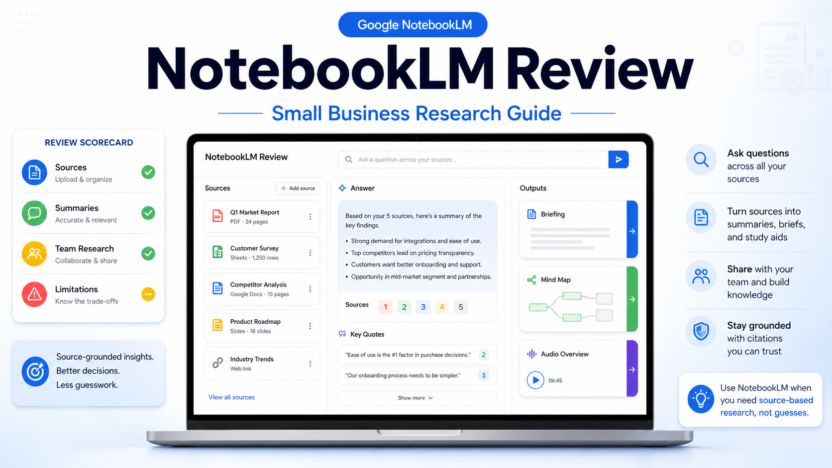
NotebookLM is useful for small business research when your team needs answers grounded in specific source material instead of broad web guesses. It is best for turning documents, PDFs, notes, web pages, slides, transcripts, and research packs into summaries, briefing notes, study tools, mind maps, and question-and-answer sessions.
It is not a replacement for a full project management system, CRM, legal review process, or a general chatbot that can reason across live business context. Its biggest strength is narrower: you give NotebookLM a set of sources, then use it as a thinking partner for those sources.
For a small team, that can be valuable. A founder can review competitor notes, a marketer can analyze customer interviews, a consultant can digest client documents, and an operations lead can turn SOPs into training material. The key is to use it for source-based work, not unsupported decision-making.
Google describes NotebookLM as an AI research and thinking partner, and Google Help lists features such as creating notebooks, adding sources, chat, notes, Mind Maps, Audio Overviews, Video Overviews, flashcards, quizzes, infographics, and slide decks. The Google Workspace NotebookLM page also positions it for teams that need to centralize information and move from documents to insights faster.
If you are comparing it with answer engines, see our NotebookLM vs Perplexity guide. If your team needs a broader research process, our AI research workflow for teams is a better next read.
Quick Verdict
NotebookLM is worth using when your business already has source material and wants faster synthesis. It is especially useful for reviewing long PDFs, customer interview notes, research folders, training documents, sales enablement material, meeting notes, and internal policies.
Choose NotebookLM if you need:
- answers tied to uploaded or selected sources
- fast summaries of long documents
- briefing docs from research packs
- study-style outputs for training
- audio-style summaries for listening
- mind maps to explore a topic
- a lightweight research workspace
Do not choose NotebookLM as your main system if you need:
- live web monitoring
- CRM automation
- ticketing or support workflows
- team task management
- final legal, financial, or compliance decisions
- a single knowledge base with permission-heavy operations
The product is strongest when the source set is clear, current, and narrow enough for the question you are asking.
What NotebookLM Does Well
NotebookLM helps you create a notebook around a topic or project, add sources, and then ask questions against those materials. Google Cloud documentation for NotebookLM Enterprise explains the same core idea in business terms: users add data sources such as PDFs, Google Docs, Google Slides, and website URLs, then interact with the content to query, chat, or generate summaries, with responses grounded in those documents.
That source-grounded model is the reason NotebookLM feels different from a normal chatbot. A general chatbot is useful for brainstorming, drafting, and broad reasoning. NotebookLM is more useful when you want to ask, "What do these documents say?" or "What themes appear across these interviews?"
For small businesses, this is practical because most research is scattered. Notes sit in Docs. Product material sits in PDFs. Customer feedback sits in transcripts. Training content sits in slides. NotebookLM gives teams a lightweight place to explore that material without building a formal internal search system.
Best Use Cases for Small Business
Customer Research
NotebookLM can help summarize customer interviews, survey exports, sales call notes, and support themes. A marketer can add transcripts and ask which objections appear most often. A founder can ask which features customers mention repeatedly. A product lead can create a briefing doc before prioritizing roadmap themes.
The important boundary is that NotebookLM should support analysis, not replace judgment. If five interviews mention the same issue, that is useful signal. It is not automatically market proof. The team still needs to review examples and decide what to do.
Competitor And Market Notes
A small business can collect competitor pages, product docs, public positioning, and sales notes into a notebook. NotebookLM can help compare claims, extract recurring messaging, and summarize category language.
This is more controlled than asking a broad chatbot for competitor analysis because you decide which sources are in scope. That makes the output easier to audit.
Training And SOP Review
NotebookLM can turn internal documentation into easier learning material. Google Help lists outputs such as flashcards, quizzes, slide decks, Audio Overviews, and Mind Maps, which makes the tool useful for onboarding and training review.
For example, a service business could load SOPs and ask for a training outline. A small ecommerce team could add return policy docs and create a short FAQ for new support staff. A consultant could add client onboarding documents and generate a briefing before a kickoff call.
Content Research
NotebookLM can help content teams organize source packs before writing. A writer can add research documents and ask for themes, source-backed outlines, audience questions, and contradictions.
This does not mean the article should be copied from NotebookLM output. It means NotebookLM can reduce the time spent reading and structuring source material before a human writes the final piece.
Meeting And Project Notes
If your team already records meetings or keeps structured notes, NotebookLM can help turn those notes into action context. It can summarize decisions, surface open questions, and help someone prepare for the next meeting.
For task tracking, however, it should feed a project management tool rather than replace one. NotebookLM can explain the notes. It is not the system of record for ownership, deadlines, and status.
Where NotebookLM Is Weak
NotebookLM is only as useful as the sources you add. If the source material is old, messy, incomplete, or biased, the output will reflect that problem. This is a tool for working through sources, not a guarantee that the sources are correct.
It also may not fit teams that need strict workflow controls. A support team may need ticket routing. A sales team may need CRM fields. A legal or finance process may need approvals and audit trails. NotebookLM can assist research, but it should not become a hidden replacement for business systems that require accountability.
The other limitation is scope discipline. When a notebook becomes too broad, answers can become harder to interpret. Small businesses should create focused notebooks by project or decision: one notebook for customer interviews, one for a competitor review, one for training documents, and one for a content research pack.
NotebookLM vs A General Chatbot
Use NotebookLM when your question depends on a known set of documents. Use a general chatbot when you need brainstorming, broad drafting help, or flexible reasoning that is not tied to a source set.
A practical split looks like this:
| Need | Better Fit | Why |
|---|---|---|
| Summarize a PDF pack | NotebookLM | The task depends on specific uploaded sources |
| Brainstorm campaign ideas | General chatbot | You need open-ended ideation |
| Analyze customer interview transcripts | NotebookLM | Source grounding matters |
| Draft a social post from a brief | General chatbot | The output is creative and flexible |
| Create training notes from SOPs | NotebookLM | The source documents are the reference point |
| Ask current web questions | Search or answer engine | NotebookLM is strongest around selected sources |
Many teams should use both. NotebookLM is the reading room. A general chatbot is the drafting and brainstorming assistant.
How to Use NotebookLM Safely
Start with a narrow notebook. Add only the sources needed for one decision or project. Then ask specific questions such as:
- What are the top five customer objections in these interviews?
- Which policy details are unclear for a new employee?
- What are the strongest claims repeated across these product docs?
- Which questions should we answer before choosing a vendor?
- What should go into a one-page internal briefing?
After NotebookLM responds, review the cited or referenced source context. Do not paste outputs directly into public content, proposals, or policy documents without human review.
For business information, also think about privacy and data handling. Teams using Workspace or enterprise setups should review the relevant Google Workspace, Google Cloud, and admin documentation before adding sensitive customer, financial, legal, or HR material.
Setup Checklist
Before you use NotebookLM for business research, run this simple checklist:
1. define one research question 2. choose a focused source set 3. remove outdated documents 4. avoid uploading sensitive material unless your plan and policies allow it 5. ask narrow questions 6. check the answer against the sources 7. export or copy only reviewed conclusions 8. store final decisions in your normal business system
This keeps NotebookLM in the right role: research assistant, not final authority.
Final Recommendation
NotebookLM is a strong choice for small businesses that need to make sense of source material quickly. It is especially useful for customer research, training docs, SOPs, content research, meeting notes, and document-heavy projects.
Use it when accuracy depends on a defined set of sources. Avoid using it as a general business operating system, a live web research tool, or a replacement for expert review.
The best starting point is simple: create one notebook for one current decision, add the cleanest sources you have, ask five focused questions, and review the answers against the original material. If that saves your team time without hiding important judgment, NotebookLM deserves a place in your research stack.
FAQs
Is NotebookLM good for small business research?
Yes, NotebookLM is good for small business research when the task depends on specific documents, notes, or source material. It is less useful for open-ended questions that require live web research or broad market monitoring.
What is NotebookLM best used for?
NotebookLM is best used for summarizing and exploring source material. Common small business uses include customer interview analysis, training document review, content research, competitor notes, SOP review, and meeting briefings.
Is NotebookLM better than ChatGPT?
NotebookLM is better when you need answers grounded in selected sources. ChatGPT is often better for brainstorming, drafting, and broad creative work. Many teams can use both tools for different parts of the research and writing process.
Can NotebookLM create audio summaries?
Yes. Google Help describes Audio Overviews as summaries based on uploaded sources, and the NotebookLM product page highlights Audio Overviews as one way to listen to a summary of source material.
Should a business upload sensitive documents to NotebookLM?
A business should review its plan, admin settings, internal privacy rules, and Google documentation before uploading sensitive customer, employee, legal, financial, or confidential material. Use NotebookLM first with low-risk source sets.
Does NotebookLM replace a knowledge base?
No. NotebookLM can help explore and summarize knowledge, but it should not replace a maintained knowledge base, project management system, CRM, or official policy repository.
Who should try NotebookLM first in a small business?
Founders, marketers, consultants, content leads, trainers, and operations managers are good first users because they often work with scattered source material and need faster synthesis.
What is the safest way to start?
Start with one focused notebook, add non-sensitive documents, ask narrow questions, review source references, and store final conclusions in your normal business tools.