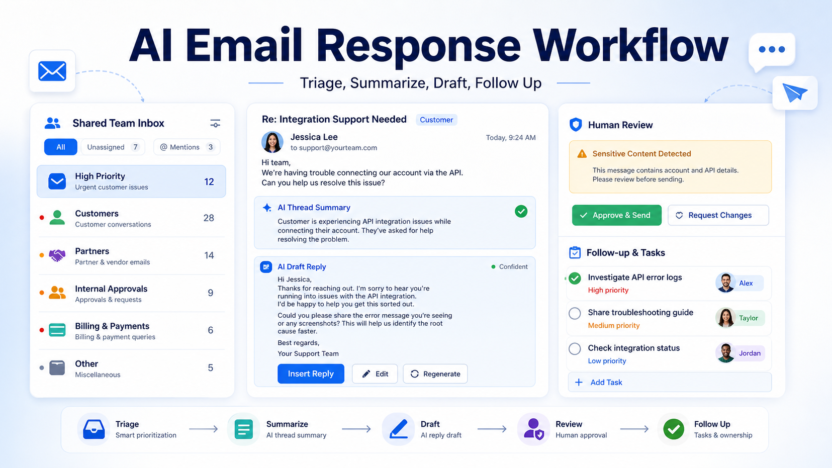
Email is where decisions go to slow down. A customer asks a question, a partner sends a contract note, a teammate forwards a thread, and nobody is sure who owns the next reply. An AI email response workflow helps by sorting messages, summarizing long threads, drafting replies, and creating follow-up tasks. The point is not to automate every answer. The point is to make busy inboxes easier to understand and faster to act on.
Teams using Google Workspace can explore Gemini in Gmail for AI-assisted writing and email help. Microsoft users can use Copilot support for tasks such as drafting messages in Outlook and summarizing email threads. The workflow below works for either ecosystem.
The AI Email Workflow
| Stage | AI role | Human role |
|---|---|---|
| Triage | Group by urgency, sender, and topic | Decide what truly matters |
| Summary | Condense long threads | Confirm the summary is accurate |
| Draft | Create a clear response | Personalize and approve |
| Follow-up | Suggest reminders and next steps | Assign ownership |
| Audit | Find unanswered important messages | Improve rules and templates |
Start With Inbox Categories
A useful workflow begins with categories. Most team email falls into a few buckets: customer requests, sales leads, partner messages, internal approvals, billing questions, operational alerts, and low-priority updates. AI can help classify email, but the team should define the categories first.
For each category, decide the owner, response standard, and escalation rule. A customer issue may need a same-day reply. A newsletter can be archived. A billing question may need finance review. If AI does not know these rules, it will produce drafts but not better workflow outcomes.
In shared inboxes, add one more field: status. Use open, waiting, assigned, resolved, and archived. AI can summarize and draft, but status keeps the team accountable.
Use AI To Summarize Before Replying
Long threads create mistakes. Someone replies to one part of the conversation and misses the actual decision. AI summaries are useful here because they can compress the thread into participants, open questions, decisions made, and required next steps.
Still, summaries need review. Before using a summary to answer a customer or partner, check the original thread for dates, commitments, attachments, and tone. AI is helpful at compressing information, but it can miss small details that matter.
A good summary prompt asks for four sections: what happened, what is being requested, what decision is needed, and who owns the next step. This makes the reply easier to write and reduces the chance of sending a vague answer.
Draft Replies With Rules
AI-generated email works best when the team has style rules. Keep replies short, direct, and specific. Ask AI to answer the question first, avoid over-apologizing, avoid fake certainty, and end with one clear next action.
For customer-facing emails, require the draft to include the customer’s actual issue, the answer or next step, any limitation, and the expected timing if known. For internal email, require the decision, owner, and deadline.
Do not let AI invent attachments, policy details, discounts, delivery timelines, or technical claims. If the answer depends on another team, the draft should say what is being checked rather than pretending the decision is final.
Add A Human Review Layer
Not every email needs the same review. Low-risk internal scheduling replies can be quick. Customer complaints, legal questions, HR issues, refunds, finance matters, and executive communications need careful human review.
Create a rule: AI may draft, but humans approve sensitive categories. This keeps speed without creating risk. It also makes the workflow easier for teams to trust.
For related productivity systems, see AI meeting notes workflow and best AI research workflow for teams.
Turn Replies Into Tasks
The biggest email productivity gain often comes after the reply. If an email creates a task, it should not stay buried in the inbox. AI can suggest follow-up tasks, owners, and due dates based on the message.
A simple rule helps: every important email ends as one of three outcomes. It is answered, assigned, or scheduled for follow-up. If it does none of those, it is probably inbox clutter.
FAQ
What is an AI email response workflow?
It is a repeatable process for using AI to triage messages, summarize threads, draft replies, and create follow-up tasks while humans approve important communication.
Can AI answer all team emails?
No. AI can help with drafts, but sensitive, contractual, financial, legal, HR, and customer-impacting replies need human review.
Is Gmail or Outlook better for AI email?
Use the system your team already runs. Gemini works inside Google Workspace, while Copilot supports Outlook and Microsoft 365 workflows.
How do I avoid generic AI emails?
Require every draft to mention the specific request, answer clearly, and end with one practical next step.
Should AI summarize long email threads?
Yes, but review the original thread before sending a reply based on the summary.
What categories should I use?
Start with customer, sales, partner, internal approval, billing, operations, and low-priority updates.
How do I handle shared inboxes?
Use statuses such as open, assigned, waiting, resolved, and archived so AI support does not hide ownership problems.
Can AI create follow-up tasks?
Yes. It can suggest tasks and due dates, but the team should confirm owner and priority.
What metric should I track?
Track first response time, unresolved important messages, follow-up completion, and repeated questions.
What is the biggest limitation?
AI depends on context. Missing attachments, vague threads, and unclear team rules can lead to weak drafts.
Final Decision
Use this workflow if your team already has the core business process in place and wants AI to remove drafting, summarizing, sorting, and follow-up friction. Do not use it as a substitute for human review, legal approval, customer-sensitive judgment, or final publishing decisions. The best setup is simple: one source of truth, one review owner, a short list of approved prompts, and a weekly check of what the AI helped create.