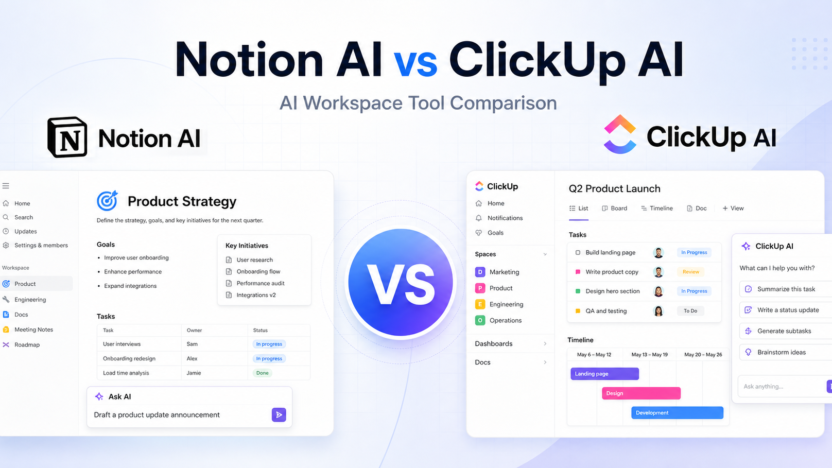
If you are comparing Notion AI vs ClickUp AI, the real question is not simply which assistant writes better text. Notion AI is strongest when your work lives in docs, wikis, notes, databases, and knowledge hubs. ClickUp AI, now branded around ClickUp Brain, is stronger when your work is already organized around tasks, projects, goals, docs, dashboards, and team execution.
Both tools can summarize, draft, answer questions, and help teams move faster. The better choice depends on where your team keeps its source of truth and whether you need an AI workspace for knowledge management or an AI layer for project delivery.
Quick Verdict
Choose Notion AI if you want an AI assistant inside a flexible workspace for notes, documentation, databases, meeting notes, lightweight projects, and company knowledge. It is especially good for teams that already use Notion as a wiki or operating system.
Choose ClickUp AI if you want AI connected to tasks, projects, docs, comments, meetings, dashboards, and execution workflows. It is usually the better fit for teams that need project management, accountability, and cross-functional delivery in one place.
Quick Comparison
| Category | Notion AI | ClickUp AI |
|---|---|---|
| Best for | Docs, wikis, notes, databases, knowledge management | Tasks, projects, docs, dashboards, team execution |
| Core workspace style | Flexible blocks and databases | Structured project management with tasks and views |
| AI brand | Notion AI, Notion Agent, AI Meeting Notes, Enterprise Search, Custom Agents | ClickUp Brain and Everything AI |
| Writing help | Strong for drafting, rewriting, summaries, notes, and documentation | Strong for task updates, docs, comments, summaries, and project communication |
| Knowledge answers | Works well when your content is organized in Notion pages and databases | Useful when work context lives across tasks, docs, comments, and connected project spaces |
| Project management | Lightweight to moderate, depending on database setup | Native project management with tasks, lists, boards, timelines, goals, and dashboards |
| Meeting support | AI Meeting Notes available on Business and Enterprise plans | AI meeting and task context features are part of the broader Brain workflow |
| Automation fit | Good for database workflows and knowledge organization | Better for operational workflows, task updates, and team execution |
| Free access | Free plan available, with AI trials noted on the pricing page | Free Forever plan available, with AI available as paid add-ons |
| Best team type | Founders, content teams, research teams, documentation-heavy teams | Agencies, operations teams, product teams, marketing teams, and project-heavy companies |
Pricing Comparison
Both products use workspace pricing plus AI-related plan or add-on options. Here is the verified plan data available from official pricing pages used for this comparison.
| Pricing Point | Notion AI | ClickUp AI |
|---|---|---|
| Free plan | Free plan at $0 | Free Forever plan at $0 |
| Entry workspace plan | Plus at $10 per seat/month in the USD pricing data | Unlimited at $7 per user/month billed yearly, with monthly pricing also shown as $10 per user/month |
| Business workspace plan | Business at $20 per seat/month in the USD pricing data | Business at $12 per user/month billed yearly |
| Enterprise plan | Enterprise custom plan | Enterprise custom plan |
| AI add-on / AI product pricing | Notion pricing includes AI trials and separate AI products including Notion Agent, AI Meeting Notes, Enterprise Search, and Custom Agents credit-based usage | ClickUp Brain at $9 per user/month; Everything AI at $28 per user/month |
| Meeting notes | AI Meeting Notes included on Business and Enterprise in the pricing data | Meeting and workspace intelligence are positioned inside ClickUp Brain / Everything AI |
| Custom AI usage | Custom Agents pricing is credit-based, with $10 per 1,000 credits shown in the pricing data | Enterprise and higher AI needs may use ClickUp’s custom workspace and AI options |
| Main pricing advantage | Lower listed Business workspace plan in the captured USD data | Clear AI add-on pricing for Brain and Everything AI |
| Main pricing tradeoff | Advanced AI and custom agents can add complexity beyond the base workspace plan | ClickUp can become more expensive when every user needs paid AI plus project management seats |
Notion AI Overview
Notion is a flexible workspace built around pages, blocks, databases, templates, and collaborative documentation. Notion AI adds an assistant layer that can help draft content, summarize pages, answer questions from workspace knowledge, improve writing, and support meeting or research workflows.
The biggest strength of Notion AI is that it sits close to your knowledge base. If your team stores SOPs, meeting notes, strategy docs, product specs, content calendars, or client notes in Notion, the assistant can make that information easier to reuse.
Notion also works well for teams that like to design their own systems. A content team can build an editorial database. A startup can build an investor CRM. A research team can maintain a source library. Notion AI then supports the written and knowledge-heavy parts of those workflows.
ClickUp AI Overview
ClickUp is a work management platform built around tasks, lists, projects, docs, goals, dashboards, calendars, whiteboards, and automations. ClickUp AI is now centered on ClickUp Brain, which connects AI assistance to the work already happening inside ClickUp.
The main advantage is execution context. ClickUp does not only hold documents; it also holds owners, deadlines, priorities, comments, statuses, dependencies, and project history. That makes its AI more useful for teams that want summaries, action items, project updates, task generation, and operational clarity.
ClickUp is less open-ended than Notion, but that structure is often the point. If your team needs visibility across projects, ClickUp gives you more native controls than a Notion database setup.
AI Writing and Documentation
Notion AI feels natural for long-form writing, internal documentation, meeting notes, brainstorming, and knowledge cleanup. It is helpful when you want to turn rough notes into a polished doc, rewrite a paragraph, summarize a strategy page, or create a first draft inside a workspace.
ClickUp AI is also capable at writing, but its writing feels more connected to execution. It is useful for drafting task descriptions, summarizing comment threads, creating project updates, turning notes into action items, and improving team communication.
For pure documentation and knowledge reuse, Notion AI is easier to recommend. For writing tied to projects and task movement, ClickUp AI usually has the stronger practical context.
Project Management and Team Execution
This is where the two tools separate clearly.
Notion can manage projects through databases, board views, calendar views, templates, and custom properties. It is flexible and lightweight, but it requires more setup discipline. If your team wants a custom project hub that also stores research and docs, Notion is excellent.
ClickUp is built for project management from the start. Tasks, assignees, due dates, priorities, statuses, dependencies, time tracking, dashboards, and workload views are native parts of the platform. ClickUp AI benefits from that structure because it can help summarize and move work that already has operational metadata.
If your team misses deadlines because work is scattered, ClickUp AI is the stronger option. If your team mainly needs better knowledge organization and writing support, Notion AI may feel cleaner.
Knowledge Management
Notion AI is one of the stronger choices for teams that think in pages, knowledge bases, and reusable systems. It is comfortable for wikis, product docs, research notes, training libraries, content briefs, and company handbooks.
ClickUp can also store docs and knowledge, but its knowledge management is usually attached to tasks and projects. That is useful for execution-heavy teams but may feel heavier if your main goal is a clean internal wiki.
A simple rule: if the knowledge itself is the product, choose Notion. If the knowledge exists to move projects forward, choose ClickUp.
Pros and Cons
Notion AI Pros
- Excellent fit for documentation-heavy teams
- Flexible workspace for notes, databases, wikis, and content systems
- Strong writing, summarizing, and knowledge-assistant use cases
- Clean interface with less project-management overhead
- Good for founders, creators, researchers, and internal knowledge teams
Notion AI Cons
- Project management requires more custom setup
- Less native structure for complex task operations
- Advanced AI products and custom agents can add pricing complexity
- Teams may need strong workspace governance to avoid messy databases
ClickUp AI Pros
- Strong fit for project-heavy teams
- AI is connected to tasks, docs, comments, deadlines, and work status
- Better native project management than Notion
- Useful for agencies, marketing teams, product teams, and operations teams
- Clear AI add-on pricing for Brain and Everything AI
ClickUp AI Cons
- More complex interface than Notion for simple documentation workflows
- AI costs can rise when many users need paid AI access
- Less elegant as a pure notes or wiki tool
- Teams that only need writing help may not need ClickUp’s full work management stack
Which Tool Should You Choose?
Choose Notion AI if your priority is building a flexible knowledge workspace. It is the better pick for documentation, research notes, content planning, internal wikis, meeting notes, and custom databases. It is especially strong when your team wants a calm place to think, write, organize, and reuse information.
Choose ClickUp AI if your priority is managing work from idea to completion. It is better for task-heavy teams, agencies, product teams, marketing teams, and operations groups that need AI connected to deadlines, statuses, owners, comments, and project reporting.
For many small teams, the choice comes down to your main pain point. If information is hard to find, Notion AI is likely the cleaner answer. If work is hard to track, ClickUp AI is likely the stronger answer.
FAQs
Is Notion AI better than ClickUp AI?
Notion AI is better for documentation, knowledge management, research notes, and flexible databases. ClickUp AI is better for structured project work, task management, and team execution.
Is ClickUp AI good for project management?
Yes. ClickUp AI is strongest when it can work with tasks, comments, docs, deadlines, assignees, and project updates inside ClickUp.
Does Notion have a free plan?
Yes. Notion lists a Free plan at $0, plus paid workspace plans including Plus, Business, and Enterprise.
How much does ClickUp Brain cost?
ClickUp’s pricing page lists ClickUp Brain at $9 per user/month and Everything AI at $28 per user/month.
Which tool is better for a company wiki?
Notion AI is usually better for a company wiki because Notion’s page and database model is designed around flexible documentation and knowledge hubs.
Which tool is better for agencies?
ClickUp AI is usually better for agencies that need tasks, owners, deadlines, statuses, dashboards, and client delivery workflows. Notion AI can still work well for agency documentation and knowledge bases.
If your productivity stack also includes scheduling or meeting notes, our Motion vs Reclaim AI comparison and Otter.ai vs Fireflies.ai comparison guides are natural follow-up comparisons.
Final Verdict
Notion AI and ClickUp AI are both useful, but they solve different workspace problems. Notion AI is the better AI knowledge workspace. ClickUp AI is the better AI project execution workspace.
If your team lives in docs and databases, choose Notion AI. If your team lives in tasks, timelines, dashboards, and delivery workflows, choose ClickUp AI.