Quick Verdict
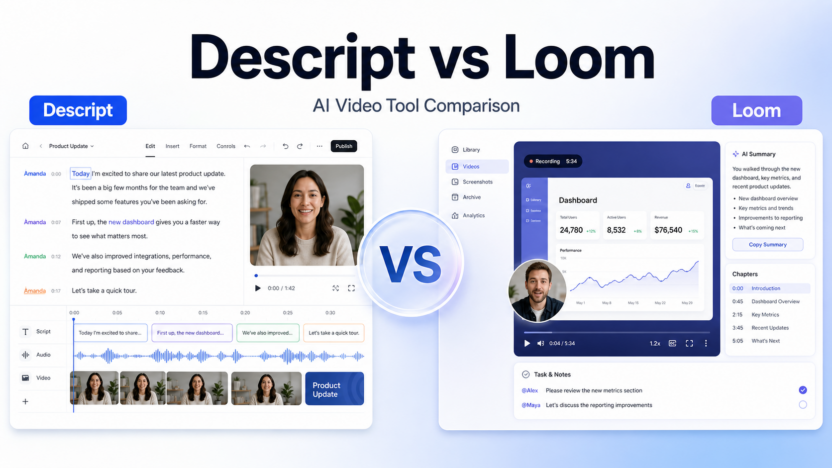
Choose Descript if your main job is editing videos, podcasts, webinars, tutorials, or marketing clips. Choose Loom if your main job is recording and sharing fast async updates. Both use AI, but they solve different problems: Descript is closer to a creative editing suite, while Loom is closer to a communication layer for teams.
Pricing last checked on July 21, 2026. Pricing and plan details in this article are based on official sources: Descript pricing, Loom pricing. Pricing may vary based on billing cycle, seat count, credits, usage, add-ons, region, and sales-led terms, so confirm current plan details from the linked official source before buying.
Related Dailytimespro reading:
- Best AI Video Generators for Training Videos
- Best AI Website Builders for Agencies
- Best AI Content Optimization Tools
- Best AI Workflow Automation Tools
Best For
Descript is best for creators, marketers, educators, podcast teams, and sales enablement teams that need transcript-based editing, filler-word removal, Studio Sound, clips, translation, dubbing, and production workflow. Loom is best for quick product walkthroughs, internal updates, customer support videos, and training snippets.
Not Best For
Descript is not ideal when the team only needs fast screen recordings with minimal editing. Loom is not ideal when the team needs deep edit control, polished audio cleanup, or complex content production.
Our Evaluation Criteria
For this article, the practical evaluation is based on ease of setup, pricing clarity, AI quality, workflow fit, integrations, admin controls, collaboration features, output review, and value for money. The goal is not to crown a universal winner. The goal is to help a small business owner, team lead, marketer, operator, or founder decide whether the tool fits a real workflow.
The most important test is whether the software improves a repeated process without creating a second place where work gets stuck. A strong AI product should make the next human step clearer. It should summarize, draft, organize, transcribe, automate, or recommend in a way that can be reviewed. If the output is hard to verify, difficult to hand off, or separated from the team's existing stack, the practical value drops even when the demo looks impressive.
Key Features
- Descript offers text-based editing, media hours, AI credits, Studio Sound, clips, dubbing, and team features depending on plan.
- Loom offers recording, transcription, summaries, chapters, tasks, AI workflows, and team sharing depending on plan.
- Descript supports more creator-oriented production workflows.
- Loom supports faster communication workflows and simpler link sharing.
- Both require a real content process if the output will be customer-facing.
Real Use Cases
Marketing tutorials
Use Descript when a tutorial needs a script, edit passes, clips, branded intros, better audio, and final export quality. Loom can work for rough tutorials, but Descript is stronger when the final asset will be published.
Customer success walkthroughs
Use Loom when a customer success manager needs to show a workflow quickly and send a link. The recording can include a short AI summary so the customer knows what problem is covered.
Podcast and webinar repurposing
Use Descript when a long recording needs to become clips, social snippets, transcript edits, or cleaner audio. Loom is not designed as the main post-production workspace.
Internal team updates
Use Loom when the goal is clarity and speed. A founder or team lead can record a short update, add a summary, and share it in Slack or a project board.
Pricing
| Plan or product | Official pricing signal | Buyer note |
|---|---|---|
| Descript Free | $0 on the official pricing page | Good for trying text-based editing and basic AI tools |
| Descript Hobbyist | $16 per person per month annually, or $24 monthly | Good for watermark-free individual projects |
| Descript Creator | $24 per person per month annually, or $35 monthly | Better for heavier creative work and more AI usage |
| Descript Business | $50 per person per month annually, or $65 monthly | Better for teams and advanced collaboration |
| Loom Business | $18 per user per month annually | Good for unlimited videos and basic editing |
| Loom Business + AI | $24 per user per month annually | Best for AI-enhanced async video updates |
The safest way to read pricing is to estimate real monthly usage before comparing plans. For seat-based products, count the people who need to create, review, or manage work, not only the person testing the product. For credit-based products, estimate the number of AI actions, recordings, generations, meetings, automations, or database operations that will happen in a normal month. For custom enterprise plans, ask what is included in onboarding, support, security, admin controls, data retention, and overage handling.
Pros and Cons
Pros
- Clear difference in use case makes the buying choice easier.
- Both tools have official pricing pages with plan details.
- Descript is stronger for production; Loom is stronger for async communication.
- Small teams can often use both if they separate internal updates from publishable content.
Cons
- A team may overpay if every user gets the wrong tool for their role.
- Neither tool removes the need for clear scripts, outlines, or review.
- AI features can create extra cleanup if source recordings are disorganized.
- Plan limits and AI usage rules should be checked before rollout.
Comparison Table
| Decision point | Descript | Loom | Better choice |
|---|---|---|---|
| Primary job | Edit content after recording | Record and share quickly | Depends on workflow |
| Best user | Creator, marketer, trainer | Manager, support rep, product lead | Role-specific |
| AI value | Editing, cleanup, clips, creative tools | Summaries, chapters, tasks, recaps | Different strengths |
| Customer-facing polish | Stronger | Adequate for quick walkthroughs | Descript |
| Async updates | Possible but heavier | Designed for this | Loom |
Alternatives
| Alternative | Best for | Main strength | Limitation |
|---|---|---|---|
| Fathom | Meeting summaries | Strong meeting capture workflow | Not a creative editor |
| Canva | Template-based video assets | Brand design and social creative | Less editing depth than Descript |
| Riverside | Remote recording | High-quality recording workflow | Different production category |
Practical Buying Guidance
Start with one use case, one owner, and one review rule. Write down where the work begins, what source material the AI can use, who approves the output, and where the approved result goes. This matters because many AI tools look useful in isolation but become weaker when they do not match the team's daily systems.
Small teams should also decide how much control they need. A solo creator may only need fast drafting, summaries, or video edits. A growing team may need shared workspaces, permissions, templates, analytics, admin controls, and clearer handoffs. A regulated or client-facing team may need stronger privacy language, data retention options, SSO, audit logs, or sales-led security review before adoption.
Another practical question is whether the tool saves time after review. AI output is rarely the final business result. It is usually a draft, summary, suggestion, transcript, report, or first pass. The buying decision should focus on whether the reviewed result is faster, clearer, and easier to trust than the current manual process.
Setup Checklist
| Setup area | What to decide |
|---|---|
| Workflow owner | Who configures the product, reviews early output, and decides whether to expand usage |
| Source material | Which videos, meetings, databases, tasks, docs, brand assets, or workspace records the tool can access |
| Approval rule | What can be published, sent, updated, or shared automatically and what needs human review |
| Integration path | Which tool receives the final approved output |
| Budget trigger | Which seats, credits, storage limits, media hours, task volume, or AI usage could increase cost |
| Risk control | What data should not be pasted, uploaded, recorded, summarized, or connected |
Common Mistakes to Avoid
Do not buy only because a feature sounds impressive. Translate each feature into a job: record a product demo, summarize a customer call, create a project update, organize a database, draft a support reply, or prepare a team knowledge page. If the feature does not connect to a job, it may not produce value.
Do not skip source quality. AI tools are only as useful as the material they receive. Messy tasks, unclear meeting agendas, unstructured databases, outdated knowledge pages, and inconsistent naming rules can create weak output. Clean the workflow enough that the AI has useful context.
Do not ignore adoption. If the team has to open another dashboard, copy information manually, or learn a process that is heavier than the old one, usage will fade. The strongest tools fit into the places where work already happens.
What a Good 30-Day Pilot Looks Like
A useful pilot for Descript vs Loom should be narrow enough to judge but real enough to matter. Choose one workflow that already happens every week. Do not start with a broad instruction such as "use AI more." Start with a specific job: summarize product demo videos, prepare async updates, organize work requests, clean up a database process, create team knowledge answers, or produce a customer-facing walkthrough. The narrower the workflow, the easier it is to see whether the tool improves the result.
During week one, focus on setup and source quality. Create the workspace, connect only the systems that are required, and define the examples the team will use for testing. If the tool uses videos, make sure the recordings have clear titles and a focused script. If the tool uses tasks or databases, clean up fields, owners, statuses, and naming rules. If the tool uses knowledge pages, update the pages that people actually rely on. AI output is much easier to trust when the input is organized.
During week two, focus on review quality. Ask the workflow owner to track which outputs were accepted, which needed edits, and which were not useful. This should be a practical log, not a complicated analytics project. The team needs to know whether the tool saves review time, reduces missed details, improves handoffs, or creates clearer next steps. If the output is fast but still requires heavy cleanup, the workflow needs refinement before a wider rollout.
During week three, focus on team behavior. Watch whether people naturally use the tool or work around it. Low adoption usually points to one of four problems: the tool is not connected to the main workflow, the output is not reliable enough, the review rule is unclear, or the cost feels hard to justify. Fix the workflow before adding more users. Expanding too early usually makes the process noisier.
During week four, make the buying decision. Compare the plan cost with the value of the repeated workflow. A good result is not only "the AI created something." A good result is that the reviewed output became easier to produce, easier to share, easier to search, or easier to act on. If the team can name that improvement clearly, the product is a stronger candidate for adoption.
Decision Scenarios
Choose this type of AI Video Generators product when the work is frequent, structured, and owned by a specific person or team. It is easier to justify a paid plan when the software helps with a process that happens every day or every week. Examples include recurring client updates, team reporting, customer onboarding, product demos, operations intake, project tracking, internal knowledge answers, and content production.
Wait before buying if the workflow is occasional, experimental, or politically unclear inside the team. If nobody owns the output, nobody reviews quality, and nobody decides where the result goes, the software will not fix the process. In that case, write the workflow first, test with a free plan or trial where available, and decide whether the tool belongs in the stack after the first few examples.
Avoid buying when the value depends on claims that cannot be checked. For a small business, the safest purchase is based on visible workflow improvements: fewer manual steps, clearer updates, faster edits, better summaries, cleaner handoffs, or less repeated searching. Be cautious with broad productivity promises that are not tied to an actual task your team performs.
Data, Permissions, and Review
Before connecting a product, decide what data can be used. Product videos, meeting recordings, customer notes, internal documents, task comments, and databases may contain sensitive information. Give the tool the smallest useful access during the pilot. If the team needs SSO, SCIM, audit logs, advanced admin controls, retention settings, or custom security terms, treat that as part of the pricing decision rather than an afterthought.
Set a review rule for every output. AI-generated summaries, titles, chapters, tasks, notes, database fields, scripts, and recommendations should be reviewed before they affect customers, contracts, billing, hiring, legal commitments, or public content. The review rule does not need to slow the team down. It simply makes clear who is accountable for the final result.
Finally, decide what should be documented after rollout. Keep a short note that explains the use case, owner, connected sources, approval rule, plan, and renewal trigger. This helps prevent subscription sprawl. If the tool stops being useful, the team can remove it because the original reason for buying it is documented.
Final Recommendation
Buy Descript for content production and Loom for communication. If budget is tight, map who creates publishable assets and who only sends quick updates, then assign seats accordingly.
FAQs
Is Descript better than Loom?
Descript is better for editing and production. Loom is better for fast async communication.
Can Loom replace Descript?
Usually no. Loom can handle quick recordings, but Descript is stronger for transcript-based editing, clips, and polished production.
Can Descript replace Loom?
Sometimes, but it may be heavier than needed for fast internal updates.
Which is cheaper?
It depends on billing cycle and plan. Descript has multiple creator and business plans, while Loom separates Business and Business + AI. Compare the linked official pricing sources before deciding.