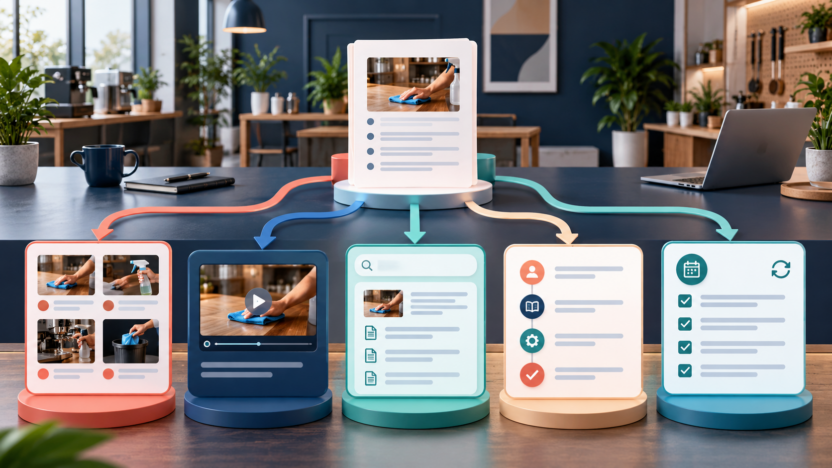
The best AI SOP generator tools do more than turn a prompt into a numbered list. They capture how work is actually performed, convert recordings or descriptions into clear steps, add screenshots or video, support review and version control, and make approved procedures easy for employees to find and follow.
Quick answer: Scribe is the best choice for quickly turning browser and desktop workflows into step-by-step screenshot guides. Guidde is best for polished video SOPs with AI voiceovers and multiple export formats. Whale is the strongest all-in-one option for small businesses that want SOP creation, training, quizzes, and conversational search. Trainual is best for role-based onboarding and accountability around procedures. Process Street is best when an SOP needs to become a repeatable workflow with forms, approvals, due dates, and automation.
No generator can verify that a procedure is correct for your business. Start with a real process owner, record the current workflow, remove sensitive data, test the instructions with someone unfamiliar with the task, and assign an owner and review date before publication.
Best AI SOP Generator Tools at a Glance
| Tool | Best for | Main strength | Main limitation |
|---|---|---|---|
| Scribe | Fast visual step-by-step guides | Automatically captures clicks and screenshots | Less focused on training programs and executable workflows |
| Guidde | Video SOPs and customer-facing how-to content | AI narration, editing, branding, and exports | Video-first output may be more than a simple internal SOP needs |
| Whale | SOP library plus employee training | AI writer, recorder, search, quizzes, and knowledge governance | Paid team plans cost more than standalone capture tools |
| Trainual | Onboarding and role-based training | Accountability, assignments, paths, signatures, and knowledge | Sales-led pricing and heavier implementation |
| Process Street | Recurring operational workflows | Turns procedures into forms, approvals, tasks, and automation | More process-management platform than lightweight guide recorder |
Pricing was last checked on October 2, 2026 from official vendor pricing and help pages. Prices may vary by billing cycle, creator seats, members, usage, AI credits, add-ons, or negotiated terms.
What Is an AI SOP Generator?
An AI SOP generator helps create a standard operating procedure from a prompt, screen capture, video, document, or existing workflow. Depending on the product, AI may draft steps, clean up writing, generate screenshots, create narration, build quizzes, recommend structure, redact sensitive information, or convert the SOP into a checklist that employees run repeatedly.
Small businesses usually need one of three approaches:
1. Capture tools record a person completing a task and create a visual guide. Scribe and Guidde lead here. 2. Knowledge and training platforms store procedures, assign learning, and track understanding. Whale and Trainual fit this model. 3. Workflow platforms turn a procedure into an active process with forms, approvals, conditions, and due dates. Process Street is the strongest example in this guide.
Choosing the wrong category creates friction. A video tool will not automatically manage approvals for a monthly close, and a workflow platform may be excessive for a two-minute browser task.
Our Evaluation Criteria
We evaluated each tool on the factors that determine whether an SOP stays useful after it is created:
- Capture speed: how easily the product records a real browser, desktop, or video process.
- AI assistance: drafting, rewriting, narration, conversion, search, quizzes, and workflow generation.
- Editing quality: control over steps, screenshots, annotations, branding, and sensitive information.
- Publishing and access: links, embeds, exports, authenticated viewers, and mobile access.
- Governance: ownership, approvals, permissions, version history, review cycles, and auditability.
- Training: assignments, quizzes, completion tracking, signatures, and role-based learning.
- Workflow execution: forms, due dates, conditional logic, approvals, integrations, and recurring runs.
- Pricing and fit: the real plan needed for creators, viewers, security, and exports.
1. Scribe: Best for Fast Screenshot-Based SOPs
Scribe records a user completing a process, then automatically creates a step-by-step guide with screenshots and written instructions. This is useful for software procedures where manually taking screenshots, cropping them, and describing each click would take longer than completing the task itself.
Scribe Pro adds desktop capture, unlimited guides, screenshot editing, redaction, branding, and exports such as PDF, Word, HTML, Markdown, and Confluence formats. Teams can keep guides private, share them inside a workspace, or publish a link.
Practical use cases
- Document how to create a customer record in a CRM.
- Show staff how to issue a refund in an ecommerce system.
- Create a visual checklist for publishing a blog post.
- Record a desktop accounting process that moves between browser and app windows.
- Build customer support instructions for account settings.
Pricing
Scribe offers a free Basic option and paid Pro plans for individuals and teams. Official billing documentation lists Pro Personal at $35 per user monthly and Pro Team at $85 per month for up to five users, then $17 per additional user monthly. Annual billing provides an advertised discount. Enterprise supports creator and viewer license types plus stronger administration and security.
Pros
- Very fast visual documentation from a real workflow.
- Strong screenshot editing, annotation, and redaction on Pro.
- Useful export formats for existing knowledge bases.
- Easy to update individual steps without recreating a full video.
Cons
- A captured process can preserve an inefficient workflow unless reviewed.
- Pro applies to every member of a Pro team; mixed licenses require Enterprise.
- Training, quizzes, and recurring workflow execution are not the core focus.
Best choice when: the main bottleneck is creating clear software instructions with screenshots.
2. Guidde: Best for AI Video SOPs
Guidde turns screen capture into polished video documentation. It can generate a storyline, captions, AI voiceovers, transitions, and branded output. Guides can be shared by link or exported as video, presentation, or PDF depending on the plan. Business and Enterprise add desktop capture, analytics, privacy controls, translation, and governance.
This format works well when motion and sequence matter. A video can show how a user moves through a complex interface, while text and PDF exports provide a faster reference for someone who already understands the process.
Practical use cases
- Create narrated onboarding videos for a SaaS product.
- Explain a multi-screen customer-support workflow.
- Turn a recorded product update into training for a remote team.
- Produce localized visual instructions for global users.
- Build customer-facing how-to videos without a video production team.
Pricing
Guidde has a Free plan for up to 25 how-to videos. Its official pricing page lists Pro at $19 per creator per month billed annually or $29 monthly, and Business at $39 per creator per month billed annually or $59 monthly. Enterprise uses custom pricing. Viewers can be added without a paid creator seat.
Pros
- Combines capture, editing, narration, branding, and export.
- Free plan gives small teams a practical trial.
- Paid plans support unlimited guides and professional presentation.
- Enterprise adds translation, SCORM, SSO, review, and version controls.
Cons
- Video takes longer to scan than a short checklist.
- Advanced privacy, localization, and governance require higher tiers.
- AI narration still needs pronunciation and factual review.
Best choice when: employees or customers benefit from watching a process rather than reading steps alone. See our full Guidde review for a deeper look.
3. Whale: Best All-in-One SOP and Training Platform
Whale combines process documentation, a step recorder, video-to-guide conversion, an AI SOP writer, checklists, training flows, quizzes, conversational search, and knowledge-health features. It is designed for a company that wants one home for procedures and employee enablement rather than separate capture, wiki, and training tools.
Its AI assistant, Ask Alice, helps employees find answers from the organization's content. Knowledge-health and review features help owners notice incomplete or stale material. Paid plans expand training, permissions, version history, analytics, voiceovers, and enterprise administration.
Practical use cases
- Build role-specific onboarding paths for operations staff.
- Convert a narrated screen recording into a written SOP.
- Assign compliance procedures and verify completion with quizzes or signatures.
- Let employees ask questions across approved procedures.
- Track which SOPs are old, incomplete, or rarely used.
Pricing
Whale offers a Free plan with one creator and up to 10 members. Scale is listed at $249 per month billed yearly with three creators; additional creators cost $29 monthly. Advance is $499 per month billed yearly with five creators; additional creators cost $39 monthly. Enterprise is custom-priced. AI credits vary by plan.
Pros
- Covers creation, storage, search, training, and governance.
- AI writer, video conversion, quizzes, and health scores reduce separate tools.
- Creator/member licensing can fit teams with few authors and many learners.
- Stronger lifecycle controls than a basic recorder.
Cons
- Higher starting cost than standalone capture tools.
- Teams need content owners and a rollout plan to justify the platform.
- AI credits and creator limits should be modeled against usage.
Best choice when: a small or growing business wants procedures to support onboarding and ongoing training in one system.
4. Trainual: Best for Role-Based Onboarding and Accountability
Trainual combines documentation, processes, training, roles, accountability, and company knowledge. AI-assisted documentation helps teams draft and improve content, while assignments, paths, completion tracking, e-signatures, quizzes, and org charts connect procedures to employee responsibilities.
This makes Trainual a strong fit when the main goal is not simply writing SOPs but ensuring that the right people receive and acknowledge them. It can be especially valuable for multi-location businesses, franchises, service companies, and teams with repeatable roles.
Practical use cases
- Build onboarding paths for sales, support, and operations roles.
- Assign mandatory policy acknowledgments with e-signatures.
- Combine procedures with videos, quizzes, and completion reminders.
- Define responsibilities alongside the processes each role owns.
- Maintain standardized training across locations.
Pricing
Trainual currently uses sales-led pricing. Its official page presents Core, Pro, Premium, and Enterprise plans but directs buyers to request a demo and quote. Pricing varies by team size and required features. Ask for a written proposal covering users, storage, signatures, SCORM, SSO, implementation, and support.
Pros
- Strong connection between procedures, roles, and training accountability.
- Assignments, paths, quizzes, signatures, and reminders support adoption.
- Built-in recording and multimedia content reduce tool switching.
- Premium and Enterprise provide stronger customization and security.
Cons
- No simple public fixed price for direct comparison.
- More implementation work than a lightweight SOP generator.
- May be excessive when the team only needs a few internal guides.
Best choice when: the business needs to prove that employees received, completed, and understood process training.
5. Process Street: Best for Executable SOP Workflows
Process Street treats an SOP as something people run, not only read. Teams build workflows with tasks, forms, data, conditions, approvals, due dates, roles, and integrations. Each time the process occurs, a new workflow run guides participants and records progress.
Process AI can generate a workflow from a description, create tasks and content, process data, draft emails, and support AI tasks within a workflow. This is useful for repeatable operations where missed approvals or incomplete information cause real risk.
Practical use cases
- Run employee onboarding with assigned owners and due dates.
- Manage client intake with forms, approvals, and document collection.
- Standardize invoice approval and escalation.
- Execute a recurring quality-assurance checklist.
- Create a month-end close process with conditional tasks.
Pricing
Process Street offers Startup, Pro, and Enterprise plans through custom quotes. New accounts receive a 14-day Pro trial. The official pricing page lists unlimited workflows and tasks, while user counts, storage, data records, security, and administration vary by plan.
Pros
- Converts documentation into an accountable recurring process.
- Forms, approvals, conditions, and assignments reduce manual coordination.
- AI can generate and improve workflows and perform tasks.
- Strong fit for compliance-sensitive and cross-functional operations.
Cons
- Custom pricing makes quick cost comparison harder.
- More setup than a screenshot or video guide.
- Employees must learn to run the workflow consistently.
Best choice when: the procedure must collect information, assign responsibility, enforce approvals, and create an audit trail.
Pricing Comparison
| Tool | Entry option | Paid pricing checked | Buying note |
|---|---|---|---|
| Scribe | Free Basic | Personal $35/user monthly; Team $85/month up to 5 users | Pro Team charges all team members; Enterprise adds viewers |
| Guidde | Free up to 25 videos | Pro $19 annual/$29 monthly; Business $39 annual/$59 monthly per creator | Viewers are free; advanced governance is higher-tier |
| Whale | Free: 1 creator, 10 members | Scale $249/month annual; Advance $499/month annual | Model creators, members, and AI credits |
| Trainual | Demo | Custom quote | Price varies by team size and feature scope |
| Process Street | 14-day Pro trial | Custom quote | Compare user roles, workflow volume, data, and security |
The lowest price is not always the lowest cost. A $20 capture tool can be expensive if managers still chase completions manually. A larger platform can be wasteful if the company publishes five guides a year. Estimate creators, viewers, procedures, updates, training assignments, and recurring workflow runs before buying.
How to Choose the Right SOP Tool
Choose based on what must happen after the procedure is created:
- Choose Scribe when employees need fast visual instructions for software tasks.
- Choose Guidde when video, narration, branding, and customer-facing education matter.
- Choose Whale when SOPs need a searchable home plus training and knowledge governance.
- Choose Trainual when onboarding, roles, acknowledgments, and completion accountability lead the project.
- Choose Process Street when the SOP must become a repeatable operational workflow.
Before a trial, select three real processes: one short browser task, one cross-department procedure, and one compliance-sensitive workflow. Give each draft to an employee who did not create it. Record where they hesitate, what information is missing, and whether they can complete the task without private coaching.
Teams building broader internal knowledge can also compare the best AI knowledge base tools and our Guru review. For simple reusable project context, see ChatGPT Projects vs Claude Projects.
Final Recommendation
Scribe is the best starting point for most small businesses that want to document software procedures quickly. Guidde is the better choice for polished video instructions. Whale offers the most complete combination of SOP creation, search, training, and lifecycle governance. Trainual is strongest for structured onboarding and accountability, while Process Street is the right choice for procedures that employees must actively run.
Do not select a tool based on AI drafting alone. The durable value comes from accurate capture, clear ownership, safe redaction, employee testing, easy access, review dates, and evidence that the process is followed.
FAQs
Can AI write an SOP automatically?
AI can create a useful first draft from a prompt, recording, or existing document. A process owner should verify every step, decision, permission, safety requirement, and exception before publication.
What is the easiest AI SOP generator?
Scribe is one of the easiest options for software workflows because it records actions and creates visual steps automatically. Guidde is similarly approachable when the desired output is video.
Which SOP tool is best for employee training?
Whale and Trainual are stronger than basic recorders for assignments, quizzes, progress, and knowledge retention. Trainual emphasizes role-based accountability; Whale combines documentation with searchable knowledge and training.
Which tool is best for recurring processes?
Process Street is designed for executable workflows with tasks, forms, due dates, approvals, and automation. It is better than a static guide when each run must be tracked.
How should sensitive information be handled in SOP screenshots?
Use sample accounts where possible and redact customer, employee, financial, credential, and confidential data. Review every captured image before sharing the guide.
How often should an SOP be reviewed?
Assign an owner and review after any major system or policy change. High-risk or frequently changing procedures need a scheduled review cycle; stable procedures can be reviewed less often.
What should every SOP include?
Include purpose, owner, audience, prerequisites, required access, ordered steps, decision points, exceptions, expected result, escalation path, effective date, and next review date.