Quick Verdict
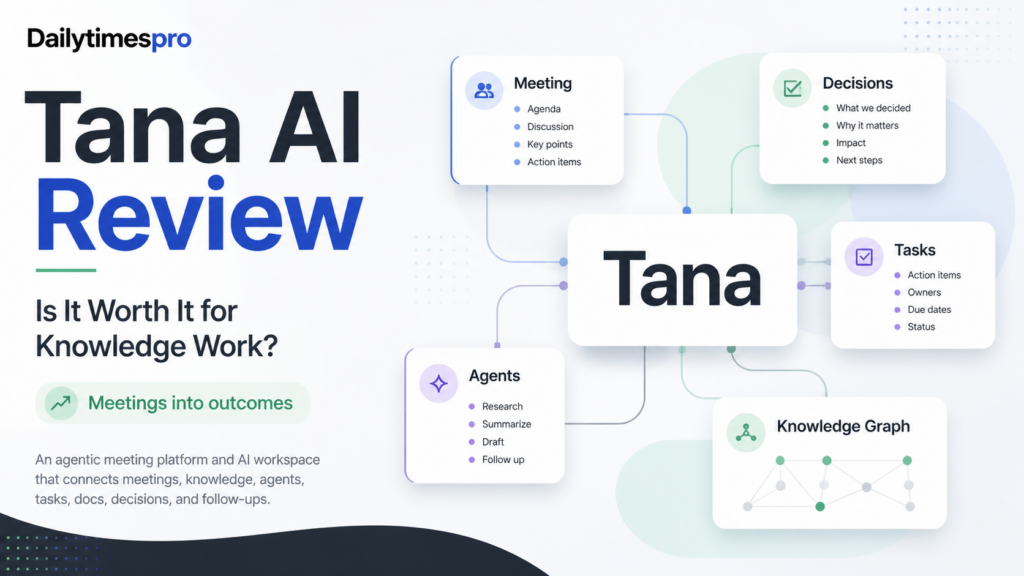
Tana AI is worth considering if your meetings create too much follow-up work and your team needs a better way to turn conversations into decisions, documents, tasks, and connected context. Tana now positions itself as an agentic meeting platform where AI agents work during native video calls, while Tana Outliner remains a separate note-taking outliner product.
The strongest reason to consider Tana is its meeting-to-workflow angle. It is not just a transcript recorder. The official product page describes connected knowledge across docs, projects, tasks, chats, decisions, contacts, and meetings. That makes it most interesting for teams where meetings drive actual work: product reviews, client calls, customer success check-ins, investor updates, sales calls, hiring loops, and leadership meetings.
Tana is not the best fit if you only need a simple note app, a basic meeting recorder, or a traditional project management board. It is also not the safest choice for teams that need every workflow to be simple on day one. The platform is more valuable when your team is willing to define how meeting notes, decisions, tasks, and agents should connect.
Best For
Tana is best for founders, consultants, product teams, customer success teams, sales teams, and knowledge workers who spend a meaningful part of the week in meetings. It is especially useful when the cost of meetings is not only time spent on the call, but the extra work after the call: writing summaries, filing issues, drafting follow-ups, updating account notes, creating briefs, and chasing owners.
In a typical small business workflow, a founder could use Tana to capture weekly leadership meetings, connect decisions to priorities, and turn follow-up items into tasks. A consultant could use it to keep client context updated after advisory calls. A product team could use it to draft PRDs, log decisions, and file product issues from design reviews or customer conversations.
Tana can also fit teams that already use AI assistants but need more shared context. Instead of asking a general chatbot to summarize pasted notes, the team can keep meetings, decisions, tasks, and documents closer together.
Not Best For
Tana is not ideal for teams that simply want low-cost transcription with minimal setup. Dedicated AI meeting assistants may be easier if the only job is recording, summarizing, and sending meeting notes.
It may also be too specialized if your team wants a broad all-purpose work management system first. For task boards, project templates, and daily team operations, our Taskade AI review may be more relevant. For conventional project management with AI features, our Asana AI review gives a different angle.
Tana is also not a fit for teams that do not want AI involved in meetings. The value proposition depends on allowing agents to capture context and help produce outcomes while work is being discussed.
Our Evaluation Criteria
This review uses practical criteria for small teams choosing an AI meeting and knowledge-work platform:
| Criteria | What Matters |
|---|---|
| Meeting capture | Whether meetings can become useful summaries, decisions, and follow-ups |
| Context quality | Whether meeting outputs connect to tasks, docs, projects, contacts, and prior decisions |
| AI agent usefulness | Whether agents can do practical work during or after meetings |
| Setup effort | Whether teams can configure workflows without heavy administration |
| Collaboration | Whether the platform supports shared team context rather than personal notes only |
| Integrations | Whether Tana can connect to work tools such as calendars, issue trackers, CRM, and communication systems |
| Pricing clarity | Whether official plan limits and prices are clear enough for buying decisions |
| Small team value | Whether the product reduces follow-up work enough to justify another workspace tool |
What Is Tana AI?
Tana is an agentic meeting platform from Tana Inc. Its official homepage says AI agents can work during native video calls and that meetings can connect with the rest of the team's work. The same page separates the meeting platform from Tana Outliner, which is the company's note-taking outliner with nodes and Supertags.
For buyers, this distinction matters. Older discussions about Tana often focus on outliners, knowledge graphs, Supertags, and personal knowledge management. The current Tana product messaging is more meeting-centered. It emphasizes video calls with AI, connected knowledge, customizable agents and skills, security controls, and integrations with tools such as MCP, GitHub, Slack, HubSpot, Linear, Jira, Google Calendar, Outlook, Codex, Cursor, Claude Code, Gemini, and others listed on the official site.
The core promise is that meeting context should not disappear into a transcript. Tana aims to capture what happened, connect it to existing knowledge, and help agents produce useful work such as action items, documents, issues, briefs, summaries, and follow-ups.
Key Features
Agentic Meetings
Tana's primary feature is the meeting itself. The official homepage describes native video calls where AI agents capture decisions and act while the conversation is happening. This is useful for teams that lose time after meetings reconstructing what was decided.
In a product meeting, that could mean turning a design decision into a written decision log and a product task. In a customer success call, it could mean updating account notes and assigning follow-up ownership. In a sales call, it could mean drafting a follow-up email and keeping deal context connected.
The practical value depends on meeting quality. If the team talks through decisions clearly, Tana has better material to work with. If meetings are vague, no AI tool can fully fix the underlying workflow.
Connected Knowledge
Tana's official product page describes connected knowledge across docs, projects, tasks, chats, decisions, contacts, and meetings. That is the part that separates it from a simple recorder.
For knowledge workers, context usually matters more than the transcript alone. A meeting summary is helpful, but a meeting summary linked to the relevant project, customer, issue, decision, and next action is more useful. Tana's knowledge graph direction is strongest when the same team keeps recurring conversations inside the platform over time.
This is also where teams need discipline. Connected knowledge becomes valuable when the team uses consistent structure. Without that structure, any knowledge workspace can become another place where notes accumulate without being used.
Customizable Agents and Skills
Tana's homepage says agents and skills can be configured with memory and tools to do real work. Examples shown on the official site include meeting prep, copywriting, executive briefs, customer research, bug triage, deal follow-up, OKR advice, and similar workflows.
For a SaaS team, this could support weekly product reviews, customer interview synthesis, backlog grooming, launch planning, and leadership updates. For a consultant, it could support client briefs, research follow-ups, and structured recommendations. For a founder, it could support investor updates, hiring debriefs, and board-prep material.
The best use cases are repeatable. A one-off meeting summary is useful, but a repeatable agent skill that always creates the same kind of useful artifact is where Tana becomes more than a meeting recorder.
Integrations and MCP
Tana's official pages mention integrations with work tools and full MCP on paid plans. The homepage lists examples including GitHub, Slack, HubSpot, Linear, Jira, Google Calendar, Outlook, Codex, Cursor, Claude Code, and Gemini. The pricing page also says Pro includes integrations and full MCP, while Business adds stronger security and control features.
For teams, integrations are important because meeting outcomes usually belong somewhere else. A product issue may need to go to Jira or Linear. A sales follow-up may need to connect with HubSpot. A calendar event may need to stay in sync. A code-related action may connect with developer tools.
Teams should avoid connecting everything at once. Start with the integration that removes the most manual follow-up work.
Security and Admin Direction
The official homepage lists security and control signals such as SOC 2 Type 2, no training on customer data, GDPR compliance, SSO, MCP and API first, portable data, and other controls. The pricing page lists Business features such as SAML SSO, advanced security and controls, audit logs, custom DPA, and data residency or retention policy control.
For small teams, this means Tana is not presenting itself only as a consumer note app. For larger teams, the important buying question is which plan includes the security controls they need and whether those controls match internal requirements.
Tana AI Pricing
Pricing last checked on September 1, 2026.
Tana's official pricing page lists these public plans at the time checked:
| Plan | Official Listed Price | Main Capacity Notes | Best Fit |
|---|---|---|---|
| Free | $0 | 5 meetings a month with AI transcripts and summaries, 1 calendar, view and edit content, 50 AI queries | Individuals trying Tana's meeting workflow |
| Pro | Early bird $20 per user/month, regular $30 shown | 20x more AI than Free, unlimited hosted meetings, botless meeting agent for Zoom, Teams, and Google Meet, integrations and full MCP | Professionals and small teams that want meeting agents and connected workflow output |
| Max | Early bird $80 per user/month, regular $120 shown | 5x more AI than Pro, dedicated support and onboarding, unlimited agents, skills, and types, integration support | Heavy meeting users and teams where meetings are core work |
| Business | Custom, billed yearly | SAML SSO, advanced security and controls, designated customer success manager, audit logs, custom DPA, data residency and retention policy controls | Organizations needing stronger governance and security controls |
The pricing page also says there is a 30-day free trial with no credit card required, and its FAQ mentions a 60-day refund window for yearly plans. It also says users can top up AI credits with custom amounts when they run out.
For most small teams, Pro is the first serious plan to evaluate because it unlocks the botless meeting agent for Zoom, Teams, and Google Meet, unlimited hosted meetings, integrations, and full MCP. Max is more appropriate when agents and skills become part of daily operating work. Business is mainly for organizations that need security, admin, audit, and policy controls.
Real Use Cases
Product and Engineering Meetings
A product team could use Tana to turn design reviews, customer calls, standups, and roadmap discussions into PRDs, action items, decision logs, and issue-tracker updates. The official homepage specifically references product and tech workflows such as filing issues, drafting PRDs, logging decisions, and sharing user insights.
Customer Success and Account Management
A customer success team could use Tana for renewal calls, onboarding sessions, QBR notes, risk tracking, and follow-up ownership. The official homepage references account notes, renewal risks, follow-ups, and owner updates as customer-success use cases.
Consulting and Advisory Work
Consultants can use Tana to keep client context current across repeated calls. A consultant could leave a strategy session with updated client notes, a decision summary, next-step tasks, and a draft brief. This is useful when each client has a long-running context that needs to remain connected.
Founder and Leadership Workflows
Founders can use Tana for investor updates, hiring loops, board prep, leadership meetings, and weekly operating reviews. A founder does not only need meeting notes; they need decisions, owners, context, and follow-up material that can be reused in the next meeting.
Sales Follow-Ups
Sales teams can use Tana to keep call context connected to deal notes and next steps. Tana's official homepage references CRM updates, investment memos, and follow-ups in role-based examples. For sales teams that mainly need meeting recording and coaching, dedicated sales meeting tools may still be worth comparing.
Knowledge Base Maintenance
Tana can help when meetings produce knowledge that should not stay hidden in transcripts. A team could turn recurring discussions into internal docs, policies, project notes, or decision records. This is most useful when the team agrees where each type of information should live.
Pros and Cons
| Pros | Why It Matters |
|---|---|
| Strong meeting-to-outcome positioning | Tana focuses on turning meetings into work products, not only transcripts |
| Connected knowledge model | Meetings, docs, tasks, decisions, contacts, and projects can build on each other |
| Customizable agents and skills | Teams can create repeatable workflows for summaries, briefs, follow-ups, and research |
| Integrations and MCP support | Meeting outcomes can connect to project, CRM, calendar, and developer tools |
| Clear official pricing tiers | Free, Pro, Max, and Business give buyers a visible upgrade path |
| Strong role-based use cases | Product, consulting, customer success, sales, founders, and creative teams are all addressed on the official site |
| Cons | Why It Matters |
|---|---|
| More specialized than a basic meeting recorder | Teams only needing transcripts may prefer a simpler tool |
| Workflow design still matters | Poorly structured meetings and unclear ownership will reduce value |
| Pro starts at a higher price than many simple note apps | Buyers need to justify the cost through reduced follow-up work |
| Business controls are custom-priced | Larger teams will need sales contact for exact organization-level pricing |
| Tana Outliner and Tana meeting platform can be confusing | Buyers should know which product and pricing page they are evaluating |
Tana vs Alternatives
| Tool | Best For | Main Strength | Limitation |
|---|---|---|---|
| Tana | Teams that want meetings, agents, decisions, and connected knowledge in one workflow | Agentic meeting platform with connected context and role-based workflow output | May be too specialized if the team only wants simple transcription |
| Granola | Individuals and teams that want polished meeting notes | Lightweight meeting note workflow | Less focused on becoming a full agentic work system |
| Read AI | Teams focused on meeting summaries and visibility | Meeting analytics and summary workflow | May not fit teams that want a deeper knowledge graph style workspace |
| Notion AI | Teams that need docs, databases, and knowledge management | Flexible workspace and documentation | Meeting-native agent workflow is not the same as Tana's core positioning |
| Taskade | Teams that want project boards, agents, automations, and lightweight apps | Broad AI productivity workspace | Less specifically centered on agentic meetings |
If you are mainly comparing AI meeting assistants, our Read AI review and Granola AI review are useful next reads. If you want broader workspace coverage, compare Tana with best AI project management tools.
What Most Teams Should Watch Before Choosing Tana
The key question is whether meetings are where your team's important work starts. If meetings are just status updates, Tana may be more tool than you need. If meetings create decisions, customer context, action items, briefs, product changes, and follow-ups, Tana's structure makes more sense.
Teams should also separate meeting capture from workflow output. Many tools can summarize a call. Fewer tools are built around turning the call into the next working artifact. Tana's value is strongest when it reduces the work after the meeting, not just the note-taking during the meeting.
Start with one high-value recurring meeting: weekly product review, customer success call, sales pipeline review, investor update, or client strategy session. Define the expected output before using agents heavily. For example, the output might be a decision log, three action items with owners, a customer summary, a follow-up email, or a draft PRD.
Final Recommendation
Tana AI is a strong option for teams where meetings produce a large amount of knowledge work. It is especially useful for founders, consultants, product teams, customer success teams, and sales teams that want calls to produce decisions, tasks, documents, and follow-ups while context stays connected.
Choose Tana if you want an agentic meeting platform and you are willing to structure recurring workflows around meeting outcomes. Consider alternatives if you only need a low-friction meeting recorder, a simple notes app, or a traditional project management tool.
For small teams, Pro is the plan to evaluate first because the official pricing page lists unlimited hosted meetings, botless meeting agent support for Zoom, Teams, and Google Meet, integrations, and full MCP. Max and Business are better suited to heavier usage, onboarding needs, security controls, and organization-level governance.
FAQs
Is Tana AI free?
Yes. Tana's official pricing page lists a Free plan at $0. At the time checked, it included 5 meetings a month with AI transcripts and summaries, 1 connected calendar, viewing and editing content, and 50 AI queries.
What is Tana best used for?
Tana is best used for meetings that need to become decisions, tasks, briefs, summaries, follow-ups, and connected knowledge. It fits teams where calls create real work and where losing context after meetings creates delays.
Is Tana the same as Tana Outliner?
No. Tana's current homepage says the agentic meeting platform is separate from Tana Outliner, the company's note-taking outliner product. Buyers should review the correct product and pricing page before choosing a plan.
Does Tana work with Zoom, Teams, and Google Meet?
Tana's official pricing page says Pro includes a botless meeting agent for Zoom, Teams, and Google Meet. The homepage also references calendar and meeting integrations. Teams should match meeting requirements to the plan they choose.
Does Tana support integrations?
Yes. Tana's official site lists integrations and tool connections including MCP, GitHub, Slack, HubSpot, Linear, Jira, Google Calendar, Outlook, and developer tools. The pricing page says Pro includes integrations and full MCP.
Is Tana good for product teams?
Tana can be a good fit for product teams because meetings often create product decisions, PRDs, issue-tracker updates, customer insight summaries, and roadmap follow-ups. The official homepage specifically references product and tech workflows.
What are the main limitations of Tana?
The main limitations are fit and workflow discipline. Tana is more valuable when meetings produce structured outcomes. It may be unnecessary for teams that only want basic transcription or personal note capture.
Who should choose Tana AI?
Choose Tana AI if your team spends serious time in meetings and wants AI agents to help turn those conversations into usable work. It is strongest when meetings, decisions, tasks, docs, and context need to stay connected over time.