Quick Verdict
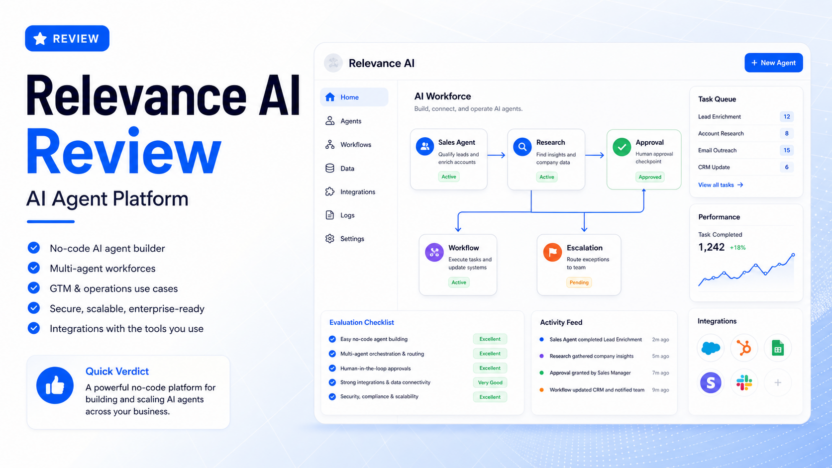
Relevance AI is worth considering if your team wants to build and run AI agents for real business workflows without starting from a developer-only API project. It is strongest for teams that need agents to research accounts, enrich leads, route tasks, summarize records, update tools, and hand off exceptions to humans. It is less suitable for a solo user who only needs a simple chatbot, a one-off writing assistant, or a basic automation between two apps.
The most useful way to think about Relevance AI is not as another chat app. It is closer to an AI workforce builder: you create agents, give them tools, connect them to data and triggers, and define when a person should review or approve the result. That makes it more powerful than a generic assistant, but it also means setup quality matters.
For small businesses, Relevance AI makes the most sense when one team already has a repeated operational process that is too manual for staff but too nuanced for a simple automation rule. A sales team researching leads, a customer success team preparing account briefs, a marketing team organizing campaign tasks, or an operations team routing internal requests could all get value if they are ready to document the workflow carefully.
Pricing last checked on August 24, 2026. Relevance AI publishes Free, Pro, Team, and Enterprise tiers in its official pricing documentation. Plan details, action allowances, vendor credits, user limits, and Enterprise terms can change, so buyers should review the live pricing page before purchase.
Related Dailytimespro guides that may help with this decision include our Zapier vs Make comparison, Make vs Relay.app comparison, Best AI workflow automation tools, and How to use AI for sales call summaries.
Best For
Relevance AI is best for teams that want to move beyond prompt-based assistance and build repeatable agent workflows. It fits revenue operations, sales, customer success, marketing operations, recruiting, and business operations teams that already know which recurring task they want to improve.
It is especially useful when the workflow needs several steps. For example, a sales workflow may need account research, contact enrichment, qualification, CRM updates, Slack notifications, and a human approval point. A normal chatbot can answer questions about one step. A stronger agent workflow can coordinate the steps and record the outcome.
It is also a good fit for teams that care about ownership. Relevance AI positions its product around agents that business users can create and operate, not only engineering teams. That matters when the people closest to the workflow need to adjust instructions, review outputs, and understand why an agent escalated a task.
Not Best For
Relevance AI is not the right starting point if your team has not chosen a specific workflow. If the goal is simply to “try AI,” a lighter tool may be faster. A general assistant such as ChatGPT, Claude, Gemini, or Perplexity can be enough for research, drafting, summarizing, and brainstorming without building a full agent system.
It may also be more platform than a small team needs if the task is only a single app-to-app automation. If you just want new form submissions to create CRM records or Slack alerts, a traditional automation platform may be easier. Our Zapier vs Make comparison is a better place to start for that type of simple trigger-action workflow.
Teams with strict security, procurement, and data rules should review the official security documentation before connecting sensitive data. Relevance AI states that it is SOC 2 Type II compliant and supports security controls, but each buyer still needs to confirm data residency, retention, access control, and internal approval requirements for their own environment.
What Is Relevance AI?
Relevance AI is an AI agent platform for building, connecting, and operating specialist agents. The company describes the product around AI workforces: collections of agents that can take actions, use tools, connect to workflows, and support teams across sales, customer success, marketing, HR, and operations.
In practical terms, the platform is designed for work that has structure but still needs judgment. A team can define what an agent should do, which tools it can use, what information it should read, when it should escalate, and how the completed task should be handled. That is different from a static template because the agent can follow instructions across multiple steps.
The official product pages emphasize no-code agent creation, multi-agent workflows, business-team ownership, and production-oriented operation. The documentation also includes integrations and tool steps for common apps such as Google Sheets and Google Calendar, which suggests the platform is designed to work inside existing business processes rather than live in isolation.
Our Evaluation Criteria
This review evaluates Relevance AI using the criteria that matter most to a small or growing business: ease of setup, workflow fit, agent quality, integrations, pricing clarity, human review controls, security posture, scalability, and value for money.
Ease of setup matters because agent workflows are only useful when a non-specialist team can understand and maintain them. A platform can be powerful, but if every small change requires an engineer, adoption slows down.
Workflow fit matters because AI agents should improve a repeated process, not create a new disconnected workspace. The best implementation has a clear input, a clear owner, a review point, and a clear output destination.
Agent quality matters because business teams need reliable behavior. An agent should follow instructions, use the right data, escalate uncertain situations, and avoid making unsupported decisions. For high-risk tasks, human approval should remain part of the process.
Pricing clarity matters because agent platforms often combine seats, actions, credits, add-ons, and usage. Relevance AI publishes plan tiers and usage elements, but buyers should still map expected monthly task volume before committing.
Security matters because agents may touch CRM records, lead data, customer notes, documents, or operational systems. Relevance AI’s official security page says the platform is SOC 2 Type II compliant, supports GDPR alignment, and provides controls such as data residency options and enterprise retention features. Buyers should validate those details against their own compliance requirements.
Key Features
No-Code Agent Builder
The core appeal of Relevance AI is that teams can build agents without turning every workflow into a custom software project. The official messaging focuses on business teams creating and operating agents in plain language. For a small business, this can reduce dependence on engineering help when the workflow is owned by sales, operations, or customer success.
No-code does not mean no planning. The team still needs to define what the agent should do, what data it can access, what result is acceptable, and when a person should step in. The best results usually come from a specific workflow brief rather than a broad instruction such as “handle sales research.”
Multi-Agent Workforces
Relevance AI’s strongest idea is the AI workforce model. Instead of one assistant trying to do everything, a team can create specialized agents for different tasks. One agent may gather account information, another may qualify a lead, another may prepare a message draft, and another may escalate exceptions.
This can be useful when a workflow naturally has stages. In a typical sales process, research, enrichment, outreach preparation, CRM updates, and manager review are separate jobs. Splitting them into focused agents can make the workflow easier to monitor.
Tools, Triggers, and Integrations
Agent platforms become more valuable when they connect to the tools teams already use. Relevance AI documentation includes tool steps and workflow features for connecting agents with apps and actions. That makes the platform more practical for operations work because the output can move into spreadsheets, calendars, messaging tools, or other systems.
A small business should evaluate integrations by workflow, not by total count. The right question is whether the platform can read the source data, perform the useful step, and write the approved result into the system where the team already works.
Human-in-the-Loop Review
The official use-case and comparison pages highlight escalation and approval patterns. This is important because many business workflows should not be fully autonomous. A lead research agent can prepare context, but a sales manager may still approve the final outreach. A support agent can draft a response, but a human may review refund, billing, or account-risk cases.
Human review is not a weakness. It is often the control that makes AI agents usable in real businesses.
Security and Governance Notes
Relevance AI’s official security documentation states that the platform is SOC 2 Type II compliant, supports GDPR, offers data residency choices, and includes enterprise data-retention controls. It also says customer data is not used for model training unless there is a specific partnership agreement.
Those details make the platform more credible for serious business use, but buyers should still review the latest security documentation and procurement terms before connecting sensitive systems.
Practical Use Cases
Sales Research and Lead Enrichment
A SaaS team could use Relevance AI to research inbound leads before sales outreach. An agent might gather company context, identify industry signals, summarize likely needs, and prepare a short account brief. Another agent could route high-fit leads to a sales rep while sending lower-priority leads into a nurture workflow.
This is useful when the team already receives enough leads that manual research slows response time. It is less useful when lead volume is low or when the sales motion requires highly personal research for every account.
Customer Success Account Briefs
A customer success team could use agents to prepare renewal or account-review notes. The workflow might collect recent activity, support history, open tasks, and product usage notes, then produce a manager-ready summary. A human CSM would still review the brief before using it with a customer.
The value here is consistency. Instead of each team member building account notes differently, the agent can follow a standard process and make gaps visible.
Marketing Operations
A marketing team could use Relevance AI to organize campaign research, create first-draft task briefs, enrich target-account lists, or route campaign requests. The agent should not replace brand review or strategy, but it can reduce the manual work around gathering inputs and preparing structured outputs.
For example, an operations lead could define an agent that reviews a request form, checks required fields, assigns a campaign type, and sends missing information back to the requester.
Internal Operations and Reporting
An operations team could use agents to update spreadsheets, prepare weekly summaries, classify internal requests, or move approved tasks into a project system. This is where agent workflows can be more useful than standalone chat because the output needs to land in a business system.
In a typical small business workflow, the agent should be responsible for preparation and routing. A person should remain responsible for judgment, exceptions, and final approval.
Pricing
Pricing last checked on August 24, 2026. According to Relevance AI’s official pricing documentation, the platform includes Free, Pro, Team, and Enterprise tiers. At the time checked, the documentation listed Free at $0 per month, Pro from $19 per month on annual billing or $29 monthly, Team from $234 per month on annual billing or $349 monthly, and Enterprise as custom.
The same pricing documentation describes usage elements such as Actions, Vendor Credits, workforces, build users, task history, and premium triggers. That means the real cost depends not only on the subscription tier but also on how many tasks the team runs, which vendor credits are consumed, and which plan limits apply.
| Plan | Best fit | Official pricing status | Key buying note |
|---|---|---|---|
| Free | Exploring the platform | Publicly listed | Good for learning before connecting important workflows |
| Pro | Solo GTM operators | Publicly listed | Useful when one operator wants meaningful task volume |
| Team | Teams building at scale | Publicly listed | Better for shared workflows and multiple builders |
| Enterprise | Organization-wide AI workforces | Custom | Requires sales conversation and security/procurement review |
Do not choose a plan only by monthly price. Estimate the number of tasks, actions, users, connected workflows, and approval steps the team expects to run each month. If the workflow becomes central to sales or operations, usage assumptions matter more than the entry price.
Relevance AI Pros and Cons
| Pros | Why it matters |
|---|---|
| Built for AI agents, not only chat | Better fit for repeated operational work |
| No-code positioning | Business teams can own more of the workflow |
| Multi-agent workflow model | Complex processes can be split into specialized agents |
| Useful GTM and operations use cases | Good fit for sales, CS, marketing, HR, and ops teams |
| Human approval and escalation patterns | Helps teams keep control over important decisions |
| Official security documentation | Helps with procurement and risk review |
| Cons | Why it matters |
|---|---|
| Requires workflow design | Weak inputs and vague instructions will produce weak workflows |
| May be too much for simple automations | Some teams only need Zapier, Make, or a basic assistant |
| Pricing depends on plan and usage | Buyers should model actions, credits, and users before scaling |
| Not ideal for one-off writing or research | General AI assistants are faster for lightweight tasks |
| Enterprise needs may require sales review | Procurement, security, and custom terms can slow adoption |
Relevance AI Alternatives
| Tool | Best for | Main strength | Limitation |
|---|---|---|---|
| Zapier | Simple app automations | Large app ecosystem and easy trigger-action flows | Less focused on multi-agent workforce design |
| Make | Visual automation workflows | Flexible scenario builder for operations teams | Can become complex for non-technical users |
| Lindy | AI assistants for business tasks | Practical AI worker style workflows | Fit depends on available integrations and task type |
| Gumloop | AI workflow automation | Strong for building AI-powered workflows | May require more process thinking than basic automation tools |
| Clay | GTM data workflows | Strong for sales data enrichment and outbound operations | More focused on GTM tables than broad AI workforce operations |
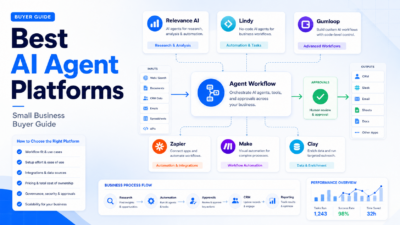
Choose Relevance AI if your main need is agent orchestration across business workflows. Choose Zapier or Make if your main need is straightforward app automation. Consider Clay if your workflow is mostly GTM data enrichment. Consider Lindy or Gumloop if you want a different style of AI workflow builder and the available integrations fit your stack.
Implementation Advice
Start with one workflow that already has clear value. Do not begin by trying to automate an entire department. A good first project might be lead research, weekly account summaries, support request triage, campaign intake, or spreadsheet updates.
Write a short workflow brief before building anything. Define the input, output, owner, review step, connected tools, and failure condition. If the workflow cannot be explained in a few sentences, it is too broad for a first agent project.
Use sample records that represent real work, but avoid unnecessary sensitive data while the process is being designed. Once the workflow looks useful, review security settings, permissions, retention, and approval paths before expanding.
Measure adoption by whether people actually use the output. If team members rewrite everything, ignore the agent, or keep a parallel manual process, the problem may be unclear instructions, poor source data, weak integration, or a workflow that should stay manual.
Final Recommendation
Relevance AI is a strong option for teams that are ready to build AI agents around specific business processes. It is most compelling when the task has multiple steps, needs tool access, benefits from human approval, and repeats often enough to justify setup.
For a small business, the safest path is to start with one narrow workflow and prove that the agent can prepare useful work without creating extra review burden. If that first workflow saves time, improves consistency, or gives the team better operational visibility, Relevance AI can become a serious part of the software stack.
If your needs are still vague, start with a lighter assistant or basic automation tool first. Relevance AI is most valuable after the team knows which process it wants an AI workforce to own.
FAQs
Is Relevance AI good for small businesses?
Yes, but only when the small business has a repeated workflow that justifies setup. Relevance AI is more useful for lead research, account summaries, task routing, and operations workflows than for occasional writing or brainstorming.
Does Relevance AI require coding?
Relevance AI positions itself around no-code agent building for business teams. Some advanced workflows may still benefit from technical help, especially when connecting sensitive data or complex systems.
What is Relevance AI best used for?
It is best used for AI agent workflows such as sales research, lead enrichment, customer success briefs, internal request routing, marketing operations, and task automation with review points.
How much does Relevance AI cost?
Pricing last checked on August 24, 2026. The official documentation listed Free, Pro, Team, and Enterprise tiers, with Pro and Team public prices and Enterprise custom pricing. Review the live Relevance AI pricing documentation before purchase because plan limits and usage details can change.
Is Relevance AI better than Zapier?
They solve different problems. Relevance AI is better for agent-based workflows that require reasoning, task coordination, and approvals. Zapier is often simpler for basic trigger-action automations between apps.
What alternatives should I compare with Relevance AI?
Compare Relevance AI with Zapier, Make, Lindy, Gumloop, and Clay. The right alternative depends on whether you need simple automation, visual workflow building, AI workers, GTM enrichment, or broad agent orchestration.
Can Relevance AI handle customer data securely?
Relevance AI’s official security documentation states that it is SOC 2 Type II compliant and supports GDPR-related controls, data residency options, and enterprise retention features. Buyers should still review the latest documentation and internal security requirements before connecting sensitive systems.
Should I use Relevance AI for fully autonomous decisions?
Use caution. Relevance AI can support autonomous-style workflows, but customer-facing, financial, legal, HR, billing, and high-impact decisions should include human review and clear escalation rules.