Quick Verdict
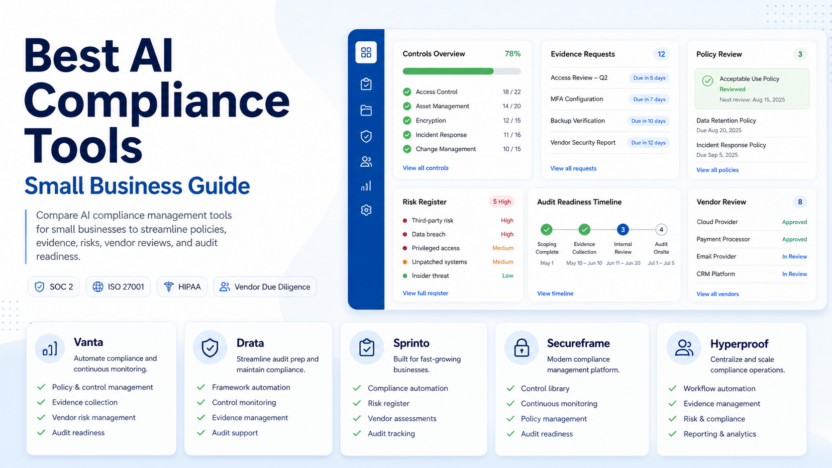
The best AI compliance management tools help small teams collect evidence, monitor controls, prepare audits, and answer security questions without turning compliance into a spreadsheet marathon. For most software, ecommerce, and service businesses, Vanta and Drata are the strongest starting points because they focus on continuous compliance automation for frameworks such as SOC 2, ISO 27001, HIPAA, GDPR, and related trust programs. Sprinto is also strong for fast-moving cloud businesses that want guided audit readiness, while Secureframe and Hyperproof fit teams that need broader governance, risk, and compliance workflows.
This guide is for small business owners, founders, operations leaders, IT managers, and SaaS teams that need a practical shortlist. The right choice depends on the frameworks you need, how many systems you connect, whether you already have an auditor, and how much internal compliance ownership you can maintain.
Best For
AI compliance management software is best for teams that need to prove security controls, manage vendor evidence, prepare for audits, track policy acknowledgments, and respond to customer security reviews. It is especially useful for SaaS companies selling to larger customers, agencies handling sensitive client data, fintech vendors, healthcare-adjacent software teams, and B2B companies that repeatedly answer the same trust questions.
Not Best For
These tools are not a replacement for legal advice, a qualified auditor, or an internal owner who understands your systems. They can automate evidence collection and surface control gaps, but they cannot decide which contractual, regulatory, or industry obligations apply to your business. If your company has no clear security ownership, no documented systems, and no immediate compliance requirement, start by mapping your assets, vendors, data flows, and access controls before buying a platform.
Our Evaluation Criteria
| Criteria | What to check |
|---|---|
| Framework coverage | SOC 2, ISO 27001, HIPAA, GDPR, PCI, CCPA, and other relevant frameworks |
| Evidence automation | Whether the tool connects to cloud, identity, HR, ticketing, endpoint, and code systems |
| AI assistance | Help with questionnaires, policy work, evidence review, and control monitoring |
| Ease of setup | How quickly a small team can connect systems and understand gaps |
| Pricing clarity | Whether official pricing is transparent or quote-based |
| Auditor workflow | Whether the platform helps collaborate with auditors and export evidence |
| Vendor risk | Whether third-party reviews and questionnaires are included |
| Long-term ownership | Whether controls, policies, tasks, and exceptions stay easy to maintain |
Comparison Table
| Tool | Best for | Main strength | Limitation |
|---|---|---|---|
| Vanta | SaaS teams preparing SOC 2, ISO 27001, HIPAA, and trust workflows | Strong continuous monitoring and broad compliance automation | Pricing is usually quote-based, so teams need a sales conversation |
| Drata | Teams that want continuous compliance and audit readiness | Strong automation, control monitoring, and auditor collaboration | Can feel broader than needed for very early teams |
| Sprinto | Cloud-first teams that want guided compliance readiness | Practical workflows for fast-growing SaaS companies | Pricing and fit depend on framework scope and company size |
| Secureframe | Teams that want compliance automation plus security questionnaires | Good mix of framework automation and trust workflows | May be more platform than a very small team needs at first |
| Hyperproof | Teams with broader governance, risk, and compliance needs | Strong for risk, control, evidence, and cross-framework programs | Better fit for more mature compliance operations |
1. Vanta
Vanta is a compliance automation platform designed to help companies build and prove security and compliance programs. Its official site positions the platform around trust management, continuous monitoring, risk, vendor security, questionnaires, and frameworks such as SOC 2, ISO 27001, HIPAA, GDPR, PCI, and others. For a small B2B software company, Vanta is often one of the first names to evaluate because it turns many audit-readiness tasks into connected checks and workflows.
In a typical small business workflow, Vanta can connect to systems such as cloud infrastructure, identity providers, HR tools, code repositories, endpoint tools, and ticketing systems. The platform can then help track whether required controls are passing, whether evidence is available, and which tasks still need attention before an audit. This is more efficient than asking every team member to manually export screenshots and spreadsheet rows when an auditor asks for proof.
Vanta is best for teams that need a structured path to SOC 2 or ISO 27001 and expect customers to ask for security proof. It is not best for teams that only need a simple policy folder or one-time checklist.
Pricing last checked on July 30, 2026. Vanta directs buyers to its official pricing page and typically requires company details for a quote. Pricing may vary based on frameworks, company size, integrations, support needs, and add-ons. Check the official Vanta pricing page for the latest details: https://www.vanta.com/pricing
2. Drata
Drata is another major compliance automation platform for companies that need continuous compliance, audit readiness, risk workflows, and trust operations. Its official site describes automation across security monitoring, policy work, evidence collection, risk, vendor review, and auditor collaboration. Drata is a serious option for SaaS teams that want a more operational compliance system rather than a static documentation project.
A SaaS team could use Drata to monitor user access, check connected cloud resources, prepare audit evidence, assign remediation tasks, and give auditors structured access to evidence. For customer-facing security reviews, Drata can also support trust workflows that reduce repeated manual answers. The practical value is not just passing one audit. The value is keeping controls visible after the audit is done.
Drata is best for teams that want strong automation and expect compliance to become a recurring operating function. It may be more than needed for a very early business that has no enterprise sales pressure and no required frameworks.
Pricing last checked on July 30, 2026. Drata publishes an official pricing page, but buyers generally need to request pricing based on company requirements. Pricing may vary based on framework coverage, integrations, company size, and support. Check the official Drata pricing page for the latest details: https://drata.com/pricing
3. Sprinto
Sprinto is a compliance automation platform aimed at cloud companies that want to move faster through audit readiness. Its official materials focus on continuous compliance, evidence automation, framework support, and security program workflows. For smaller SaaS companies, Sprinto can be attractive because the buying problem is often specific: prepare for SOC 2, ISO 27001, GDPR, HIPAA, or another framework without building everything manually.
In practice, a team could use Sprinto to connect cloud and workplace systems, see missing controls, assign owners, collect evidence, and prepare for audit review. This is useful when compliance is driven by sales requirements. For example, a startup selling to larger customers may need SOC 2 readiness before procurement teams approve the deal. Sprinto can help organize that effort, but the company still needs someone to own policies, access reviews, and remediation decisions.
Sprinto is best for cloud-first teams that want a guided compliance workflow and do not want to build a compliance program from scratch. It is not best for teams that want a purely legal interpretation of regulatory obligations.
Pricing last checked on July 30, 2026. Sprinto has an official pricing page and generally asks buyers to request a quote. Pricing may vary by framework, employee count, integrations, and audit scope. Check the official Sprinto pricing page for the latest details: https://sprinto.com/pricing/
4. Secureframe
Secureframe provides compliance automation, security questionnaires, trust center workflows, vendor risk, and framework management. Its official site highlights automation for compliance programs and security reviews. This can make Secureframe useful for teams that need both audit readiness and customer trust workflows.
A typical small business use case is a SaaS vendor that has just started selling to mid-market or enterprise customers. The team may need SOC 2 evidence, standard policies, access reviews, vendor tracking, and fast responses to customer security questionnaires. Secureframe can help centralize those tasks so the company is not rebuilding the same proof for every prospect.
Secureframe is best for teams that want a broad trust and compliance workflow. It may be less suitable if the team only needs a narrow checklist or one framework with minimal automation.
Pricing last checked on July 30, 2026. Secureframe provides an official pricing page and generally uses quote-based pricing based on requirements. Pricing may vary based on frameworks, users, integrations, and scope. Check the official Secureframe pricing page for the latest details: https://secureframe.com/pricing
5. Hyperproof
Hyperproof is a governance, risk, and compliance platform that can support control management, evidence collection, risk workflows, audit preparation, and multiple frameworks. It is often a better fit when compliance is more than one audit and the company needs a system for ongoing risk and control ownership.
For a growing company, Hyperproof can help map controls across frameworks, track owners, collect evidence, manage risks, and prepare audit materials. This matters when the same control supports several requirements. Instead of maintaining separate spreadsheets for SOC 2, ISO 27001, vendor reviews, and internal risk, the team can manage shared controls in one place.
Hyperproof is best for more mature teams that want broader GRC structure. A very small company preparing for its first SOC 2 may prefer a tool with a more startup-focused onboarding path.
Pricing last checked on July 30, 2026. Hyperproof has an official pricing page and typically requires a pricing conversation. Pricing may vary based on modules, users, frameworks, and implementation needs. Check the official Hyperproof pricing page for the latest details: https://hyperproof.io/pricing/
Real Use Cases
Preparing for SOC 2
A small SaaS team can use a compliance platform to connect cloud infrastructure, identity tools, HR records, code repositories, ticketing systems, and device management. The platform can then help show which controls are ready, which controls need evidence, and which tasks are assigned to engineering, operations, or leadership.
Handling customer security questionnaires
Sales teams often receive repeated security questionnaires from prospects. A compliance tool can help maintain approved answers, route exceptions to the right owner, and reduce repetitive manual work. This is useful when enterprise prospects ask about access control, incident response, encryption, vendors, and audit status.
Managing vendor risk
Small businesses increasingly rely on cloud tools, payment processors, support platforms, and analytics services. Compliance software can help maintain a vendor list, track risk reviews, collect security documents, and flag renewals or missing information.
Tracking access reviews
Access reviews are easy to postpone when the team is busy. A compliance platform can help identify users, assign review tasks, and document whether access is still appropriate. This is valuable for audits and for basic security hygiene.
Keeping evidence current
The biggest mistake is treating compliance as a one-time audit sprint. Continuous monitoring helps teams see gaps before the auditor asks. It also helps leadership understand whether controls are still operating after the certificate or report is complete.
Pros and Cons
| Pros | Cons |
|---|---|
| Reduces manual evidence collection | Quote-based pricing can make budgeting harder |
| Helps small teams understand audit gaps | Setup still requires internal ownership |
| Creates a repeatable system for controls and policies | Some platforms may be more than a very small team needs |
| Supports customer trust and security reviews | AI assistance still requires review for accuracy and policy fit |
| Can map controls across frameworks | Legal and regulatory obligations still need qualified advice |
How to Choose
Choose Vanta or Drata if you want a well-known compliance automation platform for SOC 2 and related frameworks. Choose Sprinto if you want a guided cloud-focused path and your immediate goal is audit readiness. Choose Secureframe if security questionnaires, trust workflows, and vendor risk are central to your sales process. Choose Hyperproof if your team needs broader GRC structure across risks, controls, evidence, and multiple frameworks.
For most small teams, the best decision starts with the required framework. If a customer requires SOC 2, choose a tool that supports SOC 2 well and works with your auditor. If your buyers ask for ISO 27001, vendor security, or HIPAA evidence, make sure those workflows are included before signing a contract.
Alternatives
Other tools worth comparing include Thoropass, OneTrust, AuditBoard, Scrut Automation, Laika, and LogicGate. These may be better for specific company sizes, industries, or governance requirements. If your team mainly needs support automation instead of compliance automation, read our best AI help desk tools guide. If contract review is the bigger problem, see our Juro vs Ironclad comparison. For workflow automation context, read Make vs Relay.app.
Final Recommendation
For a small business preparing for its first serious compliance requirement, start with Vanta, Drata, or Sprinto. They are practical options for audit readiness and continuous evidence collection. If your compliance work also includes heavy customer questionnaires and vendor reviews, include Secureframe in the shortlist. If your organization already has multiple frameworks, risk programs, and mature control ownership, evaluate Hyperproof.
Do not buy based only on the longest feature list. Ask each vendor which frameworks are included, which integrations are supported, how auditor collaboration works, what implementation support is included, and what happens after the first audit. The strongest tool is the one your team can keep updated every week.
FAQs
What is an AI compliance management tool?
It is software that helps teams manage compliance tasks such as evidence collection, control monitoring, policy workflows, vendor reviews, questionnaires, and audit preparation. AI may assist with summaries, questionnaires, and workflow guidance, but compliance decisions still need human ownership.
Which compliance tool is best for SOC 2?
Vanta, Drata, Sprinto, and Secureframe are all commonly evaluated for SOC 2 readiness. The best choice depends on integrations, auditor workflow, company size, framework scope, and pricing.
Do these tools replace an auditor?
No. They help organize evidence, controls, and workflows. A qualified auditor or assessor is still needed when a formal audit or certification requires independent review.
Is pricing transparent?
Most compliance automation vendors use quote-based pricing. Pricing may vary based on company size, framework scope, integrations, support, and add-ons. Always confirm details on the official pricing page and with the vendor.
Can a small business use these tools without a compliance team?
Yes, but someone still needs to own the program. The platform can guide tasks and collect evidence, but policies, risk decisions, access reviews, and audit responses need accountable owners.
What should I prepare before buying?
List your required frameworks, current systems, employee count, vendors, customer security requirements, audit timeline, and internal owner. This makes vendor demos and pricing conversations more useful.
Are AI compliance tools safe for sensitive data?
Review each vendor's security documentation, data handling terms, access controls, and privacy commitments before connecting systems. Use least-privilege access and avoid connecting more data than needed for the compliance workflow.