Quick Answer
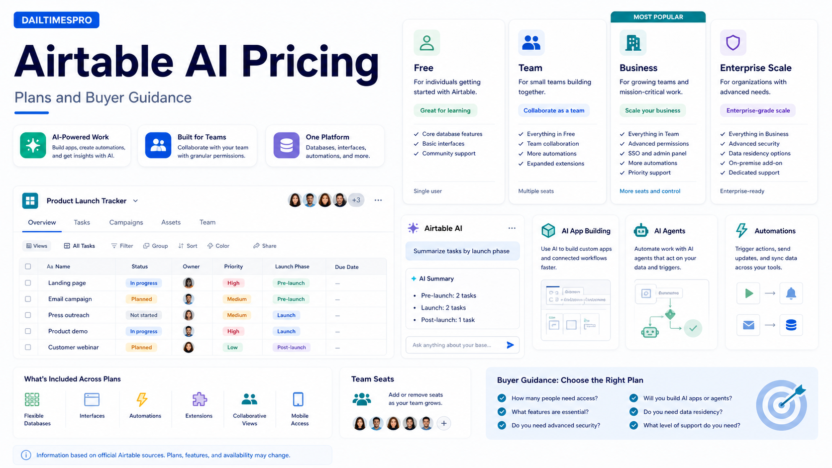
Airtable AI pricing depends on the Airtable plan your team chooses and the AI features available in that workspace. Based on the official Airtable pricing page reviewed on June 30, 2026, Airtable lists a Free plan, Team at $20 per user per month billed annually, Business at $45 per user per month billed annually, and Enterprise Scale with custom pricing.
For most small businesses evaluating Airtable AI, the practical decision is not only the monthly price. The bigger question is whether Airtable will become a real operations database for your team. If you only need a simple spreadsheet, the Free plan may be enough to explore. If you need team workflows, automation, interfaces, and AI-supported app building, Team or Business is more realistic.
If you are comparing Airtable against AI spreadsheet tools, our Rows AI review is a useful next read.
Pricing Last Checked
Pricing last checked on June 30, 2026. The pricing details below are based on Airtable’s official pricing page available at the time of review.
Airtable Pricing Overview
| Plan | Official annual-billing price listed | Best for | Notes |
|---|---|---|---|
| Free | $0 | Individuals and very small teams exploring Airtable | Useful for testing whether Airtable fits the workflow |
| Team | $20 per user/month billed annually | Teams building shared apps and workflows | Stronger fit for small business teams that need collaboration |
| Business | $45 per user/month billed annually | Departments needing more advanced controls and scale | Better when workflows are business-critical |
| Enterprise Scale | Custom pricing | Larger organizations with enterprise requirements | Requires sales-led evaluation |
Monthly billing, annual billing, feature limits, AI availability, and enterprise terms should be reviewed from Airtable’s official pricing page during purchase planning.
What Is Airtable AI?
Airtable is a flexible database and app-building platform. Airtable AI adds AI features to help teams build apps, summarize information, generate content, classify records, create workflows, and work with operational data.
For small businesses, Airtable AI makes the most sense when the company already needs a structured database. Examples include content calendars, CRM-lite workflows, recruiting pipelines, vendor tracking, project intake, customer feedback, and inventory or asset tracking.
Free Plan
The Free plan is useful for learning Airtable and testing whether a database-style workflow is better than a spreadsheet. It can work for a founder, freelancer, or very small team that wants to organize simple records.
The limitation is that serious team workflows usually need more collaboration, automation, interface, permission, and scale features. If Airtable becomes the place where your team runs work, Free is more of a trial or starter layer than a long-term operations system.
Team Plan
The Team plan is listed at $20 per user per month billed annually. It is usually the first plan small teams should evaluate seriously. It is designed for teams that need shared apps, collaboration, and more capable workflow building than the Free plan.
A small marketing team could use Team for a content calendar, campaign tracker, asset database, and approval workflow. A service business could use it to track client onboarding, delivery status, internal tasks, and vendor information.
The buying question is simple: will multiple people use Airtable as a shared workspace every week? If yes, Team is more relevant than Free.
Business Plan
The Business plan is listed at $45 per user per month billed annually. It is more appropriate when Airtable becomes business-critical for a department or cross-functional workflow.
Business may fit teams that need more advanced controls, larger workflows, stronger admin needs, or more serious operations use. For example, an operations team using Airtable for vendor intake, procurement tracking, project approvals, and reporting may need Business-level capabilities sooner than a small creative team using Airtable as a planning board.
Enterprise Scale
Enterprise Scale uses custom pricing. It is for organizations with enterprise-level requirements such as advanced administration, governance, security, support, and scale.
Most small businesses should not start here unless they have strict compliance, procurement, or centralized IT requirements. Enterprise Scale is more relevant when Airtable is being rolled out across many teams with formal governance.
How AI Changes the Buying Decision
Airtable AI can make the platform more useful, but it should not be the only reason to upgrade. AI is valuable when it supports a real workflow: summarizing customer feedback, drafting content briefs, classifying support issues, creating project summaries, or helping users build apps faster.
If your Airtable base is messy, AI will not fix the underlying structure. Before paying more, make sure the base has clear fields, owners, views, and update rules. AI works better when the data model is clean.
Real Small Business Use Cases
Customer feedback analysis
A SaaS team could collect feedback from support tickets, sales calls, and forms in Airtable. AI can help classify themes, summarize requests, and identify repeated issues.
Content operations
A marketing team could manage topics, briefs, writers, status, channels, and publishing dates. AI can help draft summaries or organize records, while humans still approve final copy.
Vendor and procurement tracking
Airtable can support vendor intake, approval status, renewal dates, and contract links. If you need a workflow structure for this, see our AI procurement workflow guide.
Recruiting pipeline
HR teams can track candidates, stages, interview notes, and hiring tasks. AI can help summarize notes, but hiring decisions should remain human-controlled.
Pros and Cons
| Pros | Cons |
|---|---|
| Clear public pricing for Free, Team, and Business plans | Per-user pricing can become expensive as the team grows |
| Flexible for many small business workflows | Requires thoughtful base design |
| AI can support summaries, classification, and app building | AI does not replace workflow ownership |
| Stronger than a simple spreadsheet for structured operations | May be more platform than a tiny team needs |
| Enterprise option exists for larger rollouts | Enterprise Scale pricing is custom |
Airtable AI Alternatives
| Tool | Best for | Main strength | Limitation |
|---|---|---|---|
| Rows AI | AI-assisted spreadsheet analysis | Good for lightweight reporting and dashboards | Less app/database oriented than Airtable |
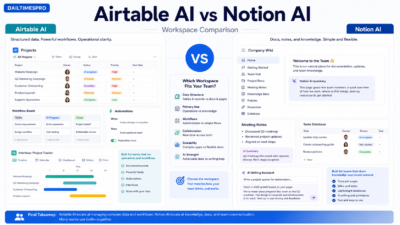
| Notion AI | Docs plus lightweight databases | Good for knowledge work and team docs | Less structured for complex operations |
| Google Sheets with Gemini | Spreadsheet teams in Google Workspace | Familiar spreadsheet model | Less database/app-builder focused |
| ClickUp Brain | Project and task workflows | Stronger task/project context | Not a direct Airtable database replacement |
Which Plan Should You Choose?
Choose Free if you are exploring Airtable or building a small personal base. Choose Team if multiple people need shared workflows and Airtable will be used every week. Choose Business if the workflow is important enough to need stronger controls and scale. Choose Enterprise Scale only when governance, security, support, and enterprise rollout requirements justify custom pricing.
The safest small-business path is to build one important workflow first. If the team uses it consistently and Airtable becomes central to the work, then upgrade with a clearer business case.
Cost Planning Tips
Before upgrading, count real active users, not everyone who may occasionally view a base. Airtable can become expensive when a company gives paid seats too broadly. Also identify which workflows actually need Airtable AI. A team may need AI for content operations, feedback analysis, or workflow summaries, while other users only need to view records or update simple fields.
Review automations, interfaces, permissions, and reporting needs before selecting a plan. If the workflow is only a simple tracker, Free or Team may be enough. If the workflow controls important operational data across departments, Business may be easier to justify.
Common Buying Mistakes
The first mistake is paying for seats before the workflow is designed. Airtable pricing is per user, so unused seats create waste.
The second mistake is treating Airtable AI as magic. AI works best when the base has clear fields and clean data.
The third mistake is building too many bases. A few well-owned bases are better than many abandoned experiments.
The fourth mistake is ignoring ownership. Every important Airtable app should have an owner who maintains fields, automations, permissions, and documentation.
Final Recommendation
Airtable AI is worth evaluating if your team needs a flexible operations database with AI assistance. The Team plan is the most likely starting point for small business teams that are serious about Airtable. Business makes sense when Airtable becomes operationally important. Free is useful for exploration, and Enterprise Scale is for larger organizations with formal requirements.
Do not choose a plan only because AI features sound useful. Choose based on the workflow Airtable will support, how many people need access, and whether the database will be maintained.
FAQs
How much does Airtable cost?
Based on the official Airtable pricing page reviewed on June 30, 2026, Airtable lists Free at $0, Team at $20 per user per month billed annually, Business at $45 per user per month billed annually, and Enterprise Scale with custom pricing.
Is Airtable AI included in every plan?
AI availability and feature access should be reviewed from Airtable’s official plan details at purchase time. The right plan depends on the workspace features, user count, and AI needs.
Is Airtable Team enough for small business?
Team is often the first serious plan for small teams using Airtable collaboratively. It can fit content, CRM-lite, operations, project intake, and reporting workflows.
When should a business choose Airtable Business?
Business is more relevant when Airtable supports important department workflows that need more advanced controls, scale, and administration than a starter team setup.
Is Airtable better than Rows AI?
Airtable is better for structured databases and app-like workflows. Rows AI is better for spreadsheet-style analysis and lightweight dashboards.
Can Airtable replace project management software?
It can replace some lightweight tracking workflows, but teams with complex task dependencies, workload planning, and project execution may still prefer dedicated project management software.
Is Airtable worth it for one person?
The Free plan may be enough for one person exploring Airtable. Paid plans make more sense when collaboration, scale, or advanced workflow features are needed.