Quick Verdict
Rows AI is worth considering if your small business wants a spreadsheet tool that feels more modern than a traditional spreadsheet and includes AI help for formulas, data work, summaries, and lightweight reporting. It is best for teams that need quick analysis, dashboards, and structured tables without building a full BI stack.
Rows AI is not the right fit if your company already has complex Excel models, strict finance controls, or a large data warehouse workflow. It is also not a replacement for a dedicated business intelligence tool. Think of it as a practical AI spreadsheet workspace for marketing, sales, operations, and founder-led reporting.
This review is based on official Rows product and pricing information reviewed on June 30, 2026.
Best For
- Small teams that live in spreadsheets but want more AI assistance
- Marketers analyzing campaign data
- Sales teams tracking pipeline and outreach performance
- Founders building lightweight dashboards
- Operations teams cleaning messy CSVs
- Agencies creating repeatable client reports
Not Best For
- Finance teams with complex legacy Excel models
- Companies needing enterprise BI governance
- Teams that require deep database administration
- Users who only need a basic free spreadsheet
Our Evaluation Criteria
| Criteria | Why it matters |
|---|---|
| AI assistance | The AI should help with formulas, summaries, cleanup, and analysis rather than only generic chat. |
| Spreadsheet usability | Users should still understand rows, columns, formulas, tables, and charts. |
| Reporting workflow | Small teams need dashboards and repeatable reports, not only one-off calculations. |
| Data cleanup | Messy CSVs, exports, and lead lists are common in small businesses. |
| Collaboration | Teams need sharing, comments, permissions, and repeatable workflows. |
| Pricing clarity | Buyers need a clear official pricing source before adopting a new workspace. |
| Alternatives | Rows should be compared with Google Sheets, Excel, Airtable, and Notion-style databases. |
What Is Rows AI?
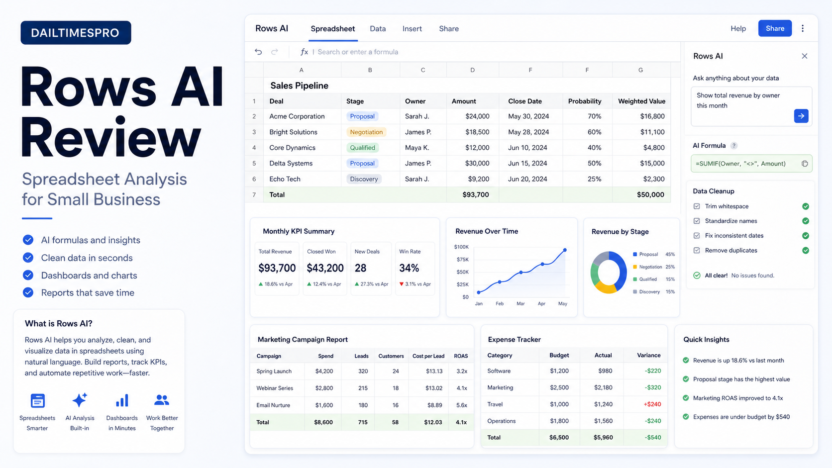
Rows is a spreadsheet-style tool designed for modern business workflows. Rows AI adds assistance for spreadsheet work, helping users generate formulas, analyze data, summarize tables, and work through reporting tasks faster.
The appeal is straightforward. Many small businesses still rely on spreadsheets for sales tracking, marketing reporting, budgets, task lists, and simple dashboards. Traditional spreadsheets are flexible, but they can be slow when users do not know the right formula or need to clean data quickly. Rows AI tries to reduce that friction.
Key Features
AI formula help
Formula writing is one of the biggest spreadsheet bottlenecks. A team member may know what they want to calculate but not how to write the formula. AI formula help can turn a plain-language request into a formula draft that the user can review.
Data cleanup
Small businesses often export messy CSV files from CRMs, email tools, payment systems, and ad platforms. AI assistance can help standardize names, summarize columns, classify rows, or prepare data for reporting. A human still needs to validate important results.
Dashboards and charts
Rows is useful when spreadsheet data needs to become a lightweight dashboard. A founder could track monthly recurring revenue, lead sources, conversion rates, or expenses without building a heavy BI setup.
Integrations and imports
Rows is designed for business data workflows, so imports and connected data matter. The value increases when the team can bring data from the tools it already uses and create repeatable reports.
Collaboration
For small teams, spreadsheet work often fails because one person owns the file and everyone else waits. A shared workspace helps when multiple people need to review numbers, update inputs, or use the same dashboard.
Real Use Cases
Marketing campaign reporting
A marketing team could use Rows AI to clean campaign exports, calculate cost per lead, summarize channel performance, and turn weekly data into a simple report. This is useful when the team is not ready for a full analytics platform.
Sales pipeline analysis
A sales manager could use Rows to review deal stages, expected revenue, response rates, and follow-up activity. AI can help summarize patterns, but the sales team should still verify source data before making forecast decisions.
Operations tracking
An operations lead could build a lightweight tracker for vendor payments, recurring tasks, onboarding steps, or internal service levels. For teams also documenting procedures, our Best AI SOP Software for Small Business guide covers process documentation tools.
Client reporting
Agencies could use Rows for repeatable client reports that combine campaign data, performance notes, and charts. The main benefit is speed: fewer manual formulas and more reusable reporting structure.
Data cleanup before analysis
Rows AI can help prepare messy datasets before analysis. Examples include splitting names, standardizing categories, tagging rows, or summarizing long text fields. For sensitive financial or legal decisions, review the output carefully.
Pricing
Pricing last checked on June 30, 2026. Rows publishes current plan information on its official pricing page. Buyers should review the current plan details, workspace limits, AI usage, and collaboration features from that page before purchase.
Pros and Cons
| Pros | Cons |
|---|---|
| Good fit for business users who already understand spreadsheets | Not ideal for complex enterprise BI requirements |
| AI help can reduce formula and cleanup friction | AI output still needs review before important decisions |
| Useful for lightweight dashboards and reports | Teams with deep Excel models may prefer Microsoft Excel |
| More approachable than a full analytics platform | Database-heavy teams may need Airtable, Notion, or BI tools |
| Helpful for marketing, sales, operations, and agency workflows | Adoption depends on whether the team will move work into Rows |
Rows AI Alternatives
| Tool | Best for | Main strength | Limitation |
|---|---|---|---|
| Google Sheets with Gemini | Teams already in Google Workspace | Familiar spreadsheet workflow | AI availability depends on Workspace plan and setup |
| Microsoft Excel with Copilot | Excel-heavy businesses | Strong fit for Microsoft 365 environments | Can be heavier than needed for lightweight dashboards |
| Airtable AI | Structured databases and workflows | Better for relational data and app-like tables | Less traditional spreadsheet feel |
| Notion databases with AI | Knowledge work and lightweight tracking | Combines notes, docs, and databases | Not a full spreadsheet replacement |
Setup Tips
Start with one reporting workflow. Good candidates include weekly marketing performance, monthly sales pipeline review, expense tracking, or client reporting. Avoid moving every spreadsheet at once.
Define source data clearly. If exports come from CRM, ads, payment, or support systems, document where the data comes from and who owns it. AI can help analyze data, but it cannot fix unreliable inputs.
Create a review step. Any AI-generated formula, categorization, or summary should be checked before it affects budgets, forecasts, hiring, or customer decisions.
Use templates for repeated work. If a report is needed every week, build a repeatable table and dashboard rather than starting from a blank spreadsheet each time.
Small Business Workflow Examples
Weekly marketing report
A marketing manager could import ad spend, leads, conversions, and campaign notes into a Rows workbook. The AI layer can help summarize which channels improved, which campaigns need attention, and which numbers should be checked before the report is shared. The final report still needs human review, especially when budget decisions depend on it.
Founder dashboard
A founder could use Rows to track a small set of operating metrics: new leads, booked calls, revenue, churn risk, support tickets, cash outflow, and project delivery status. The benefit is not replacing a finance system. The benefit is creating a lightweight view of the business without waiting for a formal analytics setup.
Agency client reporting
An agency could create one reusable reporting structure for multiple clients. Each month, the team can update campaign data, summarize results, and prepare a dashboard. AI assistance can help write the first version of the summary, but account managers should edit it so the final report reflects the actual client context.
Operations cleanup
An operations assistant could take a messy vendor export, standardize categories, flag missing values, and prepare a cleaner table for review. This is a practical use case because many small businesses lose time cleaning exported CSV files before anyone can analyze them.
What Rows AI Should Not Be Used For
Rows AI should not be treated as an automatic decision system. If the spreadsheet affects payroll, taxes, legal obligations, investor reporting, or customer billing, the output needs careful review. AI can help speed up preparation, but it should not be the only control.
Rows is also not a substitute for a data warehouse when the business has multiple systems, strict permissions, production dashboards, and compliance requirements. At that stage, the company may need a dedicated BI tool, analytics engineer, or managed reporting setup.
Finally, Rows should not become another isolated spreadsheet silo. If only one person understands the workbook, the business still has an operational risk. Document the source data, formulas, assumptions, and owner for each recurring report.
That ownership point matters more than the AI feature list. A simple, reviewed dashboard that the team trusts is more valuable than a sophisticated workbook nobody maintains.
Common Mistakes
The first mistake is assuming AI makes spreadsheet analysis automatically accurate. AI can help draft formulas and summarize patterns, but the underlying data and logic still matter.
The second mistake is using Rows for workflows that require enterprise governance. If your company needs strict audit controls, complex financial modeling, or warehouse-level analytics, a more mature system may be required.
The third mistake is failing to train the team on when to use AI. A good rule is simple: use AI to draft, summarize, and explore; use human review to approve, publish, or make decisions.
When Rows AI Is the Right Choice
Choose Rows AI if your team wants a spreadsheet-style tool for analysis, dashboards, and reporting with useful AI assistance. It is especially good for small business teams that need more structure than a basic spreadsheet but less complexity than a BI platform.
When to Avoid Rows AI
Avoid Rows AI if your team is deeply tied to Excel macros, finance models, or enterprise reporting systems. Also avoid it if your business has no one responsible for data quality. AI spreadsheet tools are only as reliable as the data and review process behind them.
Final Recommendation
Rows AI is a practical option for small businesses that want AI-assisted spreadsheets for reporting, cleanup, dashboards, and lightweight analysis. It is strongest for marketing, sales, operations, and agency workflows where speed and clarity matter more than enterprise analytics depth.
If your team already uses Google Workspace or Microsoft 365 heavily, compare Rows against the AI features in those ecosystems before switching. If your data is more relational and workflow-driven, compare Airtable AI. If you want notes plus lightweight databases, Notion may be enough.
FAQs
Is Rows AI good for small businesses?
Yes, especially for teams that use spreadsheets for reporting, campaign analysis, sales tracking, and operations dashboards. It is most useful when users need AI help with formulas, summaries, and data cleanup.
Can Rows AI replace Excel?
It can replace some lightweight spreadsheet workflows, but it is not automatically a replacement for complex Excel models, macros, financial workbooks, or Microsoft-heavy processes.
Can Rows AI replace Google Sheets?
It depends on the workflow. Rows may be better for modern reporting and AI-assisted analysis, while Google Sheets remains strong for teams already standardized on Google Workspace.
Is Rows AI safe for financial decisions?
AI output should be reviewed before financial decisions. Rows can help with analysis, but users should verify formulas, source data, and summaries before relying on results.
What are the best Rows AI alternatives?
Google Sheets with Gemini, Microsoft Excel with Copilot, Airtable AI, and Notion databases with AI are common alternatives depending on whether the team needs spreadsheets, databases, or knowledge work.
Does Rows publish pricing?
Rows publishes plan information on its official pricing page. Pricing last checked on June 30, 2026.
Who should avoid Rows AI?
Teams with advanced Excel models, strict BI governance needs, or complex data warehouse workflows may need a more specialized tool.