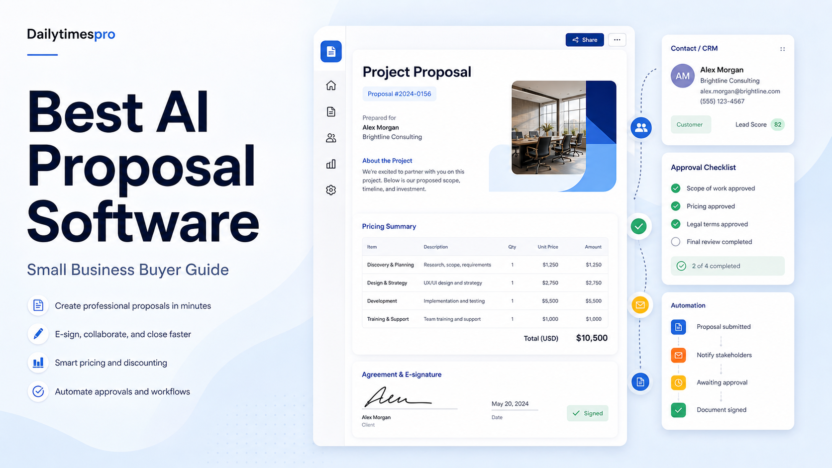
AI proposal software can help small businesses turn approved pricing, service descriptions, case assets, and sales notes into clearer proposals. The value is not magic writing. The value is reducing repetitive document assembly while keeping pricing, scope, approvals, and e-signature steps controlled.
Quick Verdict
PandaDoc is a broad proposal and document platform for teams that need templates, approvals, quotes, and e-signature. Proposify fits teams that want proposal control and sales content management. Qwilr is strong for interactive web-style proposals. Better Proposals is a practical option for smaller service businesses. A CRM-native quote tool may be better when pricing logic already lives in the CRM.
Best For
- Small agencies, consultants, and B2B service teams.
- Sales teams that repeatedly build similar proposals.
- Businesses that need approval, e-signature, and document tracking.
- Teams with approved pricing and service language ready to reuse.
Not Best For
- Teams without approved pricing or legal terms.
- Businesses that need complex contract lifecycle management.
- Users expecting AI to invent scope, guarantees, or customer claims.
- Organizations without a review process for commercial commitments.
Our Evaluation Criteria
Template control
Reusable templates should protect approved pricing, scope, terms, and brand language.
Quote and pricing workflow
Proposal software should reduce manual math while making approval and discounting rules visible.
AI drafting quality
AI can draft from approved notes, but claims, pricing, scope, and deliverables require human review.
E-signature and tracking
Signature, status, reminders, and audit trails matter when proposals become commitments.
CRM and payment integrations
The best fit depends on where contacts, deals, products, and invoices already live.
Pricing clarity
Compare seats, documents, e-signature, content library, quote tools, automation, CRM integrations, and add-ons.
Key Features And Capabilities
PandaDoc
Broad document creation, templates, quotes, approvals, e-signature, payments, and CRM integrations.
Proposify
Proposal templates, content libraries, approvals, tracking, and sales document control.
Qwilr
Interactive web proposals, quotes, reusable blocks, analytics, and buyer-friendly presentation.
Better Proposals
Simple proposal creation, templates, payments, signatures, and small-business workflow.
CRM quote tools
Useful when product catalog, discounts, approvals, and deal records already live in the CRM.
Real Use Cases
Agency proposals
A marketing agency can reuse approved service packages, update scope from discovery notes, route discounts for approval, and collect e-signatures.
Consulting statements of work
A consultant can draft a project plan from a call summary, then verify timeline, fees, assumptions, and exclusions before sending.
Software implementation quotes
A SaaS partner can assemble onboarding, training, and migration line items while keeping optional add-ons visible.
Renewal proposals
A customer success team can prepare renewal documents from account notes, but pricing changes and commitments need approval.
Small-business sales follow-up
A founder can quickly turn meeting notes into a clean proposal, while avoiding unsupported claims or fake proof.
Comparison Table
| Option | Best For | Main Strength | Important Limitation |
|---|---|---|---|
| PandaDoc | Document and proposal operations | Templates, quotes, e-signature | May be broader than a very small team needs |
| Proposify | Sales proposal control | Content library and approvals | Requires disciplined setup |
| Qwilr | Interactive sales proposals | Modern web-style buyer experience | Not every buyer wants a web proposal |
| Better Proposals | Small service businesses | Simple proposal workflow | Advanced enterprise controls may be limited |
| CRM quote tools | CRM-centered sales teams | Pricing and deal record alignment | Less editorial proposal flexibility |
Pricing
PandaDoc, Proposify, Qwilr, and Better Proposals publish plan pages, but the usable cost depends on seats, documents, e-signature, quote tables, content libraries, CRM integrations, payments, approvals, and billing period. Use the official pricing pages before buying.
Pricing last checked on June 27, 2026. Pricing may vary by region, billing period, users, contacts, tasks, credits, storage, usage, or add-ons. Use the linked official pricing page for the current purchase decision.
Pros
- Helps reduce repetitive work when source material is reliable.
- Supports faster drafting, organization, or handoff in a defined workflow.
- Gives teams a clearer structure for evaluating software choices.
- Can improve consistency when ownership, review, and templates are maintained.
Cons And Limitations
- Output quality depends on inputs, configuration, and review discipline.
- Pricing models are not directly comparable across vendors.
- Migration, administration, and training still require time.
- Human review remains necessary for facts, commitments, and sensitive decisions.
Alternatives
Compare the listed products with systems the team already owns. A simpler document, shared inbox, CRM workflow, project tool, or manual process may be better when volume is low. Specialist software may be necessary when the workflow requires regulated records, advanced analytics, or deep transactional controls.
A Practical 30-Day Evaluation Plan
Week 1: Define The Workflow
Choose one recurring workflow with a clear owner, approved inputs, a known output, and a human review step. Record how the work is completed today, how long it takes, where errors occur, and which systems are involved. This baseline is essential. Without it, a team can mistake novelty for improvement and buy a product that adds another interface without removing meaningful work.
Document the data the workflow uses. Mark which information is public, internal, confidential, regulated, outdated, duplicated, or missing. Confirm which users should have access. AI features cannot repair contradictory records or unclear permission boundaries. In many projects, cleaning documentation, contact data, media files, or task ownership creates more value than adding another subscription.
Week 2: Run In Parallel
Use the new tool alongside the existing process. Review every output rather than allowing automatic publication or action. Label corrections as factual, contextual, formatting, tone, permission, missing information, incorrect action, or missing context. This creates a useful evidence set and reveals whether the product reduces work after review.
Test normal and difficult cases. Include incomplete inputs, ambiguous instructions, changed requirements, unsupported file types, poor audio, unusual customer requests, unusual sales cycles, or edge cases relevant to the category. A polished demo often hides the exact conditions that make daily work difficult.
Week 3: Improve The System
Update source documents, templates, prompts, routing rules, integrations, naming conventions, and permissions based on observed failures. Remove steps that do not improve the outcome. If users bypass the workflow, determine whether the cause is poor fit, missing training, slow performance, inadequate integration, or a review process heavier than the original task.
Define escalation. State which actions the software may assist with, which actions require approval, and which requests must always go to a qualified person. Legal interpretations, employment decisions, financial commitments, security incidents, customer exceptions, and public claims should not be hidden behind a confident AI answer.
Week 4: Measure And Decide
Compare the pilot with the baseline. Review completion time, editing time, error rate, adoption, administrator workload, integration reliability, and expected annual cost. Include seats, contacts, tasks, credits, storage, implementation, training, and the cost of correcting mistakes. A low entry price can be misleading when the usable workflow requires higher tiers or extensive manual review.
Decide whether to expand, keep the workflow limited, change configuration, evaluate an alternative, or stop. Write down the decision and assumptions. Revisit them when prices, product capabilities, data requirements, or business volume change.
Security, Governance, And Quality Control
Use least-privilege access and multifactor authentication. Assign an account owner, billing owner, workflow owner, and output reviewer. Confirm retention, export, deletion, model-training, integration, and administrator controls from current vendor documentation. Do not paste confidential customer, employee, financial, legal, security, or product information into an unapproved account.
Keep a human in control of high-impact outputs. Verify names, dates, prices, links, calculations, commitments, claims, permissions, and citations. For automated actions, use bounded permissions, monitoring, logs, alerts, and a tested rollback or correction process. The team should know how to pause a workflow quickly.
How To Measure Value
Measure time saved after review, not before it. Track correction rates, handoff errors, turnaround time, user adoption, administrator work, and whether approved outputs reach the correct system of record. For customer-facing workflows, monitor complaints, escalations, missed requests, and quality sampling. For content, sales, or meeting work, measure revision time, consistency, and whether the final result serves the intended audience.
Model twelve-month cost. Include subscription fees, users, contacts, tasks, credits, storage, integrations, implementation, training, and maintenance. Also confirm how data and configurations can be exported if the tool no longer fits. A responsible software decision includes a practical exit path.
Detailed Decision Checklist
Write down the exact problem in one sentence before comparing plans. A useful statement names the workflow, the current friction, the expected improvement, and the owner. "We need AI" is not a buying requirement. "Our support lead needs verified draft answers from approved documentation so agents can respond faster while preserving human escalation" is specific enough to test.
List required integrations and decide which system remains authoritative. A meeting assistant may summarize calls, but the CRM or project tool may still be the record of action items. A proposal system may draft documents, but pricing and legal terms need approved sources. A knowledge workspace may help people find answers, but source owners must update policy. An automation platform can move data, but it should not become the only place where business logic is understood.
Review failure handling. Ask what happens when an integration disconnects, a credit limit is reached, an upload fails, a transcript is wrong, a source is outdated, or a user loses access. Define alerts, owners, correction steps, and acceptable downtime. A workflow that succeeds in ideal conditions but fails silently is not production-ready.
Check administration from the perspective of the future owner. The person evaluating the product may not be the person maintaining it six months later. Require clear names, documentation, change history, permission review, billing visibility, and an onboarding process for new users. Test whether a second person can understand the setup without relying on the original builder.
Finally, inspect the exit path. Confirm export formats, media or document ownership, API access where relevant, deletion procedures, and the effort required to move to another system. Record contract renewal dates and who receives billing notices. The ability to leave reduces operational risk and creates a more honest comparison of long-term cost.
Questions To Ask Before Approval
- Which approved sources or records does the workflow depend on?
- Who reviews the output, and what must that reviewer check?
- Which actions can occur automatically, and which require confirmation?
- How are errors, outages, and exhausted limits reported?
- What data is retained, where is it stored, and how is it deleted?
- What will the workflow cost at expected twelve-month volume?
- Can another employee maintain it from the documentation?
- How will the team export its data and configuration if it leaves?
Common Buying Mistakes
- Selecting a product from a feature list without testing a real workflow.
- Comparing entry prices without modeling users, volume, credits, storage, and add-ons.
- Treating generated text, summaries, recommendations, or actions as verified facts.
- Expanding before permissions, review, escalation, and ownership are documented.
- Buying software to compensate for missing process, poor data, or unclear accountability.
- Assuming every AI-labelled feature produces measurable business value.
Final Recommendation
Choose PandaDoc for a broad proposal and document workflow, Proposify for structured sales proposal control, Qwilr for interactive buyer-facing proposals, and Better Proposals for a lighter small-business process. Pilot one real proposal from discovery notes to signed agreement before standardizing.
Frequently Asked Questions
What is the best option?
The best option is the one that fits the real workflow, data, users, administration, and budget.
Is there a free plan?
Many products in this category offer a free path or trial, but current limits should be checked on the official pricing page.
Can AI replace human review?
No. Important facts, actions, claims, and decisions require accountable review.
How should pricing be compared?
Model the required plan, users, credits or volume, integrations, implementation, and maintenance.
How long should a pilot run?
A focused two-to-four-week pilot is usually enough to identify workflow fit and failure modes.
What is the biggest risk?
Poor source data, unclear permissions, and unreviewed outputs create more risk than the interface itself.
Related Dailytimespro Guides
See our AI sales follow-up workflow, AI customer support workflow, Zapier pricing.