Zapier is one of the easiest ways to connect apps and automate routine work. But it is not the only option. Small businesses often compare Zapier alternatives when they need a more visual builder, lower-cost task volume, developer flexibility, self-hosting, human approvals, or different AI automation features.
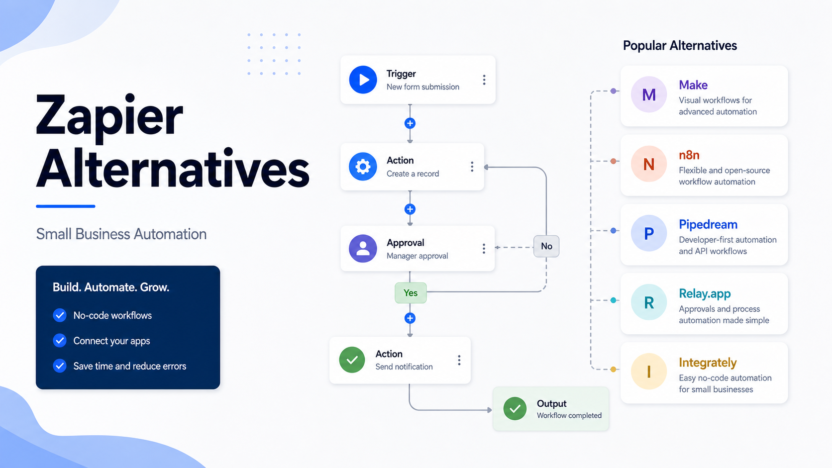
This guide compares Make, n8n, Pipedream, Relay.app, and Integrately as practical Zapier alternatives.
Quick Answer
Choose Make if you want a visual automation builder with flexible scenarios. Choose n8n if you have technical users and want deeper control or self-hosting options. Choose Pipedream if developers need API-first workflows. Choose Relay.app if approvals and human-in-the-loop steps matter. Choose Integrately if you want simpler automation templates.
Stay with Zapier if your team already uses it reliably and the pricing fits your workflow volume.
Comparison Table
| Tool | Best For | Main Strength | Limitation |
|---|---|---|---|
| Make | Visual workflow automation | Scenario builder and flexible credits | More complex than simple Zap workflows |
| n8n | Technical teams | Deep logic, self-hosting option, execution model | Less beginner-friendly |
| Pipedream | Developers | API and code-friendly automation | Not the best no-code-only choice |
| Relay.app | Human approvals | Collaborative workflows and review steps | Narrower fit than broad automation platforms |
| Integrately | Simple app automations | Fast setup for common workflows | May be less flexible for complex logic |
| Zapier | Broad app automation | Very accessible and widely supported | Pricing and task model may not fit every team |
Our Evaluation Criteria
We evaluated these alternatives by workflow builder quality, pricing clarity, app ecosystem, AI automation support, approval workflows, developer flexibility, governance, error handling, and small-business adoption risk.
Make
Make is the strongest Zapier alternative for teams that want a visual-first automation builder. Its scenarios can be easier to reason about when workflows branch, filter, transform data, or connect multiple services.
Make's official pricing page lists a Free plan with up to 1,000 credits per month and a Make plan starting at $9 per month for 5,000 credits per month. It also lists Company custom pricing for organizations running critical business processes.
Pricing last checked on June 23, 2026.
n8n
n8n is a strong option for technical teams. Its official pricing page states that plans include unlimited users and workflows and that pricing is based on monthly workflow executions. It lists Starter at 20 euros per month billed annually, Pro at 50 euros per month billed annually, Business at 667 euros per month billed annually, and Enterprise by sales contact.
n8n is especially relevant when developers or operations teams want more control than a simple no-code tool provides. It can fit internal automations, API workflows, data transformations, AI agents, and more technical integrations.
Pipedream
Pipedream is best for developers and technical operators who want automation close to APIs and code. It is useful when workflows need custom logic, event handling, data transformation, and developer-friendly control.
Pipedream is not the first choice for non-technical users who only want to connect common apps through templates. It is stronger when someone on the team is comfortable with technical workflow design.
Relay.app
Relay.app is worth comparing when automation needs human approval, handoff, or review. Some workflows should not run completely unattended. A lead qualification process, refund request, contract step, or customer escalation may need a person to confirm the next action.
Relay.app fits teams that want automation to support collaboration rather than replace every manual decision.
Integrately
Integrately is useful when the team wants simpler automation setup and common app workflows. It can fit small businesses that do not want to spend time designing complex scenarios.
The tradeoff is flexibility. As automations become more conditional, multi-step, and business-critical, the team should compare it carefully with Make, n8n, and Zapier.
Real Use Cases
Lead Capture
A small business could send form submissions to a CRM, notify sales, create a task, and add a row to a reporting sheet. Zapier, Make, and Integrately are all relevant.
Email Alerts
Operations teams can send alerts when invoices are paid, orders are delayed, or support tickets hit specific rules. This is a low-risk first automation to migrate.
CRM Updates
Sales teams can move deal stages, enrich leads, and trigger follow-ups. More complex CRM workflows need careful error handling and ownership.
Reporting Workflows
Marketing teams can move ad, form, and customer data into dashboards. Make and n8n are strong options when transformations matter.
Human Approval
Refunds, contract steps, and sensitive customer replies should include human review. Relay.app is relevant when approvals are the core need.
Pricing Snapshot
| Tool | Official Pricing Notes |
|---|---|
| Zapier | Free at $0/month; Professional starts at $19.99/month; Team starts at $69/month; Enterprise contact pricing |
| Make | Free up to 1,000 credits/month; Make plan starts at $9/month for 5,000 credits; Company custom pricing |
| n8n | Starter 20 euros/month annually; Pro 50 euros/month annually; Business 667 euros/month annually; Enterprise contact sales |
Pricing last checked on June 23, 2026.
Pros And Cons Of Switching
Pros
- You may get better workflow visibility with visual builders.
- Technical teams can gain more control with n8n or Pipedream.
- Some alternatives fit approvals better than Zapier.
- Pricing models may fit your workflow volume better.
- Migration can reduce dependency on one automation platform.
Cons
- Migration takes time and can break important workflows.
- The team must learn a new builder.
- App support differs by platform.
- Debugging and error handling can change.
- Some alternatives are less beginner-friendly.
Final Recommendation
Do not migrate because a tool looks cheaper in a simple plan table. Map your active workflows, monthly volume, app dependencies, and failure risk. Choose Make for visual scenarios, n8n for technical control, Pipedream for developers, Relay.app for approvals, and Integrately for simple setup.
For broader automation context, see our Zapier vs Make comparison and AI marketing workflow guide.
FAQs
What is the best Zapier alternative?
Make is the strongest visual automation alternative for many small businesses, n8n is strongest for technical teams and self-hosting, Pipedream is useful for developer workflows, Relay.app is useful for human-in-the-loop automation, and Integrately is useful for simpler app automations.
Why look for a Zapier alternative?
Teams usually look for alternatives because they want different pricing, more visual scenario control, self-hosting, developer flexibility, approval steps, or simpler automation templates.
Is Make cheaper than Zapier?
Make and Zapier use different pricing models. Make prices around credits and scenarios, while Zapier prices around tasks and platform features. Compare real workflow volume before deciding.
Is n8n better than Zapier?
n8n can be better for technical teams that want deeper control, self-hosting options, and execution-based pricing. Zapier is often easier for business users who want broad app automation without managing infrastructure.
Which alternative is best for developers?
Pipedream and n8n are the strongest options to compare for developer-heavy workflows because they support more technical logic and API-oriented work.
Which alternative is easiest?
Zapier and Integrately are usually easier starting points for non-technical users. Make is visual but can become more complex as scenarios grow.
Can I replace Zapier completely?
Yes, but only after mapping your active automations, app connections, error handling, and business-critical workflows. Migration should be staged, not rushed.
Do Zapier alternatives support AI workflows?
Many automation platforms now include AI-related features or integrations. Review official feature pages for each tool before buying for an AI-specific workflow.
What should I migrate first?
Start with low-risk automations such as internal alerts, form notifications, or spreadsheet updates before moving billing, CRM, or customer-facing workflows.
Should small businesses stay with Zapier?
Stay with Zapier if it works reliably, the team understands it, and pricing is acceptable. Switch only when a specific alternative solves a real limitation.
Migration Plan
Start by exporting or documenting all active Zapier workflows. Group them by risk: low-risk internal alerts, medium-risk CRM or reporting workflows, and high-risk customer, billing, or sales operations. Migrate low-risk workflows first.
For each migrated workflow, test trigger behavior, data mapping, error handling, retries, owner notifications, and rollback plan. Keep the old workflow disabled but available until the replacement has run correctly for a full cycle.
Decision Rules
If non-technical users own automation, choose the tool they can maintain. If developers own automation, choose the platform with enough control. If approvals are central, choose a workflow system that treats human review as part of the automation rather than a workaround.
How To Choose An Automation Platform
The right Zapier alternative depends on who owns automation. If operations staff own the workflows, ease of use matters more than developer flexibility. If engineers own the workflows, deeper control, logs, API handling, and self-hosting options may matter more. If the workflows include approvals, human handoff, or sales follow-up, choose a platform that makes review steps easy to maintain.
Small businesses often start with simple tasks: send form leads to a CRM, alert a Slack channel, create a task, update a spreadsheet, and notify the owner. As automation grows, the hard parts become error handling, duplicate prevention, permissions, and knowing who fixes a broken workflow. A cheaper platform is not cheaper if nobody can debug it.
Real Automation Scenarios
For lead capture, compare how each tool handles form triggers, CRM field mapping, duplicate contacts, and failed runs. For reporting, compare scheduled workflows, spreadsheet updates, and notification logic. For customer onboarding, compare conditional paths, email triggers, task creation, and handoff to a human. For internal operations, compare approvals, logs, and owner notifications.
Risk Management
Never migrate all automations at once. Start with low-risk internal alerts, then medium-risk reporting, then customer-facing workflows. Document trigger, action, owner, fallback, and expected result for every automation. This documentation matters more as the company grows because automation failures can quietly break sales, support, billing, or reporting.
What To Audit Before Switching
Before choosing a Zapier alternative, audit every active workflow. List the trigger app, action app, owner, business purpose, failure impact, monthly run volume, required fields, and handoff points. This audit prevents a common mistake: replacing the tool before understanding the system it supports.
A small company may discover that only a few workflows are business-critical. Lead routing, billing alerts, customer onboarding, and support escalations deserve more careful testing than simple internal notifications. Once workflows are grouped by risk, the team can choose a platform based on the automation types that actually matter.
Maintenance And Ownership
Automation tools fail when no one owns them. Every workflow should have a named owner, a fallback process, and a review schedule. If a CRM field changes, a form is renamed, or an app permission expires, someone must know how to fix the workflow. Choose a platform your owner can maintain.
This is where the decision between no-code and technical platforms becomes practical. A technical tool may be more powerful, but it is not a good fit if the team depends on non-technical staff for daily maintenance. A simple no-code tool may be less flexible, but it can be better when business users need to edit workflows quickly.
Final Buying Advice
Choose Make if you want visual automation depth at a lower entry cost than many teams expect. Choose n8n if technical control, workflow ownership, and execution-based planning matter. Consider other alternatives only after checking whether their app support, logs, permissions, and error handling fit your actual workflows.
Implementation Notes
After choosing a platform, create a workflow register. Each automation should have a name, owner, trigger, actions, connected apps, expected result, failure notification, and last review date. This lightweight register prevents hidden automation debt.
Review the register monthly. Remove workflows nobody uses, update workflows attached to changed apps, and check whether errors are being ignored. Good automation programs stay useful because they are maintained, not because the first setup was clever.