Quick Verdict
Guidde is worth considering if your team needs to create short how-to videos, SOPs, onboarding guides, product walkthroughs, and support tutorials without turning every documentation task into a full video editing project. It is strongest for small businesses, SaaS teams, customer success teams, support teams, agencies, and operations managers who need repeatable process documentation that people can watch, share, and reuse.
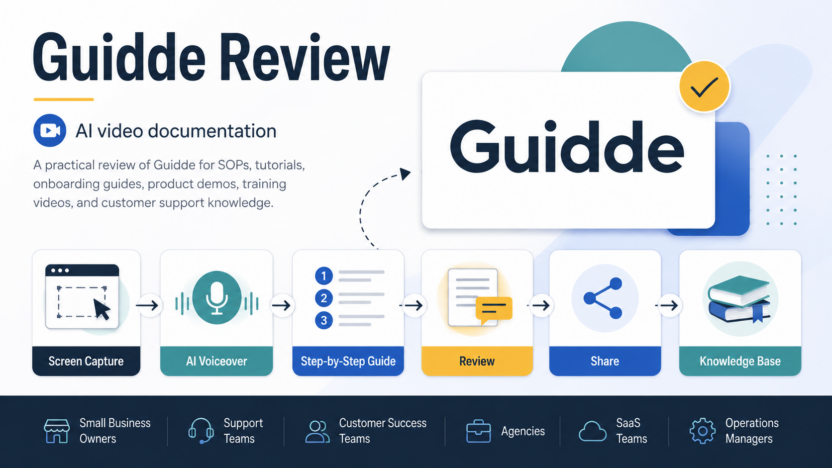
The core value of Guidde is speed. Its official site describes a workflow where teams capture a web process, then use AI-assisted voiceover, captions, highlights, transitions, and sharing to create polished documentation faster than manual recording and editing. That makes it different from general video editors. Guidde is more about turning routine workflows into reusable knowledge.
Guidde is not the best fit if your team mainly needs cinematic video editing, podcast production, advanced social video design, or a full learning management system. For those cases, compare it with broader video tools or training platforms. But if your problem is that internal knowledge, product instructions, or support answers are trapped in calls and screenshots, Guidde is a practical AI documentation tool.
Best For
Guidde is best for teams that repeatedly explain the same software workflows. A support team can use it to show customers how to update settings, connect an integration, export a report, or troubleshoot a common issue. A customer success team can create onboarding videos for new users. An operations team can document internal processes such as CRM updates, invoice review, account setup, or weekly reporting.
It also fits agencies and consultants that need client-facing walkthroughs. Instead of recording a long custom Loom video for every question, a team can create a reusable guided process and share it with multiple clients. The value compounds when the same question appears often.
For teams comparing video and documentation workflows more broadly, our Descript alternatives guide is useful if your needs extend beyond process documentation.
Not Best For
Guidde is not ideal if your main need is long-form video editing. It is not trying to replace a professional editor for YouTube videos, brand films, interviews, podcasts, webinars, or social ad production.
It may also be too focused if your team needs a complete knowledge base, help desk, LMS, or enterprise learning platform. Guidde can create and share instructional content, but teams that need assessments, certifications, user permissions across many departments, and deep training analytics may need a dedicated training or documentation suite.
Guidde is also less useful when the workflow cannot be captured visually. If the knowledge lives mostly in strategy, legal review, offline operations, or subjective expert judgment, a written SOP or internal wiki page may be clearer than a short video.
Our Evaluation Criteria
This review uses practical criteria for teams choosing an AI video documentation tool:
| Criteria | What Matters |
|---|---|
| Capture speed | Whether a team can turn a web workflow into a usable guide quickly |
| AI assistance | Whether voiceover, captions, highlights, redaction, and translation reduce editing work |
| Documentation fit | Whether the output works for SOPs, onboarding, support, and training |
| Sharing options | Whether guides can be shared by link, embedded, exported, or reused |
| Brand and review controls | Whether teams can remove watermarks, use brand kits, and review content before sharing |
| Pricing clarity | Whether official plans explain limits and upgrade reasons clearly |
| Team workflow | Whether creators, viewers, reviewers, and admins have sensible roles |
| Long-term value | Whether reusable guides reduce repeated support and training work |
What Is Guidde?
Guidde is an AI-powered video documentation platform for creating step-by-step tutorials, how-to videos, SOPs, product guides, and training content. Its official website says teams can create high-quality video documentation in minutes without needing design or video skills. The platform automatically adds voiceover, captions, and highlights to reduce the editing bottleneck.
That positioning is important. Guidde is not only a screen recorder. A basic screen recorder captures what happened. Guidde is designed to package that capture into something more useful: a narrated guide, a shareable training asset, a walkthrough, or a knowledge-base style resource.
The official Chrome Web Store listing describes Guidde as a way to turn any web workflow into a professional video tutorial and step-by-step guide. That makes it especially relevant for SaaS products, internal software processes, admin workflows, customer tutorials, and business operations where a visual walkthrough is easier than written instructions alone.
Key Features
Screen Capture for Web Workflows
Guidde's Free plan on the official pricing page includes working with any web app and up to 25 how-to videos. That makes the entry point practical for teams that want to document browser-based workflows before paying.
In a typical small business workflow, this could include showing a new employee how to update a CRM field, send a customer invoice, create a support macro, publish a blog post, or export a weekly report. The best Guidde use cases are repeatable and visual: click here, choose this option, confirm this screen, send the result.
AI Voiceover and Captions
Guidde's official homepage says the platform automatically adds voiceover and captions. This is valuable because many teams delay documentation because recording clean narration is awkward, slow, or inconsistent.
AI voiceover can make short process videos more polished without requiring every subject matter expert to record perfect audio. Captions also help viewers follow the process in quiet environments or review steps quickly. The practical value is consistency: support, onboarding, and internal process videos can feel more uniform even when different team members create them.
Highlights and Visual Guidance
The official site says Guidde adds highlights, and the pricing page includes transitions and soundtracks on the Free plan. These small presentation details matter because raw screen recordings can be hard to follow. Viewers need to know where to look and what changed.
For support teams, highlights can reduce confusion when a customer is trying to follow a setting change or troubleshooting step. For internal training, clear visual guidance helps new employees complete the workflow without asking a teammate to explain the same screen again.
Export and Brand Controls
The official pricing page lists brand kit, export videos, PPTs and PDFs, watermark removal, and blur sensitive information in paid plans. These features make Guidde more useful for teams that need documentation to look professional and protect private information.
For agencies, branding matters when sharing guides with clients. For support teams, removing sensitive details matters when recording real workflows. For operations teams, PDF or PPT export can help when a written training packet or slide-style handoff is easier than a video link.
Translation and Redaction
Guidde's pricing page lists multi-language translation and magic redaction of PII on higher plans. These are important for teams that support users in multiple regions or handle sensitive information.
Translation is useful when one product guide needs to serve customers or employees across languages. Redaction matters when the workflow includes names, emails, account details, customer records, payment information, or internal notes. Teams should still review sensitive guides before publishing them, but built-in redaction can reduce manual cleanup.
Review, Version Control, and Enterprise Features
The pricing page references content review and version control, SSO options, and enterprise-level controls. Those features become important when documentation is shared widely. A quick internal video may not need approval, but customer-facing onboarding and help-center assets usually should be reviewed before release.
For larger teams, version control matters because software screens change. If a help article or walkthrough becomes outdated, customers may follow the wrong steps. Review and versioning help teams keep video documentation closer to the current product experience.
Guidde Pricing
Pricing last checked on September 4, 2026.
Guidde's official pricing page lists these public plan details at the time checked:
| Plan | Official Listed Price | Key Plan Notes | Best Fit |
|---|---|---|---|
| Free | $0 per creator/month | Up to 25 how-to videos, works with any web app, recorded voiceover, shareable link, transitions and soundtracks | Testing Guidde and documenting a few recurring workflows |
| Pro | $29 monthly or $19 annual per creator/month shown on the pricing page | Unlimited how-to videos, watermark removal, brand kit, video/PPT/PDF export, blur sensitive information | Individuals and small teams creating regular documentation |
| Business | Higher paid tier shown on the official pricing page | Multi-language translation, magic redaction of PII, SSO, content review, and version control | Teams with review, privacy, translation, and governance needs |
| Enterprise | Custom pricing | Enterprise-level deployment and control options | Larger organizations with security, scale, or procurement requirements |
Guidde's help center also describes a free 7-day Business trial and says the Free plan can be used to create up to 25 guiddes in total. This gives teams a low-risk way to test whether video documentation is useful before moving to a paid creator plan.
The most important buying detail is the creator-based model. Teams should count who actually creates and edits documentation, not everyone who watches it. A support team may need only a few creators if most employees and customers are viewers. A training-heavy team may need more creators if many subject matter experts document processes.
Real Use Cases
Customer Support Tutorials
A support team can use Guidde to answer recurring questions with short visual guides. Examples include resetting a password, changing billing details, exporting data, connecting an integration, updating account settings, or checking a dashboard. This can reduce repetitive explanations and give customers a clearer path than a text-only answer.
SaaS Onboarding
A SaaS team could use Guidde for onboarding sequences: first login, workspace setup, invite teammates, configure settings, import data, and complete the first successful action. These guides can be embedded in help materials or shared during onboarding calls.
Internal SOPs
Operations teams can document routine workflows such as invoice processing, CRM updates, vendor onboarding, employee setup, payroll checks, or reporting. A written SOP is still useful, but a short video can show the exact screen sequence and reduce ambiguity.
Product Release Enablement
Product and marketing teams can create quick feature walkthroughs when a new release changes a workflow. This is useful for customer success teams that need to explain new capabilities without waiting for a full training library to be rebuilt.
Agency Client Handoffs
Agencies can use Guidde to hand off websites, dashboards, reporting tools, CRM processes, or campaign workflows to clients. A reusable guide is cleaner than a long one-off screen recording and can reduce post-project support questions.
Training and Knowledge Base Updates
Guidde can support internal knowledge bases by turning frequent process questions into video-backed answers. If your team also uses AI project workspaces, the Taskade AI review may help compare where process execution should live after documentation is created.
Pros and Cons
| Pros | Why It Matters |
|---|---|
| Built for process documentation | Better fit for SOPs and tutorials than general-purpose video editing |
| Free plan is available | Teams can test up to 25 how-to videos before choosing a paid plan |
| AI voiceover, captions, and highlights | Reduces the friction of producing clear walkthroughs |
| Export and sharing options | Helps teams reuse guides as videos, PDFs, PPTs, links, or embedded resources |
| Brand kit and watermark removal on paid plans | Useful for customer-facing documentation and agencies |
| Business features support review and privacy needs | Translation, redaction, SSO, review, and version control help larger workflows |
| Cons | Why It Matters |
|---|---|
| Not a full video editor | Teams producing polished marketing videos may need a broader creative tool |
| Not a complete LMS | Training programs with assessments and certifications may need another system |
| Creator-based pricing needs planning | Costs depend on how many people create documentation |
| Works best for visual workflows | Non-visual processes may be better as written docs |
| Documentation still needs ownership | Guides can become outdated if no one maintains them |
Guidde vs Alternatives
| Tool | Best For | Main Strength | Limitation |
|---|---|---|---|
| Guidde | AI video documentation, SOPs, onboarding, and support tutorials | Turns web workflows into guided videos and step-by-step documentation | Less suitable for long-form creative video editing |
| Loom | Fast screen recordings and async video messages | Very simple video capture and sharing | Less specialized for structured step-by-step documentation |
| Scribe | Step-by-step process documentation | Strong written guide and screenshot workflow | Video documentation may be less central |
| Descript | Podcast and video editing | Strong editing, transcription, and media production workflow | Not specifically built around SOP capture and guided documentation |
| Tango | Process walkthroughs and internal documentation | Useful step documentation for teams | Buyers should compare capture, editing, export, and governance needs |
If your team mostly needs media editing, compare Guidde with a broader editor in our Descript review. If your team wants meeting notes before documentation, our Tana AI review looks at a different knowledge-work problem.
What Most Teams Should Watch Before Choosing Guidde
The main decision is whether your documentation problem is visual and repeatable. Guidde makes sense when the same web process needs to be explained many times. It is less compelling when the work changes constantly or when the explanation is mostly conceptual.
Teams should also decide who owns documentation maintenance. AI-assisted capture makes the first guide faster, but someone still needs to update it when the product changes. A stale video can be worse than no video because viewers follow old steps with confidence.
Start with five recurring support or training questions. Create a Guidde for each one. If those guides reduce repeated explanations or improve onboarding clarity, the tool is probably worth deeper evaluation. If the guides are rarely used, a written checklist or internal wiki may be enough.
Final Recommendation
Guidde is a strong fit for small businesses and SaaS teams that need practical AI video documentation. It is best for support tutorials, customer onboarding, internal SOPs, product walkthroughs, agency handoffs, and training updates.
Choose Guidde if your team repeatedly explains web-based workflows and wants a faster way to create polished, shareable guides. Consider another tool if you mainly need long-form video editing, creative production, meeting transcription, or a complete training platform.
For most small teams, Pro is the plan to evaluate first because the official pricing page lists unlimited how-to videos, watermark removal, brand kit, export options, and blur for sensitive information. Business is more relevant when translation, PII redaction, SSO, review, and version control are required.
FAQs
Is Guidde free?
Yes. Guidde's official pricing page lists a Free plan at $0 per creator/month. At the time checked, the Free plan included up to 25 how-to videos, web app capture, recorded voiceover, shareable links, transitions, and soundtracks.
What is Guidde used for?
Guidde is used for AI video documentation, step-by-step tutorials, SOPs, onboarding videos, training guides, support walkthroughs, and product demos. It is most useful when the workflow can be shown visually in a web app.
Does Guidde create voiceovers?
Yes. Guidde's official website says it automatically adds voiceover and captions. This helps teams create clearer process videos without requiring every creator to record polished narration manually.
Can Guidde replace Loom?
Guidde can replace Loom for teams that need structured how-to documentation rather than quick async video messages. Loom may still be simpler for informal screen recordings, while Guidde is more focused on repeatable guides and SOPs.
Is Guidde good for customer support teams?
Yes. Guidde can be useful for support teams that answer recurring product questions. Short walkthroughs can show customers exactly how to complete a task, update a setting, connect an integration, or troubleshoot a common workflow.
Does Guidde support exports?
Guidde's official pricing page lists export options for videos, PPTs, and PDFs on paid plans. That makes it useful when teams need to reuse documentation across help centers, training materials, client handoffs, and internal guides.
What are Guidde's main limitations?
Guidde is less suitable for long-form creative video editing, complete LMS programs, and workflows that are not visual. Teams also need a maintenance process so guides stay current when software screens or steps change.
Who should choose Guidde?
Choose Guidde if your team creates recurring software tutorials, SOPs, onboarding videos, customer support guides, or internal process documentation. It is strongest when video can make a repeatable workflow easier to understand.