Quick Verdict
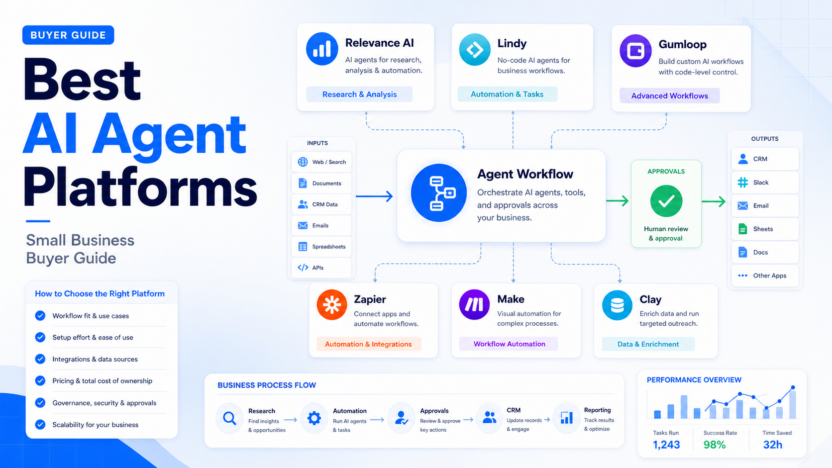
The best AI agent platform for a small business depends on the job the agent needs to own. Relevance AI is the strongest fit when a team wants a structured AI workforce for sales, operations, research, and approval-based workflows. Lindy is a good fit for business users who want AI assistants that can handle routine tasks across email, calendar, CRM, and back-office processes. Gumloop is useful when a team wants flexible AI workflows with more control over steps and data. Zapier and Make remain strong when the main need is app automation with AI added into the workflow. Clay is the best fit when the agent-like workflow is mostly GTM data enrichment and outbound preparation.
This guide is for small business owners, operations leads, sales teams, agencies, and SaaS teams that want AI agents for repeated business processes, not one-off prompts. The practical question is simple: which platform can take a real input, perform useful steps, route exceptions, and put an approved output where the team already works?
Pricing last checked on August 25, 2026. Official pricing sources reviewed include Relevance AI pricing documentation, Lindy pricing, Gumloop pricing, Zapier pricing, Make pricing, and Clay pricing.
For deeper context on adjacent automation decisions, see our Relevance AI review, Zapier vs Make comparison, Make vs Relay.app comparison, and Best AI sales enablement tools.
How We Chose These AI Agent Platforms
This article evaluates tools by workflow fit, setup effort, agent capability, integrations, pricing clarity, governance, security posture, and value for money. The goal is not to reward the tool with the longest feature list. The goal is to identify which platform helps a small team automate a repeated business process without losing control.
A useful AI agent platform should have four practical qualities. First, it should handle a clear workflow, such as researching accounts, routing support questions, summarizing documents, updating records, or preparing follow-up tasks. Second, it should connect to business tools that already matter, such as CRM, email, calendar, spreadsheets, documents, help desk software, or databases. Third, it should include review controls so a person can approve sensitive work. Fourth, pricing should be understandable enough to estimate the cost of a normal month.
Small businesses should be careful with vague AI automation projects. A platform may look impressive in a demo but still fail if the team has not defined the input, owner, review path, and output destination. Start with one repeatable job before building a larger agent system.
Best AI Agent Platforms Compared
| Platform | Best for | Main strength | Limitation to consider | Pricing model |
|---|---|---|---|---|
| Relevance AI | AI workforces and multi-step business agents | Strong agent orchestration and team workflows | Requires clear process design | Free, Pro, Team, Enterprise tiers listed officially |
| Lindy | AI assistants for daily business tasks | Practical assistants across email, calendar, CRM, and operations | Fit depends on connected apps and task complexity | Public plans plus higher-tier options listed officially |
| Gumloop | Flexible AI workflow automation | More control over workflow steps and data movement | May require more process thinking than simple assistants | Public usage-oriented plans listed officially |
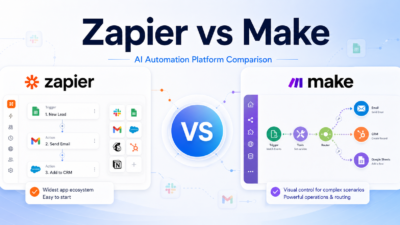
| Zapier | App automation with AI steps | Huge app ecosystem and simple trigger-action workflows | Less focused on multi-agent workforce design | Free and paid automation tiers listed officially |
| Make | Visual automation workflows | Flexible scenario builder for complex operations | Scenarios can become hard to maintain without ownership | Free and paid operations tiers listed officially |
| Clay | GTM enrichment and outbound workflows | Strong sales data workflows and enrichment | Narrower fit outside GTM and revenue teams | Public GTM plans listed officially |
1. Relevance AI
Relevance AI is the best choice for teams that want a dedicated AI agent platform rather than a basic automation add-on. It is built around AI workforces: groups of agents that can handle different roles, use tools, follow instructions, and route work through approval points.
A sales team could use Relevance AI to research target accounts, enrich company details, prepare lead notes, and route qualified prospects to reps. An operations team could use it to classify incoming requests, update a spreadsheet or CRM, and escalate uncertain cases. A customer success team could use agents to prepare account briefs before renewal or onboarding calls.
The strongest reason to choose Relevance AI is workflow depth. It is useful when a process has several steps and the team wants specialist agents rather than one generic assistant. It also fits teams that want business users to build and adjust workflows without making every change a custom engineering task.
Relevance AI is not the best first purchase if your team has only a simple app-to-app automation need. If the workflow is “when this form is submitted, send this alert,” Zapier or Make may be enough. Relevance AI is more compelling when the work requires research, classification, routing, enrichment, drafting, or approval.
2. Lindy
Lindy is best for teams that want AI assistants for common business work. It is positioned around AI employees or assistants that can help with tasks such as email handling, meeting support, scheduling, CRM updates, sales admin, and internal operations.
In a typical small business workflow, Lindy could help a founder or operations lead reduce recurring admin work. For example, an assistant could summarize inbound emails, prepare follow-up tasks, update CRM records, or coordinate calendar-related work. A sales team could use it to reduce manual follow-up and internal coordination.
Lindy’s advantage is practical business usability. It is easier to understand for a team that thinks in terms of assistants rather than workflow diagrams. That can make adoption smoother for non-technical users.
The tradeoff is that the right fit depends heavily on the tasks and integrations your team needs. Before choosing Lindy, map the exact repetitive work you want an assistant to handle and confirm that the required tools are supported.
3. Gumloop
Gumloop is a strong option for teams that want AI workflow automation with more control over the flow. It is useful when the team wants to combine AI steps, data processing, document handling, web research, approvals, and integrations into a repeatable process.
A marketing team could use Gumloop to process content briefs, research competitor pages, summarize findings, and push structured output into a planning document. An operations team could use it to classify form submissions, enrich records, or generate internal reports from multiple sources.
Gumloop is attractive when a team has a workflow that is too custom for a simple assistant but does not require a full internal software build. It gives more control over the process than a pure chat assistant.
The main limitation is setup discipline. Flexible workflow tools can become messy when nobody owns naming, versioning, permissions, and review. Gumloop is better for teams willing to document how the workflow should run.
4. Zapier
Zapier is still one of the best choices for small businesses that want reliable automation between many apps. It is not only an AI agent platform, but its AI features and automation ecosystem make it relevant for teams that want AI inside everyday workflows.
A small business could use Zapier to route new leads, summarize form submissions, draft internal alerts, update CRM fields, create tasks, and notify Slack or email channels. The value comes from connecting many apps quickly.
Zapier is strongest when the workflow is clear and event-driven. If a trigger happens in one tool and the business needs a predictable action in another tool, Zapier is usually easy to test.
Zapier is weaker when the team wants a broader multi-agent system with role-specific agents, advanced branching, and deep operational ownership. For that, Relevance AI, Gumloop, or another agent-focused platform may be a better fit.
5. Make
Make is best for visual automation workflows where the team wants more control than a simple trigger-action builder. It is useful for operations teams that need branching, routers, data transformations, multi-step scenarios, and detailed workflow logic.
In a typical small business workflow, Make could connect forms, spreadsheets, CRMs, help desks, email tools, and databases. With AI modules added, it can summarize text, classify requests, prepare drafts, or enrich records as part of a larger scenario.
Make is a strong choice when the team has someone who can maintain visual workflows carefully. It can handle more complex automations than many lightweight tools, but that power requires ownership.
The limitation is maintainability. If scenarios grow without documentation, a small team may struggle to debug them later. Use Make when you want automation depth and have a process owner.
6. Clay
Clay is best for GTM teams that want AI-assisted data enrichment, prospect research, list building, and outbound preparation. It is not a general AI agent platform for every business function, but it can behave like an agentic workspace for sales and marketing data.
A SaaS team could use Clay to build target-account lists, enrich company and contact data, run research steps, segment leads, and prepare personalized outreach inputs. Agencies can also use it for outbound workflows when they need structured research at scale.
Clay’s strength is GTM specificity. If your main use case is sales intelligence and outbound operations, a broad agent platform may be less efficient than a tool built around revenue data workflows.
The limitation is category fit. Clay is not the best choice for general operations, support routing, HR workflows, or project management automation. Choose it when GTM data is the main job.
Pricing Comparison
Pricing last checked on August 25, 2026. The vendors above publish plan pages with different billing models. Some price by seat, some by task or usage, some by operations, credits, compute, or workspace capabilities. That means the cheapest listed plan is not always the cheapest real option for your workflow.
| Platform | Official pricing structure reviewed | Practical buying note |
|---|---|---|
| Relevance AI | Free, Pro, Team, and Enterprise tiers | Estimate actions, credits, users, and workforces before scaling |
| Lindy | Public plans with task and capability differences | Match plan choice to assistant volume and connected workflows |
| Gumloop | Public workflow/usage-oriented plans | Estimate runs, steps, data volume, and team collaboration needs |
| Zapier | Free and paid automation tiers | Watch tasks, premium apps, paths, and app limits |
| Make | Free and paid scenario/operations tiers | Watch operation volume, scenario complexity, and team needs |
| Clay | Public GTM-focused plans | Watch credits, enrichment needs, and outbound workflow scale |
Do not compare these tools only by the monthly subscription label. For agent workflows, the real cost often depends on how many records, emails, tasks, actions, credits, or workflow runs the team processes each month.
Real Small-Business Use Cases
Lead Research and Sales Handoff
A small sales team could use an AI agent platform to research new leads, summarize the account, identify likely buying signals, and route qualified prospects to a rep. Relevance AI, Clay, Lindy, Zapier, and Make can all support parts of this workflow, but they approach it differently.
Choose Clay if enrichment and GTM data are the center of the process. Choose Relevance AI if the workflow needs multiple specialized agents. Choose Zapier or Make if the main task is moving data between tools after a form submission.
Customer Support Triage
A support team could use AI agents to classify incoming messages, identify billing questions, summarize context, route urgent cases, and prepare draft replies. Human review should remain in place for refunds, account changes, legal language, and high-risk customer issues.
For support-heavy workflows, buyers should compare integration fit with the current help desk. If the agent output does not land where support reps work, adoption will be weak.
Internal Operations Requests
Operations teams often receive scattered requests through email, forms, Slack, spreadsheets, and project tools. AI agents can classify the request, collect missing information, assign an owner, update a tracker, and notify the right person.
Make and Zapier are strong for structured routing. Relevance AI and Gumloop can be better when the request requires interpretation or a multi-step decision path.
Reporting and Weekly Summaries
A founder or manager could use AI workflows to collect updates, summarize activity, identify blockers, and create a weekly report. The main risk is source quality. If the underlying records are incomplete, AI may make the report look cleaner than the business reality.
Use human review for any report that affects hiring, budgets, customer commitments, or performance decisions.
Pros and Cons of AI Agent Platforms
| Pros | Why it matters |
|---|---|
| They reduce repeated admin work | Teams spend less time copying, summarizing, and routing information |
| They can connect multiple tools | Outputs can move into CRM, email, Slack, sheets, or project systems |
| They support repeatable workflows | The same process can run consistently each week |
| They make handoffs clearer | Agents can prepare work before a human approves it |
| They can improve operational visibility | Workflow logs and outputs help teams see bottlenecks |
| Cons | Why it matters |
|---|---|
| Setup requires process clarity | Vague workflows produce vague outputs |
| AI output still needs review | Customer-facing and sensitive work must be checked |
| Usage-based pricing can surprise teams | Credits, tasks, operations, or runs can affect monthly cost |
| Integrations determine real value | A strong agent is weak if it cannot reach the right systems |
| Ownership can become unclear | Someone must maintain prompts, permissions, and workflow logic |
How to Choose the Right Platform
Choose Relevance AI if you want a dedicated AI workforce platform and your workflow has multiple stages. It is the best fit when agents need roles, tools, review paths, and operational ownership.
Choose Lindy if your team wants practical AI assistants for admin and business tasks. It is a good starting point when users think in terms of delegating tasks rather than designing workflow diagrams.
Choose Gumloop if you need custom AI workflow automation and are comfortable designing step-by-step flows. It is useful for teams that want more control over data movement and AI steps.
Choose Zapier if your main need is app automation across a large ecosystem. It is often the fastest route for predictable trigger-action workflows.
Choose Make if you want visual automation with branching and deeper scenario logic. It is strong when a process owner can maintain the workflow.
Choose Clay if your agent-like workflow is mostly GTM data, enrichment, account research, and outbound preparation.
Implementation Checklist
Before buying, write down the first workflow in plain English. Include the source input, expected output, systems involved, owner, review step, success measure, and stop condition.
| Step | What to define | Why it matters |
|---|---|---|
| Workflow | The repeated task the agent should support | Prevents vague AI experiments |
| Input | Forms, emails, records, documents, calls, or spreadsheets | Output quality depends on source quality |
| Owner | Person responsible for setup and review | Avoids abandoned automation |
| Review | What a human must approve | Protects trust and accuracy |
| Destination | CRM, sheet, ticket, document, project board, or message | Ensures output lands in the right place |
| Cost driver | Seats, tasks, operations, credits, runs, or records | Helps avoid subscription surprises |
Final Recommendation
For most small businesses, the best first AI agent platform is the one that solves one repeated workflow cleanly. If your process needs specialized agents and approval paths, start with Relevance AI. If you want practical AI assistants for daily work, compare Lindy. If you need flexible workflow control, compare Gumloop. If the process is mostly app automation, use Zapier or Make. If the process is GTM data enrichment, compare Clay.
Do not start with a platform decision. Start with a workflow decision. The right tool becomes much clearer once the team knows what the agent should read, decide, draft, update, escalate, and hand off.
FAQs
What is an AI agent platform?
An AI agent platform helps teams build software agents that can follow instructions, use tools, process data, take workflow steps, and hand work back to people for review. It is more operational than a simple chatbot.
What is the best AI agent platform for small business?
Relevance AI is a strong choice for multi-step agent workflows, Lindy is practical for AI assistants, Gumloop is useful for custom AI workflows, Zapier and Make are strong for app automation, and Clay is best for GTM data workflows.
Are AI agent platforms better than Zapier?
Not always. Zapier is often better for simple trigger-action workflows. Agent platforms are better when work requires interpretation, research, drafting, routing, and human approval.
Should small businesses use autonomous agents?
Small businesses should use agents with review rules. Fully autonomous workflows are risky for customer-facing, billing, legal, HR, finance, and high-impact decisions.
How should I compare AI agent pricing?
Compare seats, tasks, actions, credits, operations, workflow runs, premium integrations, data volume, and approval needs. The real cost depends on usage, not only the plan name.
Which AI agent platform is best for sales teams?
Clay is strong for GTM enrichment and outbound workflows. Relevance AI is strong when sales research, qualification, CRM updates, and approvals need to work together as a broader agent process.
Which platform is easiest to start with?
Zapier is often easiest for simple app automation. Lindy can be easier for users who want task-focused assistants. Relevance AI and Gumloop are better when the workflow needs more structure.
What is the safest first AI agent workflow?
Start with an internal workflow such as lead research summaries, support triage drafts, meeting follow-up routing, or weekly reporting. Keep human approval in place before anything reaches customers.