Quick Answer
An AI procurement workflow helps a small business collect purchase requests, compare vendor information, route approvals, check budget fit, hand approved purchases to finance, and track renewals. The goal is not to let AI approve spending automatically. The goal is to reduce messy email threads, missing context, duplicate vendor checks, and late renewal surprises.
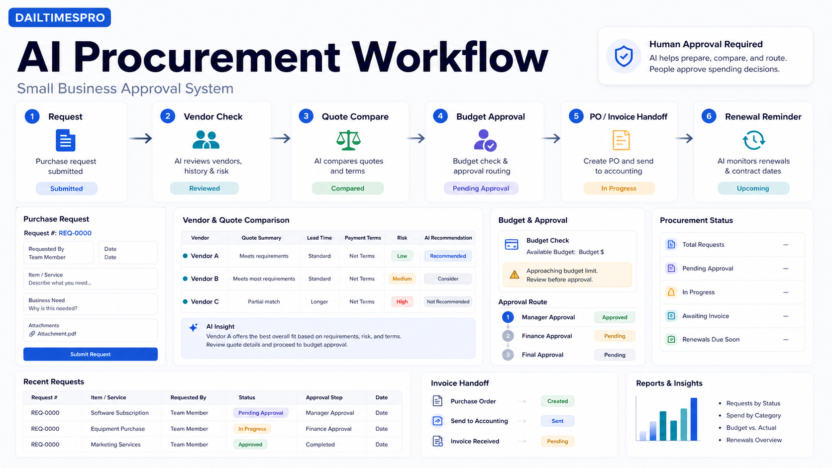
A practical workflow has six stages: request intake, vendor information collection, quote comparison, budget and policy check, human approval, and invoice or renewal handoff. AI can help summarize requests, extract details from quotes, flag missing information, draft approval notes, and prepare reporting. Humans should still approve vendors, spending, legal terms, and risk decisions.
If your team is also documenting internal procedures, the Best AI SOP Software for Small Business guide can help you turn this workflow into repeatable documentation.
Best For
- Small businesses buying software, services, contractors, or equipment
- Operations teams that manage vendor requests through email
- Finance teams that need cleaner purchase context
- Founders who want approval visibility without adding heavy procurement software
- Agencies and service businesses handling repeated subscriptions and tools
Not Best For
- Companies with regulated procurement requirements that need enterprise controls
- Teams making high-risk legal, compliance, or security decisions without expert review
- Businesses that expect AI to approve spending without human oversight
- One-person companies with very few recurring purchases
What the Workflow Should Include
| Stage | Purpose | AI can help with | Human decision required |
|---|---|---|---|
| Request intake | Capture who needs what and why | Summarize request, classify category, detect missing fields | Confirm business need |
| Vendor check | Collect vendor details | Extract website, category, documents, security notes | Decide if vendor is acceptable |
| Quote comparison | Compare options | Summarize plans, terms, and differences | Choose vendor and plan |
| Budget check | Confirm affordability | Flag budget owner, category, recurring cost | Approve spend |
| Approval routing | Send to the right owner | Draft approval notes and reminders | Approve or reject |
| Invoice handoff | Send finance clean context | Prepare invoice notes and renewal reminders | Process payment |
Step 1: Create a Purchase Request Form
Start with a structured request form. The form should ask for the requester, department, vendor name, product or service, business reason, expected cost, renewal type, urgency, security or data risk, and requested approval date.
AI can help summarize messy requests, but the form should still force the basics. A vague request such as "Need new software" is not enough. The approver needs to know why the purchase matters, who will use it, what problem it solves, and what happens if the business does not buy it.
For small teams, the form can live in Notion, Airtable, Google Forms, Microsoft Forms, ClickUp, Monday, or a procurement platform. The tool matters less than the consistency of the fields.
Step 2: Collect Vendor Information
Create a standard vendor profile. Include the official website, pricing page, contract or terms link, security page, data processing notes if relevant, cancellation terms, and renewal terms.
AI can help extract key points from vendor pages or uploaded documents, but it should not be treated as the final source of truth. The team should keep links to official pages and review any important legal, security, or financial claim.
In a typical small business workflow, this stage prevents repeated questions. Finance does not need to ask for the vendor name again. Operations does not need to search for the pricing page. The approver can see the core context in one place.
Step 3: Compare Quotes and Options
For purchases with multiple vendors, create a comparison table. Include use case, plan, users, recurring cost, implementation effort, support, security notes, cancellation terms, and main limitations.
AI can help summarize differences between quotes or documents. It can also draft a comparison note for the approver. The limitation is that AI may miss a clause, misread a plan, or simplify a detail too much. For larger purchases, review the original quote and contract.
Do not compare vendors only by price. A cheaper tool can be more expensive if it creates manual work, lacks support, or does not fit the workflow.
Step 4: Add Budget and Policy Checks
Every purchase request should connect to a budget owner. Even a small subscription can become expensive if nobody tracks renewals. Add fields for monthly cost, annual cost, department, budget owner, renewal date, payment method, and cancellation notice period.
AI can flag missing budget fields or summarize total recurring cost, but the approval decision should remain human. This is especially important for annual contracts, tools that store customer data, and purchases that affect multiple departments.
Step 5: Route Human Approval
Approval routing should be simple. Low-risk purchases may need only a manager. Higher-cost purchases may need finance. Tools that touch customer data may need security or legal review. Contracts may need a founder or legal reviewer.
AI can draft approval messages such as: what is being requested, why it is needed, cost category, vendor summary, and open questions. This saves time, but the approver should make the decision.
Avoid approval chains that are too complex. A small business needs enough control to avoid waste, not a slow enterprise purchasing process.
Step 6: Handoff to Finance and Track Renewals
After approval, finance needs the vendor name, amount, billing cycle, payment method, invoice contact, approval record, contract link, and renewal date. If that handoff is incomplete, the purchase becomes hard to track later.
AI can help create a renewal reminder, summarize the approved purchase, or prepare an invoice note. The workflow should also record whether the subscription should be reviewed monthly, quarterly, or annually.
Renewal tracking is one of the most practical benefits of a procurement workflow. Many small businesses waste money because renewals happen quietly and nobody knows who owns the tool.
Tool Stack Options
You do not need a complex stack to start. A lightweight version can use a form tool, spreadsheet or database, automation tool such as Zapier, shared drive, and project-management task. For example, a request form can feed a database, trigger an approval task, and create a renewal reminder.
More mature teams can use procurement software, contract management tools, or finance platforms. The right stack depends on purchase volume, approval complexity, and whether vendors handle sensitive data.
If the team already uses a project management system, keep procurement tasks there at first. A lightweight approval task is easier to adopt than a separate system nobody opens. The procurement record should still be structured enough that finance can review it later.
Example Workflow for a Software Purchase
In a typical small business workflow, a department lead submits a request for a new software subscription. The form captures the business reason, expected users, budget owner, renewal type, and whether the tool will store customer data. AI summarizes the request and flags missing details, such as an absent pricing page or unclear owner.
The operations owner checks the vendor information and adds official source links. If multiple vendors are being compared, AI can draft a comparison table from the submitted notes, but the owner should verify the source pages. The approval task then routes to the budget owner. If the tool touches customer data, the task also routes to whoever handles security or privacy review.
After approval, finance receives a clean handoff: vendor, amount, billing cycle, payment method, owner, renewal date, and approval record. A renewal reminder is created before the cancellation window. This prevents the common problem where nobody knows who approved the subscription or whether it is still needed.
Approval Thresholds
Small businesses should use simple thresholds. For example, low-cost low-risk purchases can go to a manager. Medium-cost purchases can go to a budget owner and finance. High-cost, annual, legal, or data-sensitive purchases should receive extra review.
The exact thresholds depend on the business, but the principle is consistent: riskier purchases need more review, while routine low-risk purchases should not get trapped in a slow approval chain. AI can identify the category and suggest the route, but the company should define the rules.
Procurement Reporting
Once the workflow is running, create a monthly report. Track open requests, approved purchases, rejected purchases, recurring spend by category, upcoming renewals, and requests missing key information. AI can summarize the report for leadership, but the data should come from the workflow database.
This reporting turns procurement from reactive admin work into a management system. It helps the business see where money is going, which tools are duplicated, and which renewals need attention.
Common Mistakes
The first mistake is letting AI make approval decisions. AI should organize information, not approve spending or legal risk.
The second mistake is skipping renewal tracking. A purchase workflow that ends after payment misses one of the most important cost-control points.
The third mistake is failing to keep official source links. Vendor pricing, terms, and security pages can change. Store the source link used during review so the team can revisit it later.
The fourth mistake is overbuilding. A small business should not create a slow procurement bureaucracy for simple low-risk purchases. Use thresholds, such as different approval paths for low, medium, and high-cost requests.
Security and Privacy Notes
Procurement often touches sensitive information: vendor contracts, pricing, customer data access, internal budgets, and employee requests. Do not paste confidential contracts, customer information, or security documents into unmanaged AI tools without reviewing vendor policies.
For purchases involving customer data, require extra review. Ask what data the vendor stores, where it is processed, who can access it, whether there is a data processing agreement, and how cancellation works.
Final Workflow Checklist
- Create a standard purchase request form.
- Require vendor, use case, cost, owner, and urgency.
- Store official pricing, terms, and security links.
- Use AI to summarize, classify, and flag missing information.
- Compare vendors with a structured table.
- Route approval based on cost, data risk, and contract risk.
- Keep human approval for spending and vendor decisions.
- Send clean context to finance after approval.
- Track renewal dates and cancellation windows.
- Review recurring tools regularly.
Final Recommendation
Start with a lightweight AI procurement workflow before buying complex software. The first win is visibility: every request has an owner, cost, vendor source, approval status, and renewal date. AI should reduce admin work by summarizing, extracting, and preparing review notes. It should not replace approval judgment.
For most small businesses, a form, database, automation rule, and review checklist are enough to start. As purchase volume grows, move to dedicated procurement or finance software.
FAQs
What is an AI procurement workflow?
An AI procurement workflow uses AI and automation to organize purchase requests, vendor information, quote comparisons, approvals, invoice handoff, and renewal reminders. Humans still approve spending and risk.
Can AI approve purchases automatically?
It should not approve important purchases automatically. AI can summarize and route information, but budget, vendor, legal, and security decisions should remain human-controlled.
What tools do I need?
A small business can start with a form, spreadsheet or database, shared document storage, approval tasks, and calendar reminders. More advanced teams can use procurement, finance, or contract management tools.
What should be included in a purchase request?
Include requester, vendor, product or service, business reason, expected cost, billing cycle, renewal date, budget owner, urgency, data risk, and approval deadline.
How does AI help procurement?
AI can summarize requests, extract quote details, draft approval notes, identify missing fields, classify vendor categories, and prepare renewal reminders. The output should be reviewed.
How do you avoid procurement delays?
Use clear thresholds. Low-cost, low-risk purchases should move quickly. Higher-cost or data-sensitive purchases should receive more review.
What is the biggest benefit for small businesses?
The biggest benefit is control over recurring spend and vendor ownership. A clear workflow prevents lost requests, duplicate subscriptions, unclear approvals, and missed renewal windows.