Quick Verdict
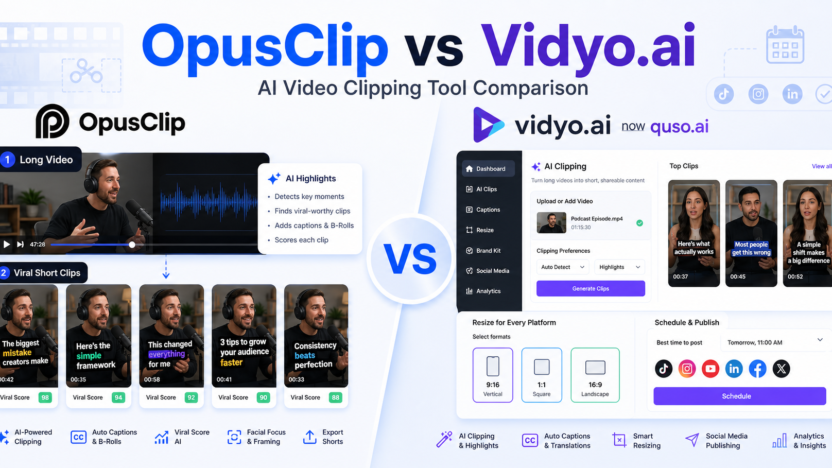
OpusClip is the better choice if your main goal is turning long videos into short clips quickly. It is strongest for creators, podcasters, marketers, agencies, livestreamers, and teams that want AI clipping, virality scoring, animated captions, filler and silence removal, brand templates, social posting, and exports for tools such as Adobe Premiere Pro and DaVinci Resolve.
Vidyo.ai now redirects to quso.ai, so this comparison treats Vidyo.ai as quso.ai. Quso.ai is the better choice if you want AI clips plus a wider social media content workflow. It combines clipping, captions, resizing, scheduling, content planning, analytics, social publishing, AI writing tools, and brand-kit features in one platform.
Choose OpusClip if clipping quality and short-video repurposing are the priority. Choose quso.ai if clipping is only one part of a broader social media management workflow.
Quick Comparison
| Comparison Point | OpusClip | Vidyo.ai / quso.ai |
|---|---|---|
| Main purpose | AI video clipping and long-to-short repurposing | AI clipping, editing, scheduling, analytics, and social content planning |
| Best for | Creators, podcasters, marketers, agencies, livestreamers | Coaches, businesses, creators, small teams, agencies, social media managers |
| Core workflow | Upload or import long video, generate short clips, refine, caption, export or post | Create clips, resize, caption, plan, schedule, publish, and analyze social content |
| Strongest feature area | AI clipping with Virality Score | Unified social content workflow around clips and scheduling |
| Captions | AI animated captions in 20+ languages | AI subtitles, clip transcripts, full transcripts, social captions |
| Resizing | Multiple aspect ratios on Pro | Resize to 16:9, 9:16, and 1:1 on visible plans |
| Social publishing | Auto post to YouTube Shorts, TikTok, and Instagram Reels on Starter | 1-click scheduling and publishing to multiple social platforms on higher plans |
| Editing depth | Powerful editor, filler removal, silence removal, brand templates | AI video editor, Intelliclips, Cutmagic, filler-word removal, content planner |
| Team features | Team workspace on Pro; custom business plan for larger needs | Growth and custom plans add brand kit, analytics, templates, support, and higher minutes |
| Free access | Free plan with 60 credits per month | Pricing page emphasizes paid Lite, Essential, Growth, and custom annual variants |
| Best paid starting point | Starter at $15/month | Lite at $29/month or $24/month with annual billing shown |
| Main limitation | More focused on clipping than full social media operations | More platform-like, so it may be more than users need for simple clipping |
| Choose it if | You mainly need the best long-video-to-short-clips workflow | You need clipping plus scheduling, planning, and social content operations |
Pricing Comparison
Both tools use usage-based limits, but the value is packaged differently. OpusClip prices around credits, clipping, social posting, brand templates, workspace seats, and creator or business needs. Quso.ai prices around AI clips, captions, video resizing, social scheduling, minutes, brand kit, analytics, and custom usage.
| Pricing Point | OpusClip | Vidyo.ai / quso.ai |
|---|---|---|
| Entry paid plan | Starter at $15/month | Lite at $29/month, or $24/month with annual billing shown |
| Mid paid plan | Pro at $29/month, or $14.50/month with annual billing shown | Essential at $39/month, or $32/month with annual billing shown |
| Higher paid plan | Business is custom | Growth at $49/month, or $40/month with annual billing shown |
| Annual savings | Annual billing can save up to 50% | Annual pricing cards show savings, including Essential annual at $21/month and Growth annual at $25/month in visible table text |
| Free or starter usage | Free has 60 credits; Starter has 150 credits per month | Essential annual card lists 300 minutes per month; Growth annual card lists 600 minutes per month |
| Pro or growth usage | Pro lists 3,600 credits per year available instantly | Custom annual card lists 900-1,800 minutes per month |
| Social connections | Starter auto posts to YouTube Shorts, TikTok, and Instagram Reels; Pro lists 6 social account connections | Essential includes 1-click schedule to 7 social platforms; Growth adds unlimited scheduling and bulk publishing |
| Brand assets | Starter has 1 brand template; Pro has 2 brand templates | Growth lists custom brand kit and templates |
| Export or editing | Pro includes export to Adobe Premiere Pro and DaVinci Resolve | Visible plans include 1080p exports, resizing, and AI editing tools |
| Official pricing page | OpusClip pricing page | quso.ai pricing page |
| Tool | Plan | Monthly Price | Annual Price | Best For | Key Limits Or Notes |
|---|---|---|---|---|---|
| OpusClip | Free | $0 | $0 | Trying AI clipping | 60 credits per month, 1080p rendered clips, watermark, clips exportable for 3 days |
| OpusClip | Starter | $15/month | Monthly only on the visible pricing card | Individual creators | 150 credits per month, Virality Score, captions, social posting, editor, 1 brand template |
| OpusClip | Pro | $29/month | $14.50/month, billed annually as $174 | Professional creators and teams | 3,600 credits/year, team workspace with 2 seats, 2 brand templates, 6 social accounts |
| OpusClip | Business | Custom | Custom | Teams needing custom scale | Custom credits, seats, social connections, assets, integrations, storage, security, support |
| quso.ai | Lite | $29/month | $24/month with annual billing shown | Basic clipping and captions | AI clips, captions, video generator, resizing, Full HD 1080p exports |
| quso.ai | Essential | $39/month | $32/month with annual billing shown; annual table also shows $21/month | Creators needing AI tools and scheduling | Filler removal, AI tools, scheduling to social platforms, content planner |
| quso.ai | Growth | $49/month | $40/month with annual billing shown; annual table also shows $25/month | Teams managing social content | Bulk publishing, analytics, brand kit, priority support, 600 minutes/month in annual table |
| quso.ai | Custom | $42-$83/month range shown annually | Custom annual range shown | Higher-volume teams | 900-1,800 minutes/month, based on visible custom card details |
Pricing sources checked: June 14, 2026. Sources: OpusClip official pricing page and quso.ai official pricing page.
What Is OpusClip?
OpusClip is an AI video repurposing platform for turning longer videos into short clips. Its official pricing page highlights AI clipping with Virality Score, animated captions, auto posting to YouTube Shorts, TikTok, and Instagram Reels, a video editor, brand templates, filler and silence removal, AI B-roll, multi-source imports, multiple aspect ratios, social scheduling, and exports to Adobe Premiere Pro and DaVinci Resolve on higher plans.
OpusClip is focused. It is not trying to be a full social media operating system first. Its main job is to help users extract useful short clips from longer videos and publish them faster.
What Is Vidyo.ai / quso.ai?
Vidyo.ai now redirects to quso.ai. The current quso.ai product describes a broader social media and AI video workflow, including AI clip generation, subtitles, content repurposing, social media scheduling, content planning, analytics, AI social captions, video editing, Intelliclips, filler-word removal, and Cutmagic.
Quso.ai is strongest when clipping is part of a larger content operation. It is useful for teams that want to create short clips, schedule them, analyze performance, manage brand assets, and keep social publishing in one dashboard.
OpusClip vs Vidyo.ai for AI Clipping
OpusClip is the more clipping-focused tool. The Virality Score, short-video generation, captions, social auto-posting, brand templates, and editor are all centered on turning long videos into clips quickly. If your main question is “Which moments should become shorts?”, OpusClip is closer to that job.
Quso.ai also has clipping and Intelliclips, but its positioning is broader. It is better when clipping connects to social scheduling, planning, analytics, brand kits, bulk publishing, and recurring social workflows.
OpusClip vs Vidyo.ai for Social Publishing
OpusClip supports social posting and scheduling, especially on paid plans. Starter includes auto posting to YouTube Shorts, TikTok, and Instagram Reels, while Pro lists social scheduler features and multiple social account connections.
Quso.ai has the stronger social operations angle. Its pricing page mentions scheduling to social platforms, unlimited social post scheduling on Growth, bulk publishing, advanced analytics, custom templates, brand kit, and priority support. That makes it more appealing for teams managing a full social calendar.
OpusClip vs Vidyo.ai for Teams and Agencies
Agencies that mostly sell clip repurposing may prefer OpusClip because the workflow is direct: long video in, clips out, captions, scoring, editing, and export. The Business plan adds custom credits, seats, social connections, brand assets, storage, API and custom integrations, and priority support.
Teams that manage broader social campaigns may prefer quso.ai because it includes planning, scheduling, analytics, templates, social metadata, and content assistant features on higher plans.
Pros and Cons of OpusClip
OpusClip Pros
- Strong AI clipping workflow for long videos
- Virality Score helps prioritize potential shorts
- Animated captions and social-ready outputs
- Starter plan includes social auto-posting and watermark removal
- Pro adds workspace seats, brand templates, multiple social connections, AI B-roll, and export options
- Clear custom Business path for teams needing scale
OpusClip Cons
- More narrowly focused on video clipping than social management
- Free plan has watermark and export time limits
- Pro annual pricing is the stronger value, but some users may prefer simple monthly billing
- Heavy teams may need custom Business pricing
Pros and Cons of Vidyo.ai / quso.ai
Quso.ai Pros
- Broader workflow for clips, scheduling, planning, analytics, and social publishing
- AI clips, captions, video resizing, and 1080p exports appear on visible paid plans
- Essential adds access to more AI tools and social scheduling
- Growth adds unlimited scheduling, bulk publishing, analytics, brand kit, templates, and priority support
- Useful for coaches, content creators, agencies, and small businesses managing multiple channels
Quso.ai Cons
- Less narrowly optimized for pure clipping than OpusClip
- Higher-volume users may need the Custom annual range shown in quso.ai pricing
- Teams that only need clips may not need the broader social dashboard
- Custom usage may be needed for higher monthly minute limits
If you need a general AI video editor before clipping, our Descript vs Kapwing comparison comparison is the closest next read; for generative video, compare Runway vs Pika comparison.
Which Tool Should You Choose?
Choose OpusClip if your priority is creating short clips from long videos as efficiently as possible. It is the better fit for podcast clips, webinar clips, livestream highlights, YouTube Shorts, TikTok clips, Instagram Reels, and agency repurposing workflows.
Choose quso.ai if your priority is managing social content around those clips. It is the better fit when you need AI clipping plus scheduling, content planning, analytics, captions, transcripts, brand templates, and recurring social publishing.
The simplest decision is this: OpusClip is a clipping specialist. Quso.ai is a social content platform with clipping inside it.
FAQs
Is OpusClip better than Vidyo.ai?
OpusClip is better if your main task is turning long videos into short clips quickly. Its workflow is more tightly focused on AI clipping, virality scoring, captions, and short-video repurposing.
Is Vidyo.ai now quso.ai?
Yes. The Vidyo.ai pricing URL redirects to quso.ai, and the quso.ai pricing page describes itself as formerly vidyo.ai. This article uses Vidyo.ai and quso.ai together so readers understand the current brand.
Is quso.ai better than OpusClip?
Quso.ai is better if you want clipping plus social scheduling, planning, analytics, content publishing, and brand workflow features. It is broader than a clipping-only workflow.
Does OpusClip have a free plan?
Yes. OpusClip lists a Free plan at $0 with 60 credits per month, rendered clips up to 1080p, auto reframe, AI captions, and a watermark.
Which is cheaper, OpusClip or quso.ai?
OpusClip Starter is listed at $15/month. Quso.ai Lite is listed at $29/month or $24/month with annual billing shown. For entry-level clipping, OpusClip has the lower visible starting price.
Which is better for agencies?
OpusClip is better for agencies focused on turning client podcasts, webinars, and videos into short clips. Quso.ai is better for agencies that also manage scheduling, analytics, templates, and social publishing.
Which is better for social scheduling?
Quso.ai is stronger for social scheduling because its higher plans emphasize scheduling to social platforms, unlimited social post scheduling, bulk publishing, analytics, and brand kits.
Which is better for captions?
Both tools support captions. OpusClip emphasizes AI animated captions in 20+ languages, while quso.ai includes AI subtitles and transcript-related features. OpusClip is stronger for clip-first captions; quso.ai is stronger when captions are part of social publishing.
Can I use both OpusClip and quso.ai?
Yes. A creator or agency could use OpusClip to find and produce clips, then use quso.ai for scheduling, analytics, and social workflow. Most users should start with one tool first to avoid overlapping subscriptions.